
XnConvert - Photo Resize v1.71
XnView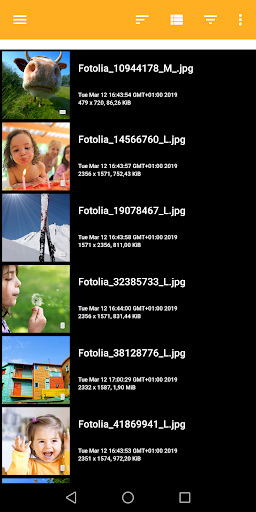
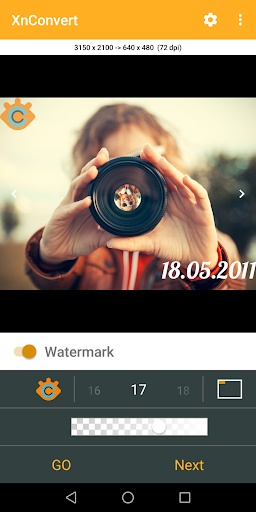
About this app
Developer Description
Photo & Picture Resize, Compress, Watermark & Convert
XnConvert allows you to easily and quickly reduce the picture size or resolution before to send emails, or to share on social media like Instagram, Facebook, Twitter.
-- SELECT your photos
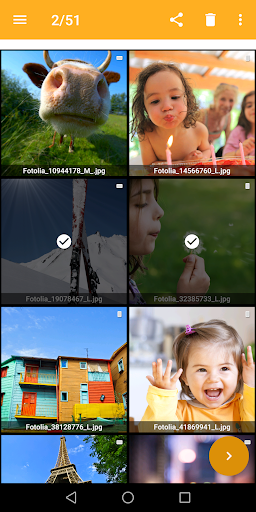
* Select in the gallery your photos
* Grid or Detail mode
* Sort by filename, pathname, date
* Group photos following criteria
-- BATCH convert, resize, compress photos
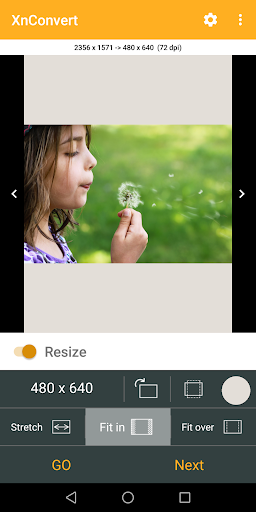
* Mode to resize photos: Stretch, Fit In, Fit over
* Predefined most-used photo resolutions
* Bilinear or Lanzcos method
* Sharpen
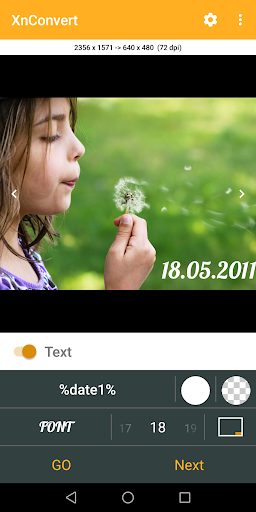
* Add text to your photos
* Add your watermark or logo to mark your photos - Affix your professional footprint
* Convert into JPEG, PNG or WEBP format
-- EDIT single photo
* Crop or rotate
* Resize
-- Features:
* Original photos are not modified
* Choose the compression of output photos
* Keep EXIF metadata
* Keep original modified file's date
* Custom image resolution
* Create your own template, and use it for a batch convert
- You can purchase the Pro version
* No Ads
* No template limit
* No limit for batch convert
RESIZE PHOTO - RESIZE IMAGE - CROP IMAGE - PHOTO BATCH CONVERT
WATERMARK, TEXT, LOGO on Photos
Help us to improve XnConvert by sending your bugs or requests on contact@xnview.com
Facebook: http://www.facebook.com/xnview
Twitter: http://www.twitter.com/xnview
Icon based on work of ArrayOfLilly
Beta tester: Jens Pous
What's New
What's new in this release:
- Bugs fixed
If you encounter any issues or require further assistance, please contact us at contact@xnview.com
In-app purchases
$3.49 per item
Version Information
- Version
- 1.71
- Downloads
- 100K+
- Updated on
- Aug 12, 2025
- Released
- Mar 21, 2019
- Requires
- Android 9
Statistics
Google Play Rating History
Rating Distribution
Downloads Over Time
XnConvert - Photo Resize has been downloaded times. Over the past 30 days, it averaged downloads per day.
Shaded area shows 30-day prediction based on historical trends
Historical data collection started recently. More data points will be available over time.
XnConvert - Photo Resize users say on Google Play
 Toxy Tronic
Excellent app. In my previous review I thought I might have found a bug. After being contacted by the developers I tested the app again and realized that the problem was me😢. Fact is:the app is flawless and it is a joy to work with. I highly recommend it to anyone as it not only offers resizing capabilities but also the option to add text and watermarks. My apologies to the developers.....
 A Google user
Thank you for the creation of this useful utility. I have been waiting for an application that would be able to apply text / image watermarks in batch with opacity. I would have rated 5-star but decided 4 for now. The reason is, it could be (should be) a bit more intuitive in the settings process. It took me several trial and error attempts to figure out how to change opacities for text or background colors. Ultimately I found out it is necessary to press on the color after the settings are selected at the end rather then only settings selection. Also, it would be nice to be able to see the affect of selected settings in real time, prior to saving. This would preclude having to exit and re-enter adjustments multiple times in order to confirm the quality of the setting. Other then that, it is a very useful tool. I may purchase this app if these issues are fixed in a subsequent version release and change my rating to 5-star.
 Brian de la Cruz
Unfortunately EXIF-Data isn't preserved after compressing. Everything gets deleted. Tried to get in touch with the developers but nobody is answering. Besides that, the app works fine.
 Steve Schmidt
Love the desktop XNView app, but this spinoff is not what I need for my tablet.
 C B Newham
XnView is fantastic. This app is awful. Slick design but terrible, illogical functionality. No ability to save as anything other than jpeg to local folder, but if you do a convert, you can save as other formats BUT only to a Google drive. There are far better apps that do conversations than this piece of junk. Disappointing from makers of such a fantastic Windows program. Instead of messing about, why don't you use the file picker provided by Android? Indeed, you will have to for latest Android.
ApkTrusted Ratings & Reviews
More from XnView
See more apps



Similar Apps

Banano Pro İmage Generator
Paid

PixaGen: Ai image generator
Paid

3D Photo: Imager
Paid

eZy Watermark Photos Pro
Paid

PhotoSpot: For Travel Planning
Free

Prisma Art Effect Photo Editor
Free

Photo Scan App by Photomyne
Free

Text & Image to Video AI Gen
Paid

PicWish: AI Photo Editor
Free

Photobook: Photo Books & Gifts
Free
Pixlr AI Photo Editor
Free

mcpro24fps manual video camera
Paid

Smart Video Downloader
Paid

KiWi Vault: Hide Photos, Video
Paid

Unfold: Story & Reels Maker
Free

PicMonkey Photo Editor
Free
Scan this QR code to download

Forwarding you to the page at Google Play market in seconds...
Open Google Play market now