
NavShip - Waterway Routing vVARY
CproSoft GmbH




About this app
NavShip - Waterway Routing solves the problem of navigating European and American waterways by providing a dedicated route assistant, benefiting sailors, fishermen, and recreational boaters the most. Compared to other navigation apps, NavShip stands out with its specialized focus on waterways, but may fall short in terms of broader geographical coverage. With a 4.1-star rating and over 500,000 downloads, it has established a strong user base. However, its reliance on ads and in-app purchases may impact the user experience.
Pros
- The app's high user rating of 4.1 stars and significant download numbers indicate a well-received and reliable tool for waterway navigation, suggesting a strong social proof.
- The developer's reputation, as evident from their website and support email, suggests a commitment to user support and updates, which is crucial for a navigation app.
- NavShip's specialized feature set, focusing on European and American waterways, provides a unique value proposition for users who require detailed navigation in these areas.
- The app's lack of permissions requests is a significant advantage, as it minimizes potential privacy concerns and suggests a transparent approach to user data.
- The availability of in-app purchases allows users to access additional features or premium content, which can enhance their navigation experience.
Cons
- The presence of ads may detract from the user experience, particularly in a navigation app where focus and attention to detail are critical.
- The monetization model, which includes in-app purchases, may lead to a fragmented user experience, with some features only accessible to paying users.
- The app's limited geographical coverage, focusing only on European and American waterways, may not be suitable for users who require navigation in other regions.
- The lack of information on the developer's update frequency and long-term support may raise concerns about the app's future viability and potential bugs or security issues.
Best for: The ideal user for NavShip - Waterway Routing is an experienced sailor, fisherman, or recreational boater who frequently navigates European or American waterways and requires a specialized route assistant to ensure safe and efficient travel, with a moderate to high level of technical skill and a willingness to invest in premium features or content.
Developer Description
Your waterway route assistant for all European and American waterways
Something for everyone:
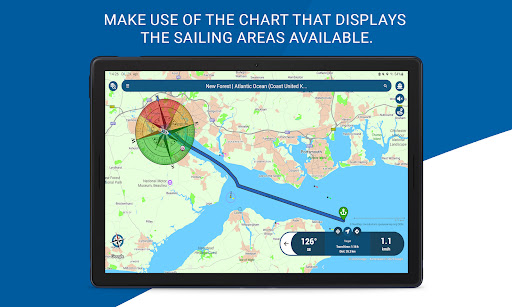
Suitable for motorboats, sailing boats and rowing boats, the sailing area can be adapted to all possible types of boat.
Your advantages:
Dock-to-dock route planning, live weather data, wind, tides, clearance heights, marinas, anchorages and berths, inland shipping news, slip ramps, AIS, water levels, water filling stations - from now on you only need one app. NavShip also takes the flow speeds of many bodies of water into account when planning your trip and warns you if it is not possible to travel with your boat.
Note:
This app should only be used as additional support. Please pay attention to your surroundings and follow the usage instructions in the app and on the website. Please note that some rivers and seas may not be included yet. Please use the contact form in the app menu (Report a bug) to request a new waterway and we will implement it as soon as possible.
Free trial:
You can try NavShip for free for 7 full days. We use ads and limit your routes to 40km, or recordings to 8km, unless you purchase a premium version.
Premium:
In-app purchase possible to unlock additional features, e.g. wind and weather data or tide table. We offer subscription packages for one week, one month, three months and one year.
Wear OS:
NavShip offers Wear OS support for smartwatches. You can easily connect the app to live routing, activate this feature in the side menu under "Settings" and "Wear OS support". Calculate a route on your smartphone and see the current speed, course deviation, distance and travel time on the smartwatch.
If you have any questions, criticism or suggestions, you can reach our support around the clock at support@navship.org.
Privacy
Given the app's lack of permissions requests, users can be relatively confident in its privacy and security. However, as with any app, it's essential to review the terms of service and privacy policy to understand what data may be collected. To minimize potential risks, users should ensure they are downloading the app from a trusted source, such as the official Play Store.
Tips
To get the most out of NavShip, users should first explore the app's settings to familiarize themselves with the available features and customize the navigation experience to their needs. Additionally, users can optimize performance by ensuring their device has a stable internet connection and sufficient storage space. Regularly checking for updates can also help ensure access to the latest features and security patches.
What's New
Updated waterways
Added filter to route information list
In-app purchases
$0.99 - $34.99 per item
Version Information
- Version
- -
- Downloads
- 500K+
- Updated on
- Jan 5, 2026
- Released
- Jul 24, 2016
- Requires
- Android Varies with device
Statistics
Google Play Rating History
Rating Distribution
Downloads Over Time
NavShip - Waterway Routing has been downloaded times. Over the past 30 days, it averaged downloads per day.
Shaded area shows 30-day prediction based on historical trends
Historical data collection started recently. More data points will be available over time.
NavShip - Waterway Routing - Google Play Rankings
Top Rankings
| Rank | Country | Category | List | Change |
|---|---|---|---|---|
| — |
Ranking History in
No ranking data available yet. Rankings are updated daily.
#13 in Top Grossing Maps And Navigation in Germany


#42 in Top Grossing Maps And Navigation in Poland

#46 in Top Grossing Maps And Navigation in Netherlands


#81 in Top Grossing Maps And Navigation in Argentina

NavShip - Waterway Routing users say on Google Play
 A Google user
like it so far, trying to figure out how to view and use local nautical map I uploaded
A Google user
Couldn't try routing until I purchased premium version. When I did the Gulf of Mexico and Florida rivers and coast are not supported to route. App is useless for me. Also tried to contact support, but that isn't working as well. Keeps telling me that my comments are spam , but won''t download the reCAPTCHA to allow submittal. After hearing from the developers it becomes clear that they are sincerely trying to make this the best app possible. I was offered a refund and also asked what I would desire of the app to keep it. The developers are working to add certain aspects to the app and need feedback from people (especially in the U.S.) as what they would like to see added to the program. Thanks NavShip
A Google user
need to give the ability to use metric or us standard
 Scott Connery
Shows path, no marker buoys. Offline mode shows no map, offline us important when cell reception is poor. Basically useless
A Google user
not user friendly at all, super hard to set a route
ApkTrusted Ratings & Reviews
More from CproSoft GmbH
See more apps


Similar Apps

Orca: Boat GPS, Charts, Routes
Free

Windmate
Paid

VesselFinder
Free

Wavve Boating: Marine Boat GPS
Free

Holland America Line Navigator
Free
ShipAtlas - Ship Tracker
Free
Windfinder Pro: Wind & Weather
Paid

Gaggle Paragliding, Ultralight
Free

Südtirol Fishing
Free

WeFish | Your Fishing Forecast
Free

Schiphol Amsterdam Airport
Free
Airport Community
Free

Bike Route Planner
Paid

GPS Essentials
Free
Nautide: Tides, Wind, Waves +
Free

Wanderz - Travel Guides
Free
Scan this QR code to download

Forwarding you to the page at Google Play market in seconds...
Open Google Play market now