
Android System Widgets + v25.12.2
Benjamin Laws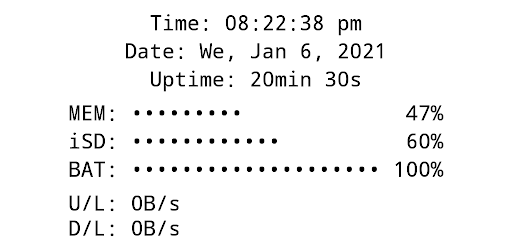




About this app
Developer Description
Simplistic, minimalistic, a bit nerdy: a retro style system monitor
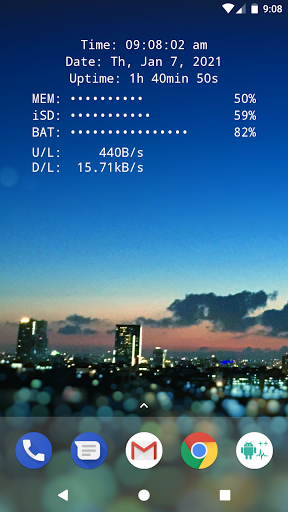
All essential info right on your home screen: Clock, Date, Uptime, RAM, Storage, Battery, Net Speed & Flashlight.
Included Widgets:
🕒 Clock / Date / Uptime
📈 Memory (RAM) Usage – monitor free & used RAM
💾 Storage / SD-Card Usage – available & used space
🔋 Battery – level + NEW: 🌡️ temperature (°C / °F)
🌐 Net Speed – current upload/download speed (NEW: switch Bytes/s ↔ Bits/s)
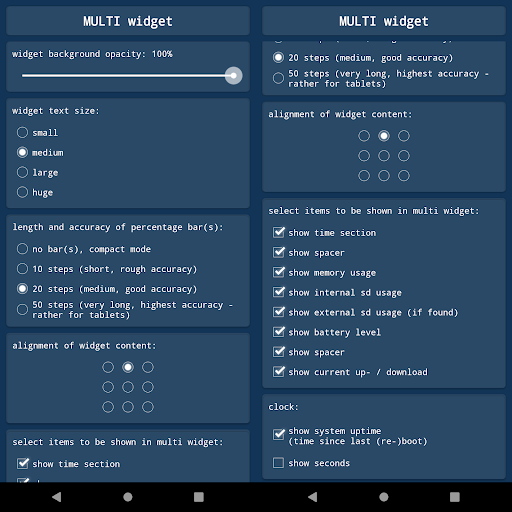
✨ Multi Widget – combine the above in one customizable widget
Flashlight Widget:
• Auto-off timer (2m, 5m, 10m, 30m, never)
• Choose from 4 flashlight icon sets
(Permission for camera & flashlight is required only to control the LED. The app cannot take pictures!)
Global Settings:
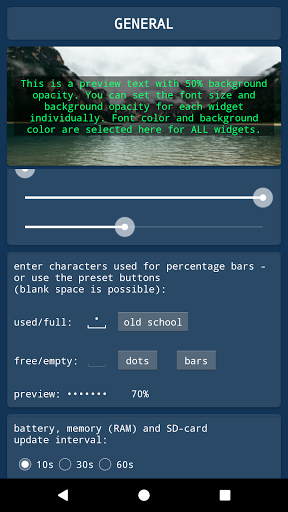
🎨 Font Color – free choice + NEW: color picker with HEX input
🖼️ Background Color – black or white
▓ Custom Characters – for percentage bar display
Widget Configuration Options:
• Background opacity
• Font size
• Percentage bar length & accuracy (or compact mode)
• Alignment of widget content (precise screen positioning)
Tapping Actions:
Tap on most widgets to see more details via toast/notification.
Example:
Internal SD:
753.22MB / 7.89GB
How To (Setup & Troubleshooting):
1. Open the app and adjust widget settings to your needs
2. Add the desired widgets to your home screen
👉 If widgets don’t load right after installation: restart your device or re-install the app.
👉 If widgets show "null" or don’t update: open the app once to initialize and make sure the Keep-Alive Service is enabled in General Settings.
Why Choose System Widgets?
✔️ All-in-one collection (RAM, Storage, Battery, Clock, Network/Internet Speed, Flashlight)
✔️ Highly customizable (colors, opacity, font size, alignment)
✔️ Lightweight, fast & no ads
📲 Get the System Widgets Collection now – make your Android home screen smarter and more useful!
What's New
Version Information
- Version
- 25.12.2
- Downloads
- 1K+
- Updated on
- Dec 13, 2025
- Released
- Sep 4, 2018
- Requires
- Android 4.1
Statistics
Google Play Rating History
Rating Distribution
Downloads Over Time
Android System Widgets + has been downloaded times. Over the past 30 days, it averaged downloads per day.
Shaded area shows 30-day prediction based on historical trends
Historical data collection started recently. More data points will be available over time.
Android System Widgets + users say on Google Play
 A Google user
One of the things I like about Android is that I can sit down and think of something I'd love for my device and be fairly certain that someone out there has had the same thought. Importantly, someone with the ability to actually design and execute the idea. This app is lovely, it fits in beautifully with my theme plan & looks extraordinarily cool on my homescreen. It's also very easy to use. Thanks to the developer.
 Isaac Cady
It does exactly what I need and I appreciate how simple and straight forward it is, but I feel like it's a little too simple. I'd like a few more customization options. Nothing drastic, but being able to choose from a few different monospace typefaces would be hugely appreciated. I like the old-school look of a seriffed, monospaced font monitoring stuff, but it does quite fit my "theme." Also, why can't we just enter an exact number for the width of progress bars, instead of only 10, 20, 50?
 Anthoney Reyes
can i suggest if the app can give us choice in showing memory(ram) by choosing usage or free?.. by default it seems the app is showing the usage only.. please make it happen.. thank you.. ill rewrite the review to 5 stars if that will happen.. thank you. peace
 b anthony aguilar
I love the premise, but the watch feature regularly freezes, so it is not easy to trust that the system monitor is doing a good job either.
ApkTrusted Ratings & Reviews
More from Benjamin Laws
See more apps







Scan this QR code to download

Forwarding you to the page at Google Play market in seconds...
Open Google Play market now