
Android System Widgets v25.12.2
Benjamin Laws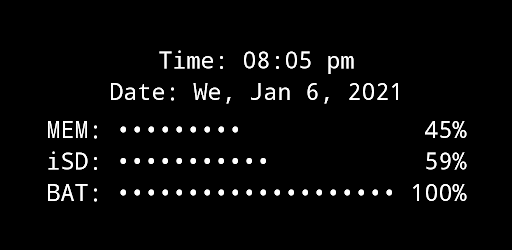


About this app
Developer Description
Simplistic, minimalistic, a bit nerdy: a retro looking system monitor
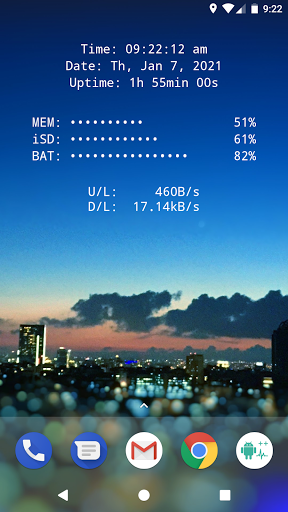
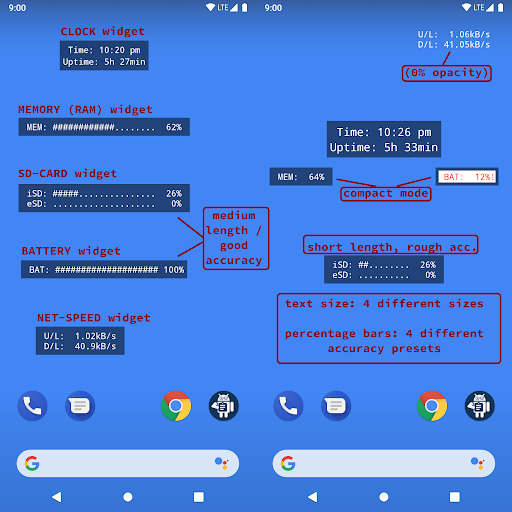
All essential info right on your home screen: Clock, Date, Uptime, RAM, Storage, Battery, Net Speed & Flashlight.
Included Widgets:
🕒 Clock / Uptime
📈 Memory (RAM) Usage – monitor free & used RAM
💾 Storage / SD-Card Usage – available & used space
🔋 Battery – level + NEW: 🌡️ temperature (°C / °F)
🌐 Net Speed – current upload/download speed (NEW: switch Bytes/s ↔ Bits/s)
✨ Multi Widget – combine several of the above in one widget (configurable)
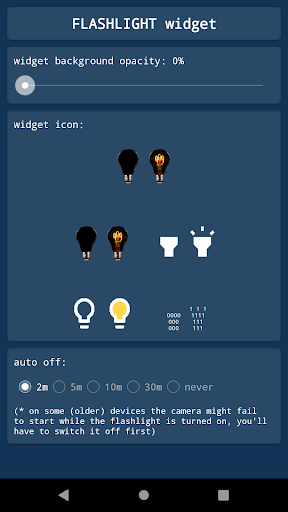
🔦 Flashlight Widget – auto-off after 2 minutes, with 4 icon sets to choose from
(Permission for camera & flashlight is required only to control the LED. The app cannot take pictures!)
Free Version Limitations (compared to "+" version):
• Multi Widget: some elements disabled
• No custom font & background colors
• Battery, SD and RAM update interval fixed at 60s
• Flashlight auto-off always after 2 minutes
How To (Setup & Troubleshooting):
1. Open the app and adjust widget settings to your needs
2. Add the desired widgets to your home screen
👉 If widgets don’t load right after installation: restart your device or re-install the app.
👉 If widgets show "null" or don’t update: open the app once to initialize and make sure the Keep-Alive Service is enabled in General Settings.
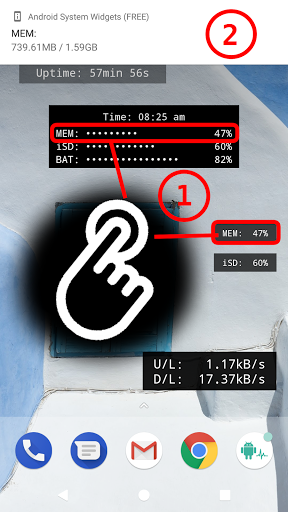
Tapping Actions:
Tapping most widgets shows detailed info as a toast/notification.
Example:
Internal SD:
753.22MB / 7.89GB
Global Settings:
🎨 Widget Font Color – + Feature!
🖼️ Widget Background Color – + Feature!
▓ Custom Characters – for percentage bar display
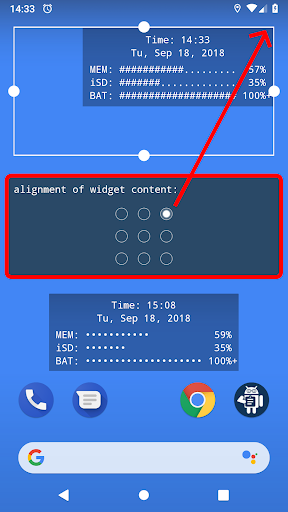
Widget Configuration Options:
- Background opacity
- Font size
- Percentage bar length & accuracy (or compact mode)
- Alignment of widget content (precise positioning on screen)
Why Choose System Widgets Free?
✔️ All-in-one widget collection (RAM, Storage, Battery, Network/Internet Speed, Clock, Flashlight)
✔️ Lightweight, fast & ad-free
✔️ Upgrade anytime to the full "+"-version for more customization
📲 Download System Widgets Free now – monitor your phone and customize your home screen!
What's New
Version Information
- Version
- 25.12.2
- Downloads
- 50K+
- Updated on
- Dec 13, 2025
- Released
- Sep 18, 2018
- Requires
- Android 4.1
Statistics
Google Play Rating History
Rating Distribution
Downloads Over Time
Android System Widgets has been downloaded times. Over the past 30 days, it averaged downloads per day.
Shaded area shows 30-day prediction based on historical trends
Historical data collection started recently. More data points will be available over time.
Android System Widgets users say on Google Play
 Huzaifa Nahiyan
Great App actually. Works exactly as advertised. All the widgets are functional. And not a single ad even in the free version. Applause to the dev of this app. Thanks! If I had money, I would buy the full version to support you but I don't. Thanks again for this little but great app.
 Android Mobile
Really good app with a neat and tidy UX. Best of all it has no ads. Why only 4 stars then? The memory and SD card usage only shows you the percent utilised instead of the actual numbers such as "2.7 / 8GB". EDIT: Yes, I already tapped the widget but that shows a notification so you have to keep tapping it to see the actual numbers. Would be great if the widget could be set to show percentage or actual usage. Also, a data usage widget would be great.
 leigel
I like it but the widgets just say null until you open the app. It's pretty annoying to be opening and closing an app just to get pieces of your home screen to load. Also when it is working, there is a very long response time to the meters.
 Helen Jones
I used to love the light bulb flashlight widget the most but now it doesn't work
 Lori Fisher
Mine don't work, probably me!
ApkTrusted Ratings & Reviews
More from Benjamin Laws
See more apps







Similar Apps

AppDash: App Manager & Backup
Free
Fcitx5 for Android
Free

Quick Settings app
Free

Sesame Search & Shortcuts
Free

Swift Backup
Free

Dolphin EasyReader
Free

HiOS Launcher - Fast
Free

ADW Launcher 2
Free

BOLT Icon Pack
Paid
Weather Live
Paid

DevCheck Device & System Info
Free

GSMArena
Free

Action Launcher: Pixel Edition
Free
Moto Widget
Free

Lenovo
Free
Modes and Routines
Free
Scan this QR code to download

Forwarding you to the page at Google Play market in seconds...
Open Google Play market now