Radio Alarm Clock v25.08.7
Benjamin Laws




About this app
Developer Description
Radio Player & Clock Radio - no app-side ads, stations may broadcast ads!
IMPORTANT INFO about Energy Settings:
-SAMSUNG
-HUAWEI
-XIAOMI
-OPPO
- ...
PLEASE check this website:
https://android-co.de/energy-settings/en
and follow the tips in order to PREVENT THE ALARM FROM FAILING!!
Thank you.
Dear user,
this app is 100% ad-free! Sometimes I receive negative ratings due to radio stations playing advertisements. There is nothing I could do against that. The app itself is ad-free.
Advice: Use 1-2 minutes of increasing volume for your alarms. You won't hear the first commercial then.
*Currently 40,000+ radio stations from all over the world!*
You will be prompted to accept the TERMS OF USE before you can use the app:
https://android-co.de/clockradio-terms-of-use/en
Description / Functions
permissions:
read phone status and identity is needed for muting alarms when calls are detected
read/write external storage is needed for importing/exporting favourites
This is an online clock radio / radio alarm app.
An internet connection is required in order to play an online stream.
In case there is no internet connection available, an integrated audio file will be played instead to make sure the user will get woken up anyway.
You can set multiple repeating (weekly) or one time alarms per day.
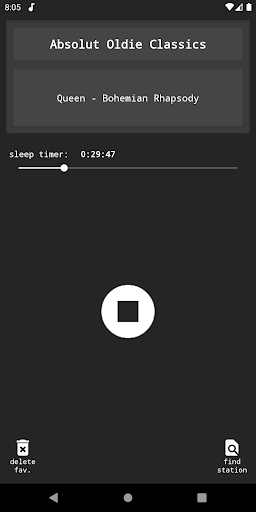
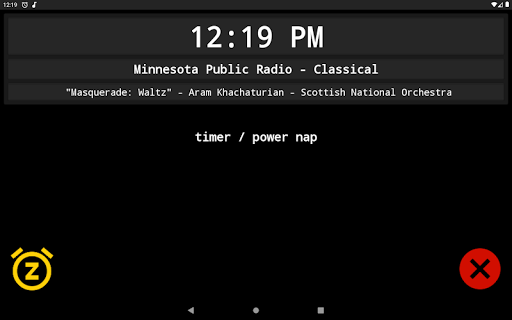
On the main page you can find a power napping timer for short naps (1-120 min).
You can add stations to your favourites and play them in the radio player.
A notification in the notification bar indicates the next alarm time; tapping the notification will open the app.
Settings:
•alarm volume
•snooze duration: 1-30 min
•alarm auto off: 0, 30, 60, 90, 120 min
•safety dialog when disabling an alarm: on/off
•increasing volume (standard alarm): 0-60 min
•increasing volume (power nap): 0-5 min
•vibration (standard alarm): on/off
•vibration (power nap): on/off
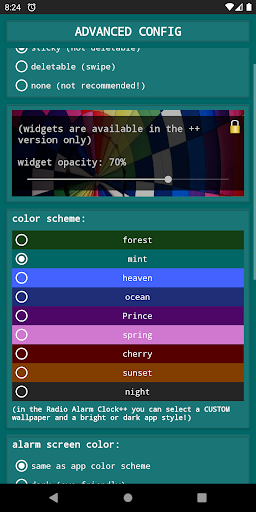
•notification type for next alarm: fixed / deletable / off
•different color schemes
•add a custom stream to favourites
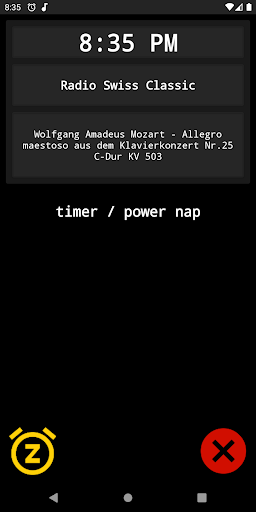
When the alarm time is reached, you may:
•stop the alarm (X)
•snooze the alarm for the set snooze duration (Z)
•control the volume (if you want to continue listening), this switches off the vibration and the increase in volume stops, if switched on
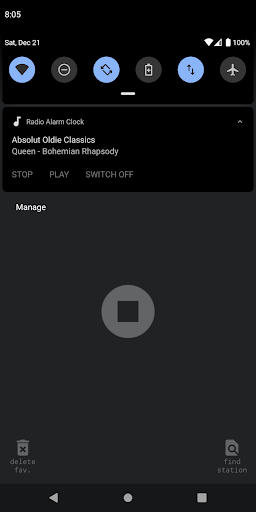
-a notification in the notification bar indicates that the radio is on and a tap leads back to the "wake-up" screen
The alarm will mute on any call and stop the vibration.
After a call, the wake-up volume will be restored.
If you like the app, I would be truly grateful if you gave it a positive rating :-)
For problems, questions, suggestions or critique feel free to contact me: support@android-co.de
There may be bugs and errors which may prevent the clock radio from waking you up as intended!
Please consider using a 'normal' alarm clock in addition to this app.
What's New
Version Information
- Version
- 25.08.7
- Downloads
- 500K+
- Updated on
- Aug 29, 2025
- Released
- Dec 14, 2017
- Requires
- Android 4.1
Statistics
Google Play Rating History
Rating Distribution
Downloads Over Time
Radio Alarm Clock has been downloaded times. Over the past 30 days, it averaged downloads per day.
Shaded area shows 30-day prediction based on historical trends
Historical data collection started recently. More data points will be available over time.
Radio Alarm Clock users say on Google Play
 Gabrielle Lambrick
Great app, nice and straightforward, does the job without extraneous features. One thing I would like to be able to do is to switch off the alarm but go on listening to the radio (at the moment, I have to turn off the alarm, unlock my phone, open the app, select the radio function ... annoying when I end up missing a chunk of music!
 sa he
sa he
works great - does everything it promises and no less. more so writing a review to ask if it is or will be possible to add stations directly through the app or its database? many of the stations i prefer aren't available, though the list is still very expansive. thank you for the app.
 Sonny
Sonny
Used to work great until around four or five months ago. Now refuses to stream any radio channel. It repeatedly says "error" then plays the in-built tune. I would happily give you five stars if you can tell me why this app, which used to work perfectly, now doesn't. Connection is *definitely not* the issue as the signal strength is perfect and always has been. Interestingly, it does work with Radio Swiss Classique, as you suggested to someone else, but other channels don't work...
 Lolita Goth
Have been using the app for a few days..it does work in the sense that it does play music in the mornings as an alarm. But it isn't the radio, it's the same song every day I wake up to which sounds like an upbeat copyright free instrumental jingle you hear on TV. I tried different radio stations but it's still that same song, and only that one song, that actually plays. I wanted to hear the radio, I would prefer to just use my normal alarm instead of this app.
 John Richey
it has stopped working, reinstalled, no good, disappointed, I used it for years and enjoyed it, frustrated
ApkTrusted Ratings & Reviews
More from Benjamin Laws
See more apps






Similar Apps

ZenAlarm: Smart Wake Up
Paid
Radio online. FM, music, news
Free

True Resonance: 432 Hz Player
Paid

Klassik Radio & Beats Radio
Free
Alarm Clock
Free

Audials Play: Radio & Podcasts
Free
Simple Alarm Clock
Free

Breethe - Sleep & Meditation
Free

The Clock: Alarm Clock & Timer
Free
Challenges Alarm Clock
Free
Digital Clock Widget
Free
Talking Alarm Clock Beyond
Free
DI.FM: Electronic Music Radio
Free
AntennaPod
Free

Radio USA - Live Radio FM / AM
Free

Zeno Radio
Free
Scan this QR code to download

Forwarding you to the page at Google Play market in seconds...
Open Google Play market now