
VScode for Android v2.3.1
Dev.Environments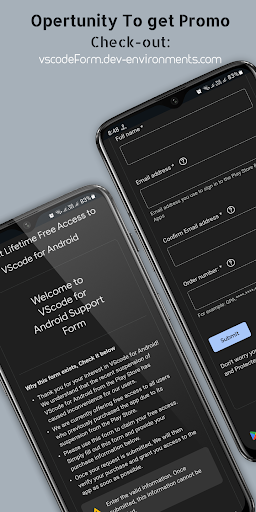



About this app
Developer Description
Code on-the-go with VScode for Android. Edit,debug and collaborate from mobile!!
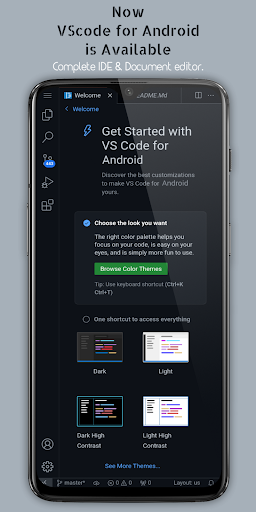
🧰 With support for a wide range of programming languages and file types, you can work on any project with ease. Plus, with customizable themes 🎨, extensions 🧩, IntelliSense 💡, debugging tools 🐞 and more, it’s never been easier to code like a pro.
🤝 And with built-in support for Git and other version control systems, collaborating with others is a breeze. Enjoy an immersive display experience with fullscreen mode that hides the system bars for an uninterrupted coding session.
🌐 Access and use VScode running on your mobile device from anywhere in the world using a web browser and your phone's IP address with port 8080. Download VScode for Android today and unleash your coding potential! 💻
🔑 Key features of VScode for Android include:
🐞 Support for debugging: Find and fix errors in your code with VScode's built-in debugger.
🌈 Syntax highlighting: Easily read and understand your code with syntax highlighting for many programming languages.
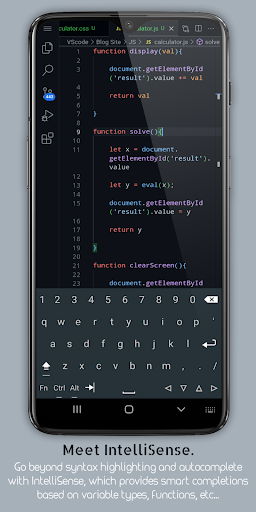
💡 Intelligent code completion: Write code faster and with fewer errors with VScode's IntelliSense feature.
✂️ Snippets: Create and use reusable pieces of code with snippets.
🔄 Code refactoring: Perform common code refactoring operations such as renaming variables or extracting methods.
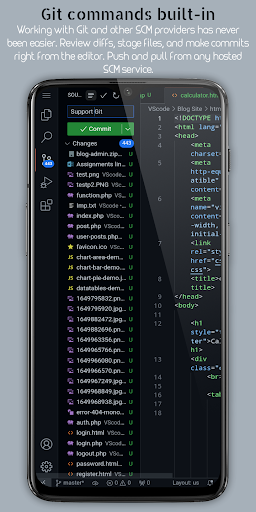
🌲 Embedded Git: Perform common version control operations directly from the editor with built-in support for Git.
⌨️ Customizable keyboard shortcuts: Customize key bindings to suit your preferences with VScode's rich and easy keyboard shortcuts editing experience.
🖥️ Immersive display experience: Enjoy an uninterrupted coding session with fullscreen mode that hides the system bars.
🌍 Remote access: Access and use VScode running on your mobile device from anywhere in the world using a web browser and your phone's IP address with port 8080.
🖱️ Multi-cursor editing: Make multiple changes at the same time with multi-cursor support.
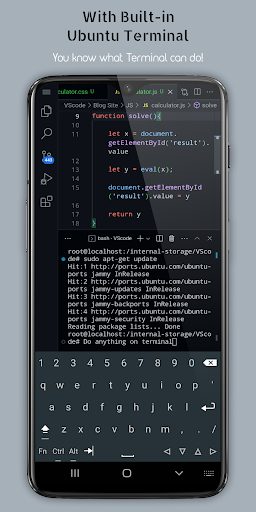
💻 Built-in terminal: Access the command line directly from within VScode using the built-in terminal.
📚 Split view editing: Work on multiple files side-by-side with split view editing.
🏃 Integrated task runner: Automate common tasks with VScode's integrated task runner.
🌐 Language-specific settings: Customize settings on a per-language basis to optimize your workflow.
💾 Workspace Management: Easily organize and switch between different projects and workspaces within VScode for Android.
✨ VScode for Android supports a wide range of programming languages, including:
🌈 HTML/CSS 🐘 PHP/🗄️SQL 🌐 JavaScript/TypeScript 🐍 Python/PowerShell ☕️ Java/🚀Kotlin 📄 XML/🧾YAML 🎯 C/C#/C++ 📑 Markdown/🐳Dockerfile 💎 Ruby/🐹Go
All files access permission: App uses this permission to Allow users of the App to Create,Edit & View All type of documents which are located in internal storage.
📧 Contact and feedback:
If you have any questions or feedback about our app, please feel free to contact us at vscodeDev.Environments@gmail.com. You can also post bugs or issues on our GitHub page at https://github.com/Dev-Environments/VScode/issues/new/choose . We appreciate your support! ❤️
We are currently offering free access to all users who previously purchased the app due to its suspension from the Play Store. Checkout the Form: https://vscodeform.dev-environments.com
Visit Our Youtube Channel for Tutorials:
https://www.youtube.com/@Dev.Environments
⚠️ Disclaimer:
Please note that our app is not officially developed by Microsoft. However, VScode for Android provides a way to use the official Visual Studio Code on your mobile device.
What's New
🚀 Major Update !
• Updated to VS Code v1.101.2 with built-in GitHub Copilot AI support for intelligent code completion
• Extra keyboard shortcut keys added above keyboard for faster coding and easier access
• Premium haptic feedback with refined tactile responses (optimized for Google Pixel & flagship devices)
• Moveable floating keyboard toggle - drag and position anywhere on screen
Version Information
- Version
- 2.3.1
- Downloads
- 5K+
- Updated on
- Jul 22, 2025
- Released
- Jan 12, 2024
- Requires
- Android 6.0
Statistics
Google Play Rating History
Rating Distribution
Downloads Over Time
VScode for Android has been downloaded times. Over the past 30 days, it averaged downloads per day.
Shaded area shows 30-day prediction based on historical trends
Historical data collection started recently. More data points will be available over time.
VScode for Android - Google Play Rankings
Top Rankings
| Rank | Country | Category | List | Change |
|---|---|---|---|---|
| — |
Ranking History in
No ranking data available yet. Rankings are updated daily.
#30 in Top Paid Productivity in United States

#10 in Top Paid Productivity in South Korea


#13 in Top Paid Productivity in France


#14 in Top Paid Productivity in Spain


VScode for Android users say on Google Play
 Wasis Haryo Sasoko
This is basically vscode on browser. A website doesn't have access to your clipboard. So you can't copy paste except using keyboard. And vs code is never meant for a phone. If you expect to code on your phone on touch screen, you will suffer a lot. This app is for those who use tablet with a keyboard / mouse.
 Marcel
It works but the price is to expensive
 Gilad Ofir
Overall it seems really nice but has poor integration with extensions. For example, the python debugger (debugpy) extension doesn't work with VSCode for Android. And a debugger is critical. I was able to get Java working though (with debugging). Will that be addressed? Edit: No, it isn't working. I just tested it again and I got: "Can't install 'ms-python.debugpy' extension because it is not compatible with the current version of VSCode for Android (version 1.85.1)."
 Rhyan Mitchell
Unfortunately after downloading this app, it wouldn't go past the please wait stage as the app tried to start up. I won't ask for a refund as I want to support the developer in the hopes that soon with more updates the bug might be fixed so I can use the app on my phone as currently it won't start up.
 Christopher Lowden
At the time of writing I can state that this does not work on my Galaxy S25 Ultra. It goes to the page that states "Requires stirage permissions" but then it never requests them and I am unable to manually grant them on my device from within the settings. It's effectively Bricked.
ApkTrusted Ratings & Reviews
Similar Apps

Code Studio
Free

Lib of Dev (Open Source)
Free
Coding Python
Free

Wix Studio
Free

Cyberpunk Red Companion
Free
Learn C++
Free

GeeksforGeeks - Learn To Code
Free

Enki: Learn to code
Free

Udemy Business
Free

Decks for Warcraft Rumble
Free

UserLAnd - Linux on Android
Free

Pocket Prep IT & Cybersecurity
Free

Cxxdroid - C/C++ compiler IDE
Free

Go.Learn
Free
Learn R Programming
Free

AWS Console
Free
Scan this QR code to download

Forwarding you to the page at Google Play market in seconds...
Open Google Play market now