Jota+ (Text Editor) v202502
Aquamarine Networks.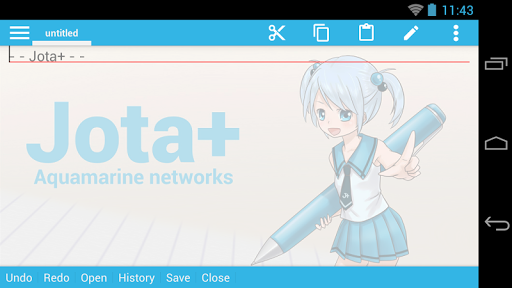




About this app
Jota+ (Text Editor) solves the problem of providing a reliable and feature-rich text editing experience on Android, benefiting writers, developers, and students who require a versatile tool for note-taking and document editing. Compared to alternatives in the Tools category, Jota+ stands out with its simplicity and ease of use, although it may fall short in terms of advanced features and customization options. With over 1 million downloads and a 3.8/5 user rating, Jota+ has established itself as a trustworthy and popular choice. Its lack of required permissions is a notable advantage, ensuring a secure and private user experience.
Pros
- Jota+ boasts a high user rating of 3.8/5, indicating a generally positive user experience and a well-designed interface that meets the needs of its target audience.
- With over 1 million downloads, Jota+ has demonstrated its social proof and reliability, making it a trustworthy choice for users seeking a text editor.
- The app's simplicity and ease of use make it an excellent choice for users who require a straightforward text editing experience without the clutter of advanced features.
- The developer's reputation and commitment to updates, as evidenced by the version history, suggest a dedication to maintaining and improving the app's quality and functionality.
- Jota+ does not require any permissions, ensuring a secure and private user experience that is free from potential data collection or security risks.
Cons
- The app's monetization model, which includes ads and in-app purchases, may be perceived as aggressive or intrusive by some users, potentially disrupting the editing experience.
- The lack of advanced features and customization options may limit Jota+'s appeal to power users or those who require more sophisticated text editing capabilities.
- Some users may experience issues with the app's performance or compatibility on certain devices, although the developer's reputation and update frequency suggest a commitment to addressing such concerns.
- The presence of ads may be a concern for users who prefer an ad-free experience, although the option to purchase ad-free access via in-app purchases is available.
Best for: The ideal user for Jota+ is a student, writer, or developer who requires a reliable, easy-to-use, and feature-rich text editor for note-taking, document editing, and other writing tasks, and values a secure and private experience without the need for advanced features or customization options.
Developer Description
Jota+ (i-o-ta plus) is the excellent text editor for Android.
Jota+ is easy to use. And have the great ability and great performance.
For documentation, for programming, Jota+ provides the best experience of a text editing.
★features of Jota+
- Support multi-file feature.
- Support 1 million characters.
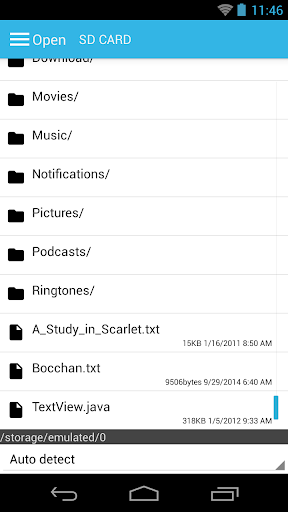
- Support many character codes and Auto-Detect feature.
- Search/Replace (Support Regular Expression)
- Highlight searching words.
- Support font customize. (Proportional / Mono Space / ttf,otf font )
- Support Install-shortcut feature.
- Auto save.
- Show Line numbers.
- Show Tab/Line-break mark.
- Realtime characters/words/lines Counter.
- Customizable Toolbar.
- Syntax highlight support many languages. (awk,X11-basic,css,c/c++,java,javascript,lua,Objective-C,pascal,php,python,ruby,sh,tex,xml,html)
And it's customizable.
- Customizable Fixed Phrase management.
- Clipboard management.
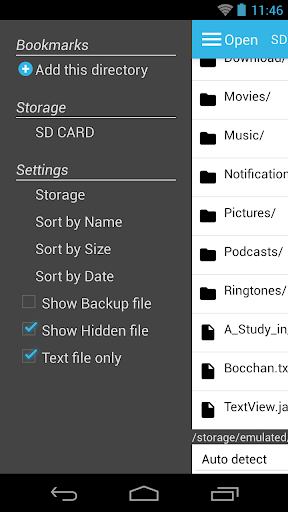
- Built in file browser with bookmark management.
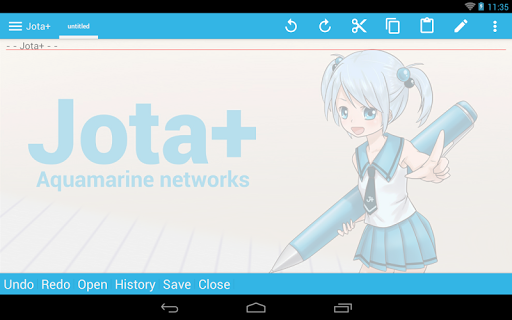
- Free Wallpaper by Non Miyabi. http://sites.google.com/site/nonsillustgallery/
- Detect file modification.
- Support physical-keyboard devices/Bluetooth or USB Keyboard/Chromebook.
- Safe app without any evil permission requests.
- Support many kinds of Cloud Storage Services. ( Dropbox, OneDrive etc...)
- Rescue Center for realtime backup.
★FREE version is for trial, so some features are locked.
But you can use free version as a Text editor with sufficient capabilities.
You can buy PRO-KEY app from Google Play to unlock extra features.
▼Firebase Crashlytics and Mobile Ads are built into the app.
Please confirm our privacy policy.
▼Warning.
We prohibit the distribution of Jota+ on places other than Google Play.
It has been confirmed that the pirated app mixed malware has been distributed.
And we do not provide support to pirated apps.
Please be careful.
▼We won't reply to anything on Review Comments.
If you have troubles or suggestions, send us an email.
▼FAQ
Q. Can't save on SD-Card or USB-Flash.
A. They are supported by Storage Access Framework.
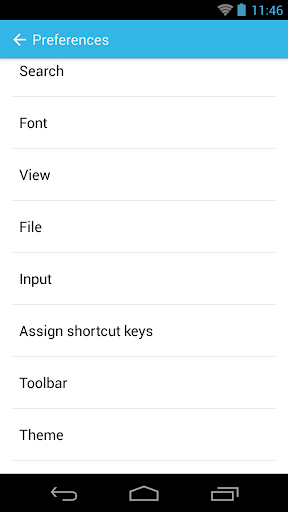
see Preferences>File>”Use Android's standard File Picker" and check it.
Q. I can't find my file in file browser.
A. Please check off "Text File Only" in side menu.
Q. I bought PRO-KEY, but couldn't activate.
A. Try following...
Make sure that your device is connected to the internet and logged into Google.
Confirm that PRO-KEY is installed in System Settings.
Click Menu - Preferences - Activate PRO-KEY.
reboot the device and start Jota+.
uninstall and re-install Jota+ or PRO-KEY.
- Some devices have Background-Task-Killer added by OEM vendors.
That kind of feature may break inter appllication communications.
Please set Jota+ and PRO-KEY to permission list.
- If you have troubles with the activation, please send an email to the developer.
Q. How to hide Floating Action Buttons.
A. See Preferences > Floating Button. Then select 'no-assign'.
Q. App exits before save my file!
Q. Overwritten my file!
A. see Preferences > Rescue Center, you may find your file.
Q. How to use in-app file picker on Android 11+. (for Connector plugins)
A. see Preferences > Files > Use Android's standard file picker.
Turn off it, then select a folder for in-app file picker.
The Root folder nor Download folder can't be selected.
To create new folder and select it is recommended.
Then you can use in-app file picker.
▼Help for Chromebook and Bluetooth Keyboard
- alt+F menu
- alt+D contextmenu
- ctrl+tab sidemenu
- ctrl+PageUp/PageDown switch tab
- see Shortcut Settings to bind ctrl+alphabet key
- cant bind ctrl+T,w on Chromebook
▼About Permissions
- modify or delete the contents of your USB storage
- read the contents of your USB storage
for loading/saving to internal storage.
- full network access
- view network connections
for mobile ads.
- install shortcut
for installing a shortcut of the file onto Home app.
(c) Aquamarine Networks.
Privacy
Given that Jota+ does not require any permissions, users can be confident that their data and privacy are protected. However, as with any app that includes ads, users should be cautious when interacting with advertisements to avoid potential security risks. To ensure a secure experience, users should only download Jota+ from trusted sources, such as the Google Play Store.
Tips
To get the most out of Jota+, users should explore the app's settings and options to customize their editing experience, such as adjusting font sizes and styles. Additionally, users can optimize performance by closing unnecessary apps and ensuring their device has sufficient storage space. For first-time users, it is recommended to familiarize themselves with the app's interface and features by experimenting with sample documents and exploring the menu options.
What's New
Support Android 16
In-app purchases
$1.99 - $6.99 per item
Version Information
- Version
- 202502
- Downloads
- 1M+
- Updated on
- Aug 17, 2025
- Released
- Jul 30, 2011
- Requires
- Android 6.0
Statistics
Google Play Rating History
Rating Distribution
Downloads Over Time
Jota+ (Text Editor) has been downloaded times. Over the past 30 days, it averaged downloads per day.
Shaded area shows 30-day prediction based on historical trends
Historical data collection started recently. More data points will be available over time.
Jota+ (Text Editor) users say on Google Play
 Seventh Signature
I've been using this editor for a long time. The only issue I see is with the recovery center. It sometimes doesn't show results, and most of the time it doesn't refresh the pages if you try and delete the entries. Other than this, it is by far the best editor I've ever used.
 AV Va
AV Va
Allows you to edit large files and open/edit together several files. Edit text files of all types of encodings. There is an advertising window above the keyboard, in free version.
 Elizabeth Fuller
I've used this for years & it's superior to any other text editor I've found. 3 stars for the moment because it's started to "helpfully" autoformat my text & I can't make it stop. It insists on putting a period before 2 spaces. I must have complete control over my input. Sometimes I need 2 spaces & no period. I've tried turning off in app preferences, in keyboard prefs (I don't use default Samsung keyboard) & in Samsung keyboard prefs. App is still changing what I input. Can't go on this way.
 Kiere Luurs
My current annoyance is text-selection. Why don't you do word-selection by a long press, like every one else?! When choosing selecion in the context-menu, the markers drop on the wrong line. And are barely movable, nor removable.
 Daniel Huston
I used this for more than a decade & it worked welll. But now it's useless. I can’t create folders. I can’t remame files. I can’t delete old files after updating them. The Jota+ suffers from accessing too much data all the time. I preferred my files created in jota+ to be isolated from the rest of Android. Now you're putting multiple colors in lines of text. I had to delete everything that I'd written. I want just one color text BLACK!
ApkTrusted Ratings & Reviews
More from Aquamarine Networks.
See more apps
Jota+ β (Text Editor)
Free
Jota+★PRO-KEY
Paid

aGrep
Free
Jota Text Editor
Free

Tweaked Keyboard Layout
Free
Jota+Connector for Dropbox V2
Free

Voice Input for Jota
Free

aDice
Free

かんたん路線検索
Free
Jota+ One Connector
Free

校正支援 for Jota Text Editor
Free
Jota+ WebDAV Connector
Free

AquaMozc for Titan
Paid
Similar Apps

JotterPad - Writer, Screenplay
Free

UpNote - notes, diary, journal
Free

touchnotes
Free

Evernote - Note Organizer
Free
Hermit — Lite Apps Browser
Free

Weekly Planner Journal
Paid

Foxit PDF Editor
Free

TicNote: AI Recorder & Agent
Free

EdrawMind: AI Mind map & Note
Free

Writer Journal - Text,Note
Free

Noteshelf - Notes, Annotations
Paid

Nothing Pomodoro Timer
Paid

Code Studio
Free

Mindbook Pro
Paid

Hedy AI Meeting Coach
Free

CLG Color
Paid
Scan this QR code to download

Forwarding you to the page at Google Play market in seconds...
Open Google Play market now