
Remove Background From Video v3.0
HUG APPS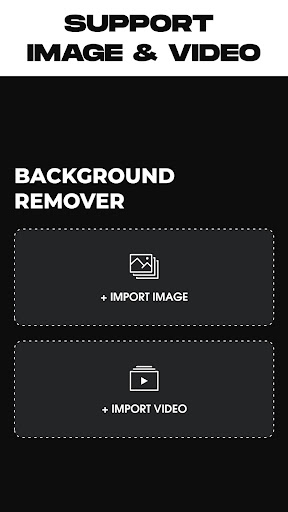







About this app
Developer Description
Remove video background, photo background remover & change video background
Remove video background app is a free app video background changer that offers a bunch of features such as changing the video background with color, talking about colors, the Remove video background app contains thousands of colors to choose from as well as gradient color, select your favorite one, and change your camera video background with it.
In addition to the colors and gradient color features, removing the video background lets you change the video background with an image from your gallery or even a video, just one click there your video background will be changed.
The green screen effect has two modes of the camera, selfie camera, and back camera, one tap to switch between them, you can change the background of your video selfie as well as the back camera.
Green screen is one of the darlings of the crowd that likes to make videos more elaborate and fun, but what is a green screen? The name refers to a filter that offers several options for funds to use in videos created by the social network.
The feature resembles the green background used in the film super heroes, for example, used as a scenario for people to act. The tool, as expected, is successful on the internet, but what about you, do you know how to use the effect?
Features :
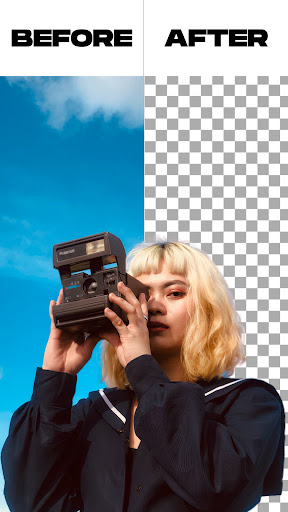
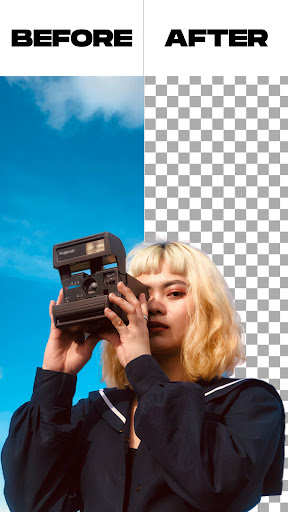
- Remove background from an image with two options, automatically background remover or manually background remover.
- Trim your video before starting to remove the background from it.
- Remove background from camera video or remove background from video gallery.
- Possibility to change the green screen, yes, you can change the green screen background to your favorite background.
How to use :
- Open the remove video background app.
- Choose between the two options, the first one if you want to remove photo background, the second option is if you want to remove video background.
- After you select your media file, the remove video background app will automatically start removing the video background or removing photo background, you just need to wait till the process is finished.
- After the removing background process is finished, you can change the background of your video or photo as like, you can select the background from the in-app backgrounds, or you can pick it up from your gallery, you have the choice.
- If you're done, just click on the export button, the remove video background app will save your video or photo into your gallery.
What's New
* Added support for the latest OS versions.
* Minor bug fixes.
Version Information
- Version
- 3.0
- Downloads
- 500K+
- Updated on
- May 31, 2025
- Released
- Feb 28, 2022
- Requires
- Android 5.0
Statistics
Google Play Rating History
Rating Distribution
Downloads Over Time
Remove Background From Video has been downloaded times. Over the past 30 days, it averaged downloads per day.
Shaded area shows 30-day prediction based on historical trends
Historical data collection started recently. More data points will be available over time.
Remove Background From Video - Google Play Rankings
Top Rankings
| Rank | Country | Category | List | Change |
|---|---|---|---|---|
| — |
Ranking History in
No ranking data available yet. Rankings are updated daily.
#86 in Top Free Beauty in United States


#31 in Top Free Beauty in Indonesia
 Smarty Men Jacket Photo Editor
Remove Background From Video
Smarty Men Jacket Photo Editor
Remove Background From Video
 Skin Bliss: Skincare Routines
#33 in Top Free Beauty in Philippines


#43 in Top Free Beauty in Thailand
 Prookie: Hair Style Face Shape
Remove Background From Video
Prookie: Hair Style Face Shape
Remove Background From Video
 Girls Hairstyle Step By Step
Remove Background From Video users say on Google Play
 Reyamae Carag18
ohh finally I have found a very excellent app to remove video backgrounds for free no hassle it's so easy thank you very much to this app ❤️❤️❤️❤️❤️ it contains only one adds if you're done and going to save it the adds as so short after that your video will be exported
 Elecspark
it does remove the background but it doesn't support video in video background only images sadly
 Itoro Okoko
it actually removes my video background, but the quality of the output video is blurry at the head level, and also shaking. You may need to improve on this.
 Chikram Unkeshwar
useful
 Silas Berlet
when I pick "import video" it says"select picture" and I don't want to import a image, I want to import a video, please fix
ApkTrusted Ratings & Reviews
More from HUG APPS
See more apps
Similar Apps

Background remover - remove.bg
Free

Apowersoft Background Eraser
Free

BeatSync: Photo & Music Videos
Free

LightCut -AI Auto Video Editor
Free

Smart Video Crop - Video Cut
Free

Splice - Video Editor & Maker
Free

Text & Image to Video AI Gen
Paid

PixelFlow: Intro Video maker
Free

PowerDirector - Video Editor
Free

Swapify - Face Swap Video
Free

Videoleap: AI Video Editor
Free

Banano Pro İmage Generator
Paid

ActionDirector - Video Editing
Free

Promeo - Story & Reels Maker
Free

Background Eraser - BG Remover
Free

PicWish: AI Photo Editor
Free
Scan this QR code to download

Forwarding you to the page at Google Play market in seconds...
Open Google Play market now