GeoGebra Scientific Calculator v5.2.874.1
GeoGebra


About this app
Developer Description
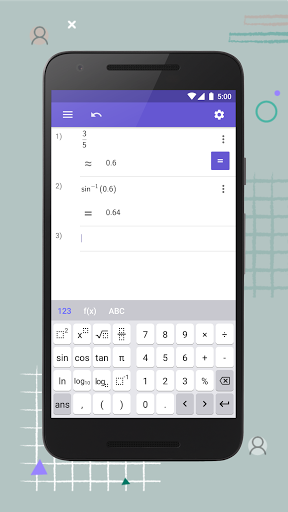
Free scientific calculator for fractions, trigonometry and statistics
The GeoGebra Scientific Calculator includes:
• Computations with fractions
• Trigonometric functions: sin, cos, tan
• Statistics functions
• Exponential functions and logarithms
We’d love to hear from you: send us your questions or feedback via Twitter @geogebra or to support@geogebra.org
What's New
Version Information
- Version
- 5.2.874.1
- Downloads
- 100K+
- Updated on
- Jan 12, 2026
- Released
- Dec 3, 2018
- Requires
- Android 6.0
Statistics
Google Play Rating History
Rating Distribution
Downloads Over Time
GeoGebra Scientific Calculator has been downloaded times. Over the past 30 days, it averaged downloads per day.
Shaded area shows 30-day prediction based on historical trends
Historical data collection started recently. More data points will be available over time.
GeoGebra Scientific Calculator users say on Google Play
 A Google user
where are integrals? your other apps have it and this scientific has none. Why don't you try to make all in one app, like SoloLearn did (just suggestion). And make dark theme!!!! Wait, what? Why integrals are not allowed in scientific calc. and where? I couldn't find it on the internet, how do I find this info?
 Daniel Getz
Nice, simple, lets you set variables and use them later. Uses a UI model of writing formulas, not mimicking calculators. Can switch between exact fraction or decimal output. So it's my favorite calculator so far, only downsides I found were: you can't depend on when it will keep or clear your previous calculations when you switch away from it; plus once or twice it bugged up and showed outputs in the wrong line as if they were the output of a different calculation.
 César Romero
I like it a lot! I think is simple, clean and intuitive. Though, there is something that I find very annoying. If I already selected to use degrees as default, later while using the trigonometric functions it is required to explicitly specify ° (degrees). And the output switches without any apparent reason between degrees and radians. I would prefer to have myself control of the use between DEG and RAD. Instead of a ° button, I would prefer a DEG <-> RAD button.
 Bubbles Meow
I would love this, if it weren't for a bug. Whenever I type, the keyboard randomly "gets stuck" on the input. So, I type out a 6, but the input becomes 666. Fix this and it's back to 5 stars.
A Google user
Nnnnnnneeeeiiinnnn
ApkTrusted Ratings & Reviews
More from GeoGebra
See more apps
Similar Apps

Desmos Graphing Calculator
Free

Cymath - Math Problem Solver
Free

Scientific Calculator Pro
Paid

Mathway: Scan & Solve Problems
Free
Real Scientific Calculator
Free
MalMath: Step by step solver
Free

Symbolab: AI Math Solver
Free
HiPER Scientific Calculator
Free

Numerade - Homework Help
Free

Socratic AI: Math Help, Solver
Paid
Scientific Calculator He-580
Free

Periodic Table - Atomic
Free
Scientific Calculator
Free
Mathos AI: Math Helper & Tutor
Free

MEL Science: a science lab app
Free
Graphing Scientific Calculator
Free
Scan this QR code to download

Forwarding you to the page at Google Play market in seconds...
Open Google Play market now