
PDF Scanner App: Document Scan v2.03
SmartSoft Apps



About this app
The PDF Scanner App: Document Scan effectively solves the problem of digitizing physical documents, making it an ideal solution for individuals and professionals who need to scan and share documents on the go. This app benefits students, freelancers, and small business owners the most, as it provides a convenient and efficient way to manage documents. Compared to alternatives in the Productivity category, this app stands out with its simple and intuitive interface, but falls short in terms of advanced features and editing capabilities. With a moderate download count and a very good user rating, this app has established a strong presence in the market.
Pros
- The app's ability to scan documents and convert them to PDF or JPG format is a significant advantage, making it a versatile tool for various use cases.
- With over 500,000 downloads and a 4.2-star rating, the app has demonstrated its reliability and effectiveness, providing social proof for potential users.
- The app's offline capability and lack of permission requests are major positives, ensuring that users can scan documents without internet connectivity and without compromising their device's security.
- The developer's reputation and frequent updates suggest a commitment to maintaining and improving the app, which is reassuring for users who rely on it for their document scanning needs.
Cons
- The app's monetization model, which includes ads and in-app purchases, may be a concern for some users, as it could lead to a cluttered interface and additional costs.
- The limited feature set and lack of advanced editing capabilities may not meet the needs of power users or those requiring more complex document management features.
- Some users may find the app's simplicity and lack of customization options to be a drawback, particularly if they are accustomed to more feature-rich alternatives.
Best for: The ideal user for this app is a busy professional or student who needs a straightforward and efficient way to scan and share documents, such as receipts, contracts, or notes, and values simplicity and ease of use over advanced features and customization options.
Developer Description
Scan docs and convert to PDF/JPG. Send and share as PDF with document scanner
Turn any mobile device into a powerful all-in-one portable scanner app. Scan and digitize pages with OCR recognition and manage files in seconds.
Keep an advanced scanner app in your pocket and increase productivity when working with PDF files.
One tap to scan any document to PDF!
Why choose PDF Scanner App:
Document scanner
Transform any type of paper into PDF format! This doc scanner app lets you digitize receipts, contracts, notes, or business cards quickly and easily.
High-Quality Scans
Smart edge detection, auto-cropping, and image enhancement provide sharp, high-resolution scans. Filters like color, black & white, and enhance ensure professional, clear results.
OCR Scanner
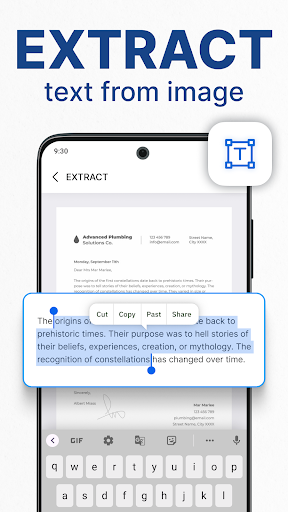
Convert images into editable text with OCR. Recognize and extract text content from invoices, books, and handwritten pages in seconds.
Add E-Signatures
Easily create and store multiple electronic signatures. Apply them to scans and send signed documents in seconds.
Share PDF/JPG
With this document scanner, easily share as PDF or JPEG through email, apps, or cloud storage.
Key Features:
- Capture in HD with border detection, auto enhancement, and smart filters.
- Convert invoices, bills, receipts, notebooks, business cards and more to PDF.
- Share scanned docs in PDF or JPG formats via email, messengers or social networks.
- Print any pages instantly and wirelessly on the go.
- View documents offline anywhere and anytime.
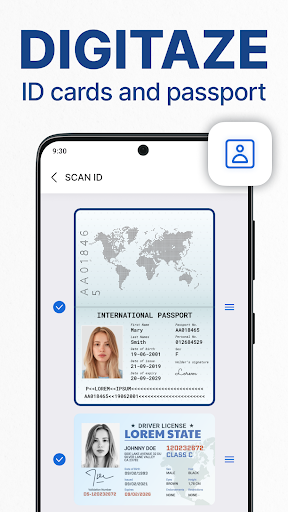
- Scan ID cards, passports, driver’s licenses, and certificates.
- Edit before saving: add or remove pages, adjust layout and size.
- Easy file management with search and sort to quickly find any document.
- Protect PDF with password and keep confidential documents safe.
- Add signatures or stamps directly before sharing or printing.
- Built-in PDF maker that helps create PDF anytime.
How to scan using PDF Scanner:
1. Place the page in front of the camera until fully visible on screen.
2. Crop document by using a selection tool.
3. Make photos of the desired pages.
4. Enhance the quality of an image by applying filters.
5. Export to PDF or JPEG.
Make PDF files from any paper or image quickly and easily.
Try this free scanner app and unlock all features for your documents!
Privacy
As the app requests no permissions, users can be assured that their device's security and data are not compromised. However, users should still be cautious when sharing scanned documents, especially if they contain sensitive information. To maintain security, users should ensure that their device is updated with the latest security patches and use a secure connection when sharing documents.
Tips
To get the most out of this app, users should experiment with the different scanning modes and adjust the settings to optimize the quality of their scans. Additionally, users can improve performance by closing other resource-intensive apps and ensuring that their device has sufficient storage space. For first-time setup, users should take a few minutes to familiarize themselves with the app's interface and features to ensure a smooth scanning experience.
What's New
🌟 Improved scanning quality
🌟 Fix bugs
In-app purchases
$4.99 - $45.99 per item
Version Information
- Version
- 2.03
- Downloads
- 500K+
- Updated on
- Dec 12, 2025
- Released
- Apr 10, 2022
- Requires
- Android 7.0
Statistics
Google Play Rating History
Rating Distribution
Downloads Over Time
PDF Scanner App: Document Scan has been downloaded times. Over the past 30 days, it averaged downloads per day.
Shaded area shows 30-day prediction based on historical trends
Historical data collection started recently. More data points will be available over time.
PDF Scanner App: Document Scan - Google Play Rankings
Top Rankings
| Rank | Country | Category | List | Change |
|---|---|---|---|---|
| — |
Ranking History in
No ranking data available yet. Rankings are updated daily.
#146 in Top Grossing Productivity in United States
 PikPak-Safe Cloud, Video Saver
PDF Scanner App: Document Scan
PikPak-Safe Cloud, Video Saver
PDF Scanner App: Document Scan
 Beatron - AI Music Maker
#49 in Top Grossing Productivity in Egypt

#65 in Top Grossing Productivity in Indonesia
 Floatee - Floating All In One
PDF Scanner App: Document Scan
Floatee - Floating All In One
PDF Scanner App: Document Scan
 PrinterL: TSC, TSPL, CPCL, ZPL
#89 in Top Grossing Productivity in Philippines
 PDF Editor & Reader | Xodo
PDF Scanner App: Document Scan
PDF Editor & Reader | Xodo
PDF Scanner App: Document Scan
 Goodnotes: AI Notes, Docs, PDF
PDF Scanner App: Document Scan users say on Google Play
 David Onitilo
is a really good application to use quite simple with excellent features . brilliant job 👏🏿👍🏿
 Clarisse Mae Bernardino
good but i wish documents are automatically cropped
 Suzanne Farrell
a bit more "tech-y" for my current skill level
 Norazehar Yaacob
baru nak cuba
 Lightsttn1 A
I installed your APP to use, and in this case to scan a QR CODE. I tried to do the scN on a file on my device, but I can't readily use it. There must be some kind of a puzzle of function to get your APP to read the code. KER-POW to plop. No read with several tries. Your APP supposedly has a QR CODE SCANNER, but what way is it to get your APP to read, and if wanted to open the link if wanted. Actually because it appears not designed to be user accessible you can only have one star. Your APP's N/G
ApkTrusted Ratings & Reviews
More from SmartSoft Apps
See more apps

Similar Apps




Scan this QR code to download

Forwarding you to the page at Google Play market in seconds...
Open Google Play market now