
Pedometer - Step Counter v2.4.4
Simple Design Ltd.




About this app
The Pedometer - Step Counter app effectively solves the problem of tracking daily physical activity for individuals aiming to lose weight or maintain a healthy lifestyle, with its simple and easy-to-use interface making it accessible to a wide range of users. Compared to other Health And Fitness apps, it stands out with its high user rating and large download base, indicating a well-received and reliable tool. However, its lack of permissions raises questions about its ability to integrate with other health apps or provide more detailed analytics. Overall, it's a solid choice for those seeking a straightforward step and calorie counter.
Pros
- With over 50 million downloads and a 4.8/5 rating, this app boasts significant social proof and a high level of user satisfaction, suggesting a well-designed and effective tool for tracking physical activity.
- The app's simple and intuitive interface makes it easy for users of all ages and technical skill levels to navigate and understand their progress, which is a significant advantage over more complex fitness apps.
- The developer, Simple Design Ltd., has a clear website and support email, indicating a level of transparency and commitment to user support that is not always found in similar apps.
- The app's small size and lack of permissions suggest that it is lightweight and respectful of user privacy, which can be a major selling point for those concerned about data collection and security.
- Regular updates, as indicated by the version history, show that the developer is actively maintaining and improving the app, which is crucial for ensuring compatibility with the latest Android versions and addressing user feedback.
Cons
- The presence of ads and in-app purchases may detract from the user experience, especially for those who prefer ad-free environments or are sensitive to frequent prompts for additional purchases.
- The app's functionality might be limited by its lack of permissions, potentially restricting its ability to integrate with wearables, other health apps, or provide more detailed health insights, which could be a drawback for users seeking a more comprehensive fitness tracking solution.
- Some users might find the app's focus solely on step counting and calorie burning to be too narrow, especially when compared to more feature-rich fitness apps that offer a broader range of tracking and analysis tools.
- The in-app purchases, ranging from $1.49 to $39.99, may be seen as expensive by some users, particularly if the premium features do not significantly enhance the app's core functionality or user experience.
Best for: The ideal user for the Pedometer - Step Counter app is an individual of any age seeking a simple, easy-to-use tool for tracking daily steps and calories burned, likely someone who is beginning a fitness journey or prefers a straightforward, no-frills approach to health tracking, with a moderate level of technical skill and an interest in using technology to support their health goals.
Developer Description
Daily step counter, Free Pedometer & Easy 🔥Calorie Counter help Lose Weight.
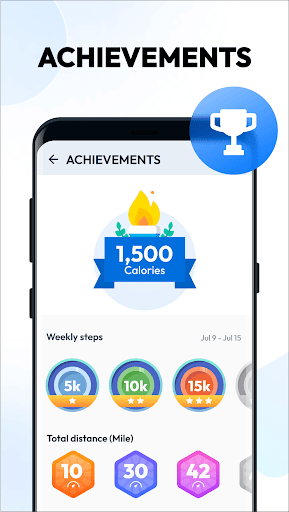
You can set daily step goals. Consecutively achieve your goal for 2 days or more will start a streak. You can easily check your streak statistics chart to stay motivated.
No Locked Features
All features are 100% FREE. You can use all features without having to pay for them.
Save Power
This step counter uses the built-in sensor to count your steps. No GPS tracking, so it barely consumes battery power.
Easy-to-use Pedometer
Just tap the start button, and it starts counting your steps. Whether your phone is in your hand, bag, pocket or armband, it can auto-record your steps even your screen is locked.
100% Private
No sign-in required. We never collect your personal data or share your information with third parties.
Start a Streak to Stay Motivated
The streak starts when you consecutively achieve your goal for 2 days or more. Keep active to let the streak continues.
Start, Pause and Reset
You can pause and start step counting at any time to save power. The app will stop background-refreshing statistics once you pause it. And you can reset today’s step count and count step from 0 if you want to.
Training Mode
You can start a separate walking training anytime you want, such as a 30-minute walking exercise after dinner. In the training mode, we provide a function to separately record your active time, distance and burned calories of your walking training.
Fashion Design
This step tracker is designed by our Google Play Best of 2017 winning team. The clean design makes it easy to use.
Report Graphs
The report graphs are the most innovative ever, they are specially designed for mobile devices to help you track your walking data. You can check your weekly and monthly statistics in graphs.
Colorful Themes
Multi colorful themes are under development. You can choose your favorite one to enjoy your step counting experience with this step tracker.
IMPORTANT NOTE
● To ensure the accuracy of step counting, please input your correct information in settings, because it will be used to calculate your walking distance and calories.
● You are welcome to adjust sensitivity to make pedometer count steps more accurately.
● Because of the device power saving processing, some devices stop counting steps when the screen is locked.
● Step counting is not available for devices with older versions when their screen is locked. It's not a bug. We are sorry to say that we are not able to solve this problem.
Best Pedometer
Looking for an accurate step counter & steps tracker? Does your pedometer use too much power? Our step counter & steps tracker is the most accurate one you can find and is also a battery saving pedometer. Get our step counter & steps tracker now!
Weight Loss Apps
Looking for lose weight app? No satisfied weight loss apps? Don't worry, here is the best lose weight app you can find to help you lose weight. This lose weight app not only can count steps but also a good weight loss apps.
Walking App & Walking Tracker
The best walking app & walking tracker ever! It's not only a walking app & walking tracker, but also a walk planner & step tracker. Try this walk planner, get in better shape and keep fit with walk planner.
Free health apps
There are so many free health apps on Google Play. Among all these free health apps, you'll find that pedometer is the most popular one.
Health and fitness
Looking for a health and fitness app? Why not try pedometer? This pedometer is designed to improve your health and fitness.
Samsung health & Google fit
Can't your steps tracking app sync data to Samsung health & Google fit? You can try this pedometer. It makes syncing data to Samsung Health & Google fit easy.
Privacy
Given that the Pedometer - Step Counter app requests no permissions, it appears to be very respectful of user privacy, with minimal risk of data collection beyond what is necessary for its core functionality. However, users should still be cautious when clicking on ads and consider the privacy implications of any in-app purchases. To further protect their privacy, users can review the developer's privacy policy on their website.
Tips
For the best experience, users should ensure their device's location services are enabled for accurate step tracking, and consider setting daily step goals within the app to maximize motivation. Additionally, exploring the app's settings can reveal options for customizing the display and notifications, which can help optimize the app's performance and minimize battery drain.
What's New
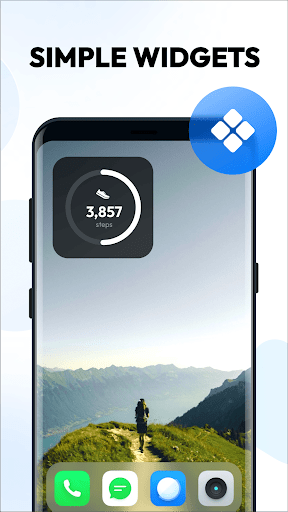
🌟 Restored widget color to transparent based on user feedback
In-app purchases
$1.49 - $39.99 per item
Version Information
- Version
- 2.4.4
- Downloads
- 50M+
- Updated on
- Dec 19, 2025
- Released
- Jan 26, 2018
- Requires
- Android 6.0
Statistics
Google Play Rating History
Rating Distribution
Downloads Over Time
Pedometer - Step Counter has been downloaded times. Over the past 30 days, it averaged downloads per day.
Shaded area shows 30-day prediction based on historical trends
Historical data collection started recently. More data points will be available over time.
Pedometer - Step Counter - Google Play Rankings
Top Rankings
| Rank | Country | Category | List | Change |
|---|---|---|---|---|
| — |
Ranking History in
No ranking data available yet. Rankings are updated daily.
#21 in Top Free Health And Fitness in Italy


#27 in Top Free Health And Fitness in Russia

#33 in Top Free Health And Fitness in India


#43 in Top Free Health And Fitness in Japan

Pedometer - Step Counter users say on Google Play
 Hassan K
Good application to maintain our health. this application counts every step exactly. In the free version, we have to enjoy some advertisements, it is ok.
 munesh Kumar
nice app on fit exercise
 Shaik Anwar Quadir
perfect app💓
 Tm Lawson
ad almost phished me, taking me to a different website off app to put in credit card info. seems unsafe.
 David Smith
App functionality is fine, but the way the 'close' menu is intentionally hidden behind ads is malicious, deceptive and hostile design. Having to minimise and reopen and then click the close button within about a second before it disappears behind the ad? Shameful.
ApkTrusted Ratings & Reviews
More from Simple Design Ltd.
See more apps
Auto Clicker: Auto Tapper
Free
Bubble Level - Level Tool
Free

Period Calendar Period Tracker
Free
Calculator Pro: Calculator App
Free

Diary with Lock: Diary Journal
Free
Push Ups Workout
Free

Butt Workout & Leg Workout
Free
Data Transfer - Copy My Data
Free
7 Minute Workout
Free

Document Reader - PDF Editor
Free

Spider Solitaire Classic
Free
Face Yoga Exercises, Skin Care
Free

Period Calendar Pro
Paid

Abs Workout - 30-Day Six Pack
Free

FreeCell - Solitaire Card Game
Free
7 Minute Workout Pro
Paid
Similar Apps

Step Counter - Pedometer
Free

Step Tracker - Pedometer
Free

Pacer Pedometer & Step Counter
Free
StepsApp – Step Counter
Free

Pedometer - Step Counter
Free
Running App - GPS Run Tracker
Free

Running & Jogging, Run tracker
Free

Lose Weight App for Women
Free
Step counter - Pedometer App
Free
Lose Weight App for Men
Free

Samsung Health
Free
Height Increase Workout
Free

Home Workout - No Equipment
Free

Yoga for Beginners Weight Loss
Free
Running Tracker App – FITAPP
Free

Weight Loss Walking: WalkFit
Free
Scan this QR code to download

Forwarding you to the page at Google Play market in seconds...
Open Google Play market now