
Proton Authenticator v1.3.1
Proton AG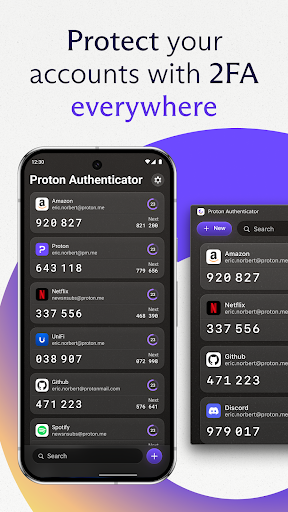






About this app
Proton Authenticator solves the problem of secure authentication for users who require an additional layer of security for their online accounts, particularly those already invested in the Proton ecosystem, such as ProtonMail users. It benefits most those who value end-to-end encryption and open-source transparency, setting it apart from other productivity apps focused on authentication. Compared to alternatives, Proton Authenticator's emphasis on security and privacy makes it a standout, though its feature set may be more limited for users seeking a broader range of productivity tools. Its lack of permissions requests is a significant advantage in terms of privacy.
Pros
- With over 100,000 downloads and a 4.8/5 rating, Proton Authenticator demonstrates strong social proof and user satisfaction, indicating a well-designed and effective app.
- The app's open-source nature and end-to-end encryption provide a high level of security and transparency, which is a significant advantage for users concerned about privacy.
- The absence of ads and in-app purchases ensures a clean and uninterrupted user experience, aligning with the app's focus on security and simplicity.
- Proton Authenticator's compatibility with Android 8.1 and later ensures that a wide range of devices can use the app, making it accessible to a broad audience.
- The developer's reputation, as seen with ProtonMail, suggests a commitment to user privacy and security, further enhancing the app's credibility.
Cons
- One concern is the potential lack of features compared to more comprehensive productivity or authentication apps, which might limit its appeal for users seeking an all-in-one solution.
- Although the app is highly rated, the relatively low number of total ratings might not fully represent the user base, potentially hiding issues not yet widely reported.
- The app's focus on security might lead to a steeper learning curve for less technically inclined users, potentially deterring some from fully utilizing its features.
- There's a dependency on the Proton ecosystem for full functionality, which might not be ideal for users already invested in other email or authentication services.
Best for: The ideal user for Proton Authenticator is a tech-savvy individual or organization seeking enhanced security for their online accounts, particularly those already using Proton services, who value end-to-end encryption, open-source transparency, and a clutter-free, ad-free experience, and are willing to potentially navigate a more specialized tool to achieve high levels of privacy and security.
Developer Description
Secure, end-to-end encrypted, open source, and available on every device
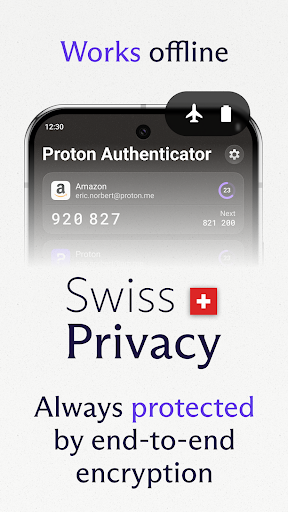
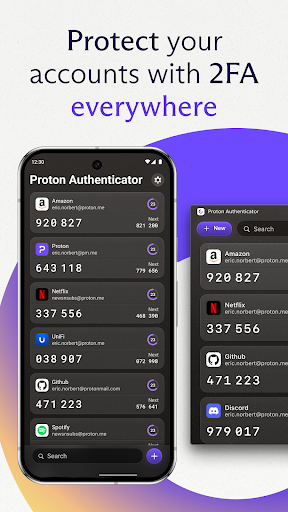
Proton Authenticator is open-source, end-to-end encrypted, and backed by Swiss privacy laws. It’s the safest way to generate and store your one-time passwords (TOTP) for 2FA Login.
Why Proton Authenticator?
- Free to use: No Proton account required, ad-free.
- Offline support, on mobile and desktop apps
- Sync your 2FA codes to all your devices with end-to-end encryption.
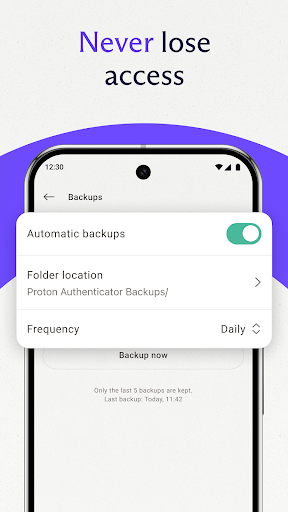
- Enable automatic backups for peace of mind
- Easily import from other 2FA apps, or export from Proton Authenticator.
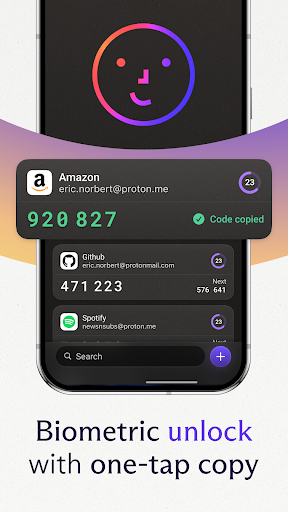
- Protect your account with biometrics or a PIN code.
- Open-source transparency, verifiable code.
- Protected by Switzerland’s privacy laws.
Trusted by millions. Built by Proton.
Take control of your digital security today.
Privacy
Given that Proton Authenticator requests no permissions, it poses minimal risk to user data privacy. However, users should still be cautious with the information they store within the app, ensuring that their device itself remains secure. Regularly updating the app and being mindful of phishing attempts targeting authentication details are also crucial for maintaining security.
Tips
For first-time setup, users should ensure they have a secure method of backing up their authentication data. To get the most out of Proton Authenticator, integrating it with other Proton services, such as ProtonMail, can enhance overall security and convenience. Additionally, regularly reviewing and updating the app's settings can help maintain optimal performance and security.
What's New
- Support FIDO2.
- New sorting options
- Support enabling/disabling anonymous data sharing in settings screen
Fixes
- Fix RTL support.
- More bug fixes.
Other
- Importer and Uri parsing improvements.
- Translation updates.
Version Information
- Version
- 1.3.1
- Downloads
- 100K+
- Updated on
- Nov 4, 2025
- Released
- Jul 28, 2025
- Requires
- Android 8.1
Statistics
Google Play Rating History
Rating Distribution
Downloads Over Time
Proton Authenticator has been downloaded times. Over the past 30 days, it averaged downloads per day.
Shaded area shows 30-day prediction based on historical trends
Historical data collection started recently. More data points will be available over time.
Proton Authenticator users say on Google Play
 SHAKTI PRASAD SAHOO
I loved it and switched from Ente Auth, but there’s still a lot that could be improved. It would be helpful to have an option to disable the swipe gesture for editing or deleting code, as it often registers accidental touches. Adding a passcode unlock on Android would also enhance security, since face unlock and fingerprint aren’t entirely reliable. Additionally, the app doesn’t perform well above 60 Hz, which makes it feel laggy on a 90 Hz display. Some aesthetic refinements are also needed.
 Sumona Akter
I like this app. It's quite simple and also has cloud sync. Nice. But I found two annoyances: Can't copy next codes, and the editing mode is not obvious. I thought editing was not possible until I found it completely by accident. The app should give the user at least some clue that editing is possible by swiping left to right. Other than that, it does the job quite well.
 Rami Kattan
Interesting app, I trust it more than others, but it still need a bit of UI enhancement such as allowing changing icons and allow setting categories for items, I have 50+ codes between personal, work, software, games, etc... Having categories will help organising the list. Will increase my vote when it is as expected.
 demmorder
Now rebuild your password manager app with the same locally first approach without demanding login.Maybe then I will move to it.
 X4Z
X4Z
The app is good, but there is one bug that makes it unusable for me. When I turn on sync across devices and reload the app, it just keeps crashing every single time. Keep in mind, I opened a ticket and sent the developers a full description of the issue two months ago, but they just ignored me. I'm going back to using what I used to use.
ApkTrusted Ratings & Reviews
More from Proton AG
See more apps





Similar Apps

Aegis Authenticator - 2FA App
Free

Bitwarden Password Manager
Free
2FA Authenticator (2FAS)
Free
1Password: Password Manager
Free

Keeper Password Manager
Free

Twilio Authy Authenticator
Free

Bitdefender Central
Free

Bitdefender Antivirus
Free

Nextcloud
Free

AppDash: App Manager & Backup
Free

FairEmail, privacy aware email
Free

Avira Security Antivirus & VPN
Free
K-9 Mail
Free

Termius - Modern SSH Client
Free

Okta Verify
Free

IFTTT - Automate work and home
Free
Scan this QR code to download

Forwarding you to the page at Google Play market in seconds...
Open Google Play market now