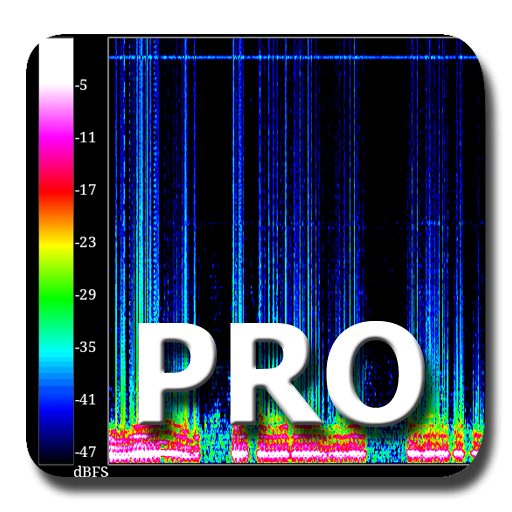
SpectralPro Analyzer vVARY
RadonSoft


About this app
Developer Description
Real-time Pro-audio analyser. Display microphone audio as coloured spectrogram.
Accurate real-time measurement feature allows detection and analysis of live audio. Spectrograms can be saved as png or jpg files to sd-card.
Bugs and feedback to: info@radonsoft.net
What's New
Version Information
- Version
- -
- Downloads
- 10K+
- Updated on
- Aug 6, 2025
- Released
- Jan 2, 2026
- Requires
- Android Varies with device
Statistics
Google Play Rating History
Rating Distribution
Downloads Over Time
SpectralPro Analyzer has been downloaded times. Over the past 30 days, it averaged downloads per day.
Shaded area shows 30-day prediction based on historical trends
Historical data collection started recently. More data points will be available over time.
SpectralPro Analyzer - Google Play Rankings
Top Rankings
| Rank | Country | Category | List | Change |
|---|---|---|---|---|
| — |
Ranking History in
No ranking data available yet. Rankings are updated daily.
#13 in Top Paid Music And Audio in France

#73 in Top Paid Music And Audio in Vietnam

#74 in Top Paid Music And Audio in Poland
#77 in Top Paid Music And Audio in Netherlands

SpectralPro Analyzer users say on Google Play
 A Google user
This app really needs time labels along the X axis. Other than that, I am quite impressed. My background in acoustical analysis would make this of interest to me, but I think even those without such a background would have to find this very cool. I have a memory, from more than a quarter century ago, of being shown a waterfall plot, and hearing the sound that was represented, and having a light go on in my head about the relationship between what I was seeing and what I was hearing. Back then, it took the better part of an hour for a pen plotter to draw the waterfall plot that I was shown. I can imagine people today, watching this app on their phones in realtime, and having the same epiphany that I had back then. About twenty years ago, I wrote a program like this to run on an MS-DOS-based computer, in realtime. Back then, it took a specialized digital signal processor to handle doing the FFTs fast enough to make this possible. Isn't it amazing how far the technology has advanced, since then, that this can now be done in a small, common, handheld device.
 Beverly Howard
I downloaded and installed the free version to help determine how microphones were performing as a project that came out of difficulty communicating with others who had hearing disabilities. The free version is limited to no options other than the default, but stated that the pro version had the ability to adjust the amplitude range, so, I paid for and installed this pro version only to find that if there is an amplitude adjustment, it makes no difference in the display. It appears that the amplitude adjustment is set by sliding the left column (there is no apparent help file) but doing so made no apparent difference on the display when testing. In addition, the website listed here and in the payment receipt is dead. It's a potentially valuable tool, but there is no way to tell.
A Google user
I would give it 5 stars and pay twice as much if it had a crosshair to see exactly which frequency is peaking. Like spectrogram pro for ios has.
A Google user
I thought the free app was good. I kicked myself for forking out for the full version. Random signals and differences between devices asked for help was told to calibrate? Sent images of faulty traces but no reply since then. In short for me poor support, over priced app with very little extra for paying full price. Use the free one and stay happy.
A Google user
The logarithmic scale feature which I paid good money for is not accurate. Middle C which appears a perfect 262 hz in the linear version appears to be 200hz or so. Also you cannot rescale to limit the plot to a particular octave. I want this app to be able to tell me which notes are being played in a piano chord, but I cannot trust the scaling - please fix this before I up my rating. It would also be a great help if you could rescale in musical notes, so that you can clearly see which notes are being played
ApkTrusted Ratings & Reviews
More from RadonSoft
See more apps
RTA Pro Analyzer
Paid
RTA Audio Analyzer
Free
Spectral Audio Analyzer
Free
LiveSpecPro Live Wallpaper
Free

MyIP
Free

Noise and Sweep Generator
Free

Boxed Balls Live Wallpaper
Free

Live Spec Live Wallpaper
Free

Signal Generator
Free
SoundCheck
Free

Boxed Balls Pro Live Wallpaper
Paid
Voice Processor
Free
Change My Voice
Free
Voice Processor Pro
Free
Similar Apps





Scan this QR code to download

Forwarding you to the page at Google Play market in seconds...
Open Google Play market now