
mconnect Player – Cast AV v3.2.86
Conversdigital Co., Ltd.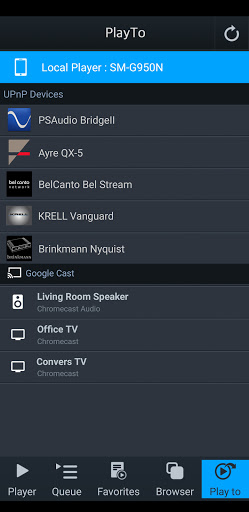
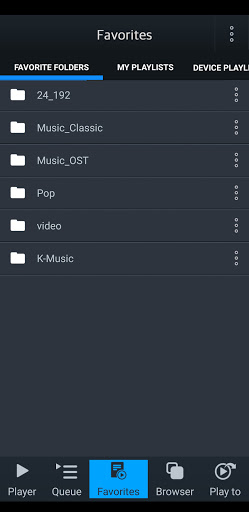
About this app
The mconnect Player is a specialized media player designed for Google Cast and DLNA/UPnP, solving the problem of seamless media streaming across devices for users with compatible hardware. This app benefits most those who have invested in a Chromecast or DLNA/UPnP-enabled devices and are looking for a straightforward way to cast their media. Compared to alternatives in the Music And Audio category, mconnect Player stands out with its focus on casting capabilities, but its lack of a free version might deter some potential users. Its simplicity and dedicated functionality make it a strong choice for those needing a reliable casting solution.
Pros
- The app's dedicated focus on Google Cast and DLNA/UPnP makes it a reliable choice for users with these devices, offering a streamlined experience for media streaming.
- The developer, Conversdigital Co., Ltd., offers a professional website and contact email, suggesting a level of commitment to customer support and updates.
- With a user rating of 3.7 out of 5 and over 10,000 downloads, mconnect Player has a decent level of social proof, indicating that many users find it useful for their media streaming needs.
- The absence of ads and in-app purchases means that users can enjoy their media without interruptions or additional costs, enhancing the overall user experience.
- The app's requirement for Android 5.0 and above ensures that it can leverage newer Android features for better performance and security.
Cons
- The paid model of $5.99 might be a barrier for some users, especially considering that there's no free version to try before committing to a purchase.
- Despite its specialized functionality, the app's total lack of permissions might raise questions about its ability to fully integrate with certain devices or services, potentially limiting its utility for some users.
- Some users might find the app's feature set too narrow, especially if they are looking for a more comprehensive media player that can handle a wider range of tasks and formats.
- The relatively low number of downloads compared to more general media player apps could indicate a smaller community of users, potentially affecting the app's long-term support and update frequency.
Best for: The ideal user for mconnect Player is someone who is technically savvy enough to set up and use Google Cast or DLNA/UPnP devices, is looking for a simple and reliable media streaming solution, and values the convenience of a dedicated app for this purpose, likely falling within the age range of 25 to 50 who are familiar with smart home technology and media streaming.
Developer Description
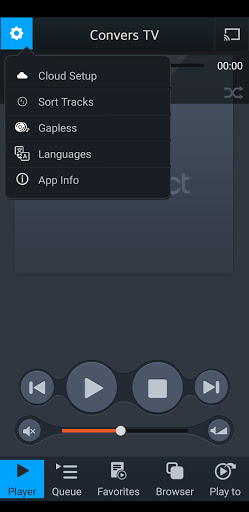
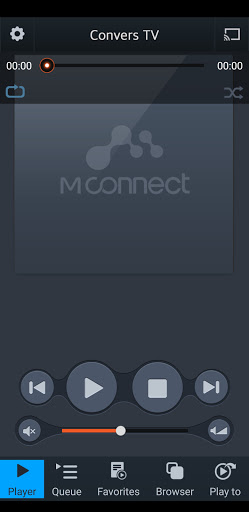
mconnect Player is a Media Player for Google Cast(Chromecast) & DLNA/UPnP.
- Send Video/Photo/Music to UPnP and Google Cast (Chromecast) devices.
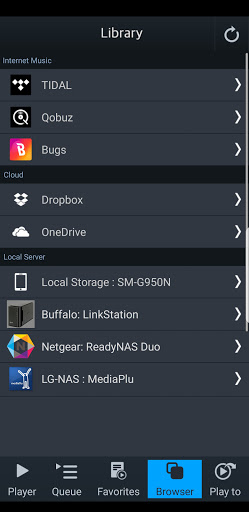
- Play TIDAL, Qobuz and Bugs music & video to UPnP and Google Cast devices.
- Send MQA tracks (in TIDAL Master and local server) to UPnP compatible audio.
You can play media files from any Servers to any Playback Devices with mconnect Player.
[Media Servers]
- Your Phone and Tablet.
- UPnP compatible servers: PC and NAS.
- Internet Music integrated into App: TIDAL, Qobuz and Bugs.
- Cloud Server integrated into App: OneDrive and Dropbox.
[Playback Devices]
- Your Phone and Tablet.
- UPnP compatible renderers: Smart TV, UPnP supported Audio, UPnP receivers.
- Google Cast: Chromecast, Google Cast compatible Audio.
Note: If you send a media file to a remote playback device, the playable media format depends on the media decoder in the remote playback device.
Google Cast and Chromecast are registered trademarks of Google Inc.
DLNA is a trademark of Digital Living Network Alliance.
UPnP is a certification mark of the UPnP Forum in the United States and other countries.
TIDAL is a trademark of ASPIRO AB.
Qobuz is a trademark of XANDRIE SA.
Bugs is a trademark of NHN Bugs Corp.
Privacy
Given that mconnect Player requests no permissions, it appears to be very privacy-friendly, as it does not collect any user data beyond what is necessary for its functionality. However, users should still be cautious when streaming media, especially if using public networks, and ensure their devices and network connections are secure. Regularly checking the developer's website for updates and security advisories is also a good practice.
Tips
For the best experience with mconnect Player, ensure that your Chromecast or DLNA/UPnP devices are properly set up and connected to the same network as your Android device. It's also a good idea to explore the app's settings to customize the streaming quality and other preferences according to your needs and network conditions. Additionally, checking for updates regularly can help you benefit from any new features or performance improvements.
What's New
Version Information
- Version
- 3.2.86
- Downloads
- 10K+
- Updated on
- Nov 4, 2025
- Released
- Feb 21, 2014
- Requires
- Android 5.0
Statistics
Google Play Rating History
Rating Distribution
Downloads Over Time
mconnect Player – Cast AV has been downloaded times. Over the past 30 days, it averaged downloads per day.
Shaded area shows 30-day prediction based on historical trends
Historical data collection started recently. More data points will be available over time.
mconnect Player – Cast AV - Google Play Rankings
Top Rankings
| Rank | Country | Category | List | Change |
|---|---|---|---|---|
| — |
Ranking History in
No ranking data available yet. Rankings are updated daily.
#12 in Top Paid Music And Audio in France

#18 in Top Paid Music And Audio in Italy

#28 in Top Paid Music And Audio in Japan
#39 in Top Paid Music And Audio in Germany
mconnect Player – Cast AV users say on Google Play
 Curtis Ballard
I have been using the Lite version and just switched to the full version. I think this is great. It turned my Oppo UDP-205 into a Tidal streaming, MQA decoding and fantastic sounding component. I ami listening to all kinds of new music in super high fidelity sound. All it took was this little 6 dollar app. Wow. Magnificent. Cool. ☺
 ed mhtrhu
the app is good; i was having issues with bubbleupnp and hqplayer so i tried mconnect and so far it's working ok; however, some details like the back button implementation make the user experience somewhat poor; the back button should not take you out of the app but to the previous screen; that's the standard android behaviour; could you fix this?
 Thomás Inskip
Decent capabilities with an amateurish and inconsistent interface. * Will play Qobuz, Tidal content on UPnP renderers. The only reason to buy it IMO. * Navigation is extremely confusing. Back swipe will exit the app rather than take you back. Similarly, using the 'return' button will exit a mode (e.g Qobuz). * DLNA mode requires you to step into albums to play. No album or artist play, shuffle. * Adding tracks to queue enters a mode where you must select tracks individually. * Etc...
 Thomas Brandenborg
Doesn't work right with any of the UPnP renderers I tested: UAPP (LG V30), Volumio, moOde (RPi 4B). It plays 1-2 tracks, then stops, times out. After countless hours I gave up on it. I emailed the Dev but never heard back. It DOES play Tidal, including Masters, which was my main reason to buy it. But the constant timeouts are just too frustrating. Update: Testing BubbleUPnP instead, it does NOT have this problem of stops and timeouts because it uses the OpenHome protocol, sending the complete playlist to the renderer (RPi). You can turn off the phone and the renderer keeps playing the whole list. However BubbleUPnP only has partial support for tidal Masters. If mconnect were to support OpenHome it would be the best of both worlds. Plus I already paid for mconnect, so there is that too... Otherwise BubbleUPnP is a no-brainer alternative if your renderer supports OpenHome.
 Moemoe musicman
if apps dont work as they should then they should refund your money. as you can see the developers dont care because they wont even respond to a review. wont even play one song without stopping...
ApkTrusted Ratings & Reviews
More from Conversdigital Co., Ltd.
See more apps
Similar Apps



Scan this QR code to download

Forwarding you to the page at Google Play market in seconds...
Open Google Play market now