
Pedometer App - Step Counter v1.2.6
AceTools Team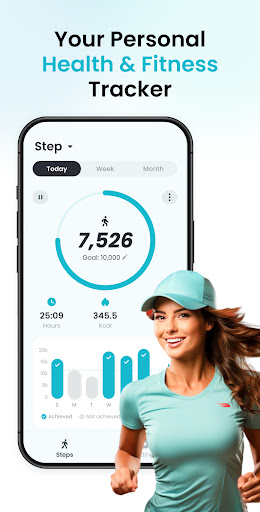


About this app
The Pedometer App - Step Counter effectively solves the problem of tracking daily physical activity by providing an accurate step counter and calorie tracker, benefiting individuals who prioritize fitness and health, particularly those with a sedentary lifestyle. Compared to alternatives in the Health And Fitness category, this app stands out with its simplicity and high user rating of 4.8/5, indicating a well-designed and reliable tool. However, it falls short in terms of advanced features, which might limit its appeal for serious athletes or those seeking more comprehensive health tracking. Its straightforward approach makes it accessible to a broad audience.
Pros
- With over 5 million downloads and a high user rating of 4.8/5, this app demonstrates strong social proof and a reputation for reliability, suggesting that it effectively meets the needs of its users.
- The app's minimal permission requirement of 0 permissions is a significant advantage, indicating a strong commitment to user privacy and security, which is crucial for health and fitness tracking apps.
- The developer, AceTools Team, offers in-app purchases and ads as a monetization model, which, although not ideal for all users, does provide a free version with functional limitations, making the app accessible to a wide range of users.
- The app's simplicity and focus on core functionality make it easy to use for individuals of all technical skill levels, providing a straightforward step counting and calorie tracking experience without overwhelming the user with unnecessary features.
- Regular updates, as indicated by the version history, suggest that the developer is actively maintaining and improving the app, which is essential for ensuring compatibility with the latest Android versions and addressing user feedback.
Cons
- The presence of ads in the free version might be distracting or annoying for some users, potentially disrupting the user experience and motivating them to opt for in-app purchases to remove ads.
- The limited feature set, while making the app easy to use, might not be sufficient for users seeking more advanced health and fitness tracking capabilities, such as detailed nutritional advice or personalized workout plans.
- The in-app purchases, ranging from $4.49 to $29.99 per item, could be seen as expensive by some users, especially if they are not sure about the value added by these premium features.
- There is a potential concern regarding the collection of user data for advertising purposes, given the presence of ads, which might raise privacy concerns for some users, although the app's minimal permission requirements mitigate this risk to some extent.
Best for: The ideal user for the Pedometer App - Step Counter is an individual of any age who seeks a simple, easy-to-use tool for tracking daily steps and calories burned, likely someone with a basic to intermediate level of technical skill, looking to monitor and improve their physical activity without needing advanced features or detailed analytics.
Developer Description
Daily step counter to track steps & calories. Accurate pedometer & step tracker.
This personal step counter features clear daily, weekly, and monthly charts so you can see your activity data at a glance. It works on all Android devices, using sensors instead of GPS for accurate step counting, which makes it more private and supports offline use.
✨ Why choose Pedometer App - Step Counter?
✦ Free & easy to use
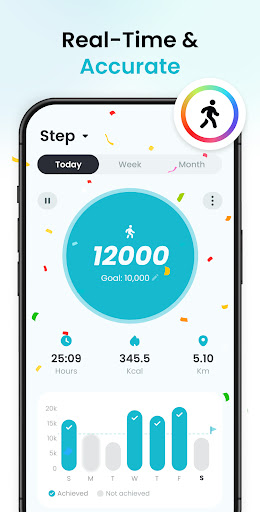
✦ Accurate step counting
✦ 100% private
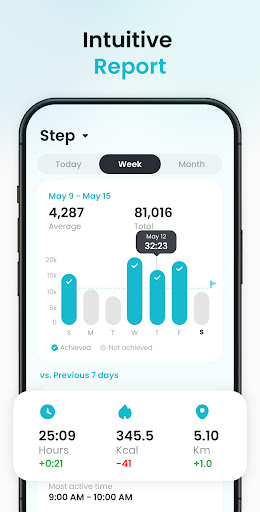
✦ Detailed activity data charts
✦ One-click share walking reports
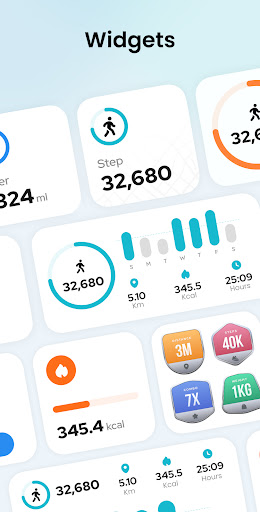
✦ Handy screen widgets
✦ Available offline
✦ No GPS tracking
✦ Work on all Android devices
✦ Colorful themes
❤️ Easy-to-use Step Counter
No wearable device required, just put your phone in your pocket, bag, or hold it in hand to auto start counting steps. It uses sensors instead of GPS to track steps, saving a lot of battery.
🚶 Accurate Step Tracker
Adjust sensor sensitivity to ensure more accurate step counting. Even if the screen is locked or there is no network connection, all steps will be automatically counted to live up to your every step.
📝 Manually Edit Steps
You can manually edit the number of steps by time period to reflect your actual exercise situation. No more worries about losing your step records!
📊 Activity Data Analysis
Get insights into your activity levels with detailed graphs showing steps, walking time, distance, and calories burned. You can view data by day, week or month, and understand your most active times and exercise trends.
📱 Handy Screen Widgets
Easily add widgets to your home screen to track your daily steps without entering the app. You can also customize the size or style of widgets according to your preference.
🎨 Personalized Themes
Colorful themes are available for you to choose from: fresh lawn green, quiet lake blue, vibrant sunshine yellow... You can customize it to your liking, adding color and vitality to your walking journey.
👤 100% Private
Your privacy matters. We don't collect any of your personal data or share your data with other third parties.
Features coming soon:
🥛 Water tracker - Remind you to drink water on time;
📉 Weight tracker - Record and follow your weight changes;
🏅Achievements - Unlock badges as you reach different fitness levels;
🎾 Personalized activities - Track training data for various sports;
🗺️ Workout map - Visualize your activity routes;
☁️ Data backup - Sync your health data to Google Drive.
⚙️ Permissions required:
- Notification permission is required to send you reminders;
- Physical activity permission is required to calculate your step data;
- Storage permission is required to store step data on your device.
Step Counter - Pedometer App is not only a walk tracker, but also a leader in healthy living. This pedometer free & versatile fitness tracker accurately records your fitness efforts, providing detailed insights into your activity levels. Whether you're looking for a walk tracker, distance tracker to monitor your daily activity or a comprehensive fitness tracker to analyze your health data, Step Tracker has you covered. Just try this steps app now!
We value your feedback and suggestions! If you have any questions or ideas, please feel free to contact us at stepappfeedback@gmail.com. Let's embark on this fitness journey together!
Privacy
Given that the Pedometer App - Step Counter requires 0 permissions, it poses a minimal risk to user privacy, as it does not request access to sensitive data such as location, contacts, or device storage. However, users should still be cautious about the data collected for advertising purposes and consider reviewing the app's privacy policy for more detailed information. To further protect privacy, users can review the app's settings and adjust their advertising preferences accordingly.
Tips
For the best experience, users should ensure their device's motion tracking capabilities are enabled and calibrated correctly for accurate step counting. Additionally, integrating this app with other health and fitness apps can provide a more comprehensive view of one's health and fitness journey. Regularly checking the app's settings can also help in optimizing its performance and customizing the user experience to individual preferences.
In-app purchases
$4.49 - $29.99 per item
Version Information
- Version
- 1.2.6
- Downloads
- 5M+
- Updated on
- Dec 22, 2025
- Released
- Apr 12, 2024
- Requires
- Android 6.0
Statistics
Google Play Rating History
Rating Distribution
Downloads Over Time
Pedometer App - Step Counter has been downloaded times. Over the past 30 days, it averaged downloads per day.
Shaded area shows 30-day prediction based on historical trends
Historical data collection started recently. More data points will be available over time.
Pedometer App - Step Counter - Google Play Rankings
Top Rankings
| Rank | Country | Category | List | Change |
|---|---|---|---|---|
| — |
Ranking History in
No ranking data available yet. Rankings are updated daily.
#26 in Top Free Health And Fitness in Japan
 Step Counter - Pedometer & BMI
Pedometer App - Step Counter
Step Counter - Pedometer & BMI
Pedometer App - Step Counter
 BitWalk|Earn Bitcoin every day
#28 in Top Free Health And Fitness in Thailand


#55 in Top Free Health And Fitness in Turkey
 Cash Pace
Pedometer App - Step Counter
Cash Pace
Pedometer App - Step Counter
#55 in Top Free Health And Fitness in France
 FitCloudPro
Pedometer App - Step Counter
FitCloudPro
Pedometer App - Step Counter
Pedometer App - Step Counter users say on Google Play
 K. Zern
This app counts my steps quite accurate. I seldom use this app, just open it occasionally to check the steps walked for a particular distance. I have yet to explore other features. Looks good to me for now.
 Oscar Makori
irrelevant ads make it terrible to use
 uzaif ansari
Accha h
 Tom Aparo
Don't download this app. It will literally hold you hostage with harassing adds, even making it impossible to close the add and get to the app. I don't mind adds, but when an app is harassing with adds, I consider it a virus. Not worth it in my opinion.
 Vincent Cheah
my pedometer has stopped calculating my steps since yesterday, opened the app only to be greeted loading page more than 1 minute still not up yet. After today android update, I keep receiving error asking me to fix Google play error, when I already sync with my gmail account and Google play as well
ApkTrusted Ratings & Reviews
More from AceTools Team
See more apps



Similar Apps

Pedometer - Step Counter
Free
StepsApp – Step Counter
Free

Step Tracker - Pedometer
Free

Pedometer - Step Counter
Free

Step Counter - Pedometer
Free
Step counter - Pedometer App
Free

Pacer Pedometer & Step Counter
Free
Running Tracker App – FITAPP
Free
Running App - GPS Run Tracker
Free

Weight Loss Walking: WalkFit
Free

Running & Jogging, Run tracker
Free

Samsung Health
Free

Fitify: Fitness, Home Workout
Free
30 Day Fitness Challenge
Free

Fasting - Intermittent Fasting
Free

Sports Tracker: Run Bike Hike
Free
Scan this QR code to download

Forwarding you to the page at Google Play market in seconds...
Open Google Play market now