
Zoom for BlackBerry v6.5.10.32620
zoom.com
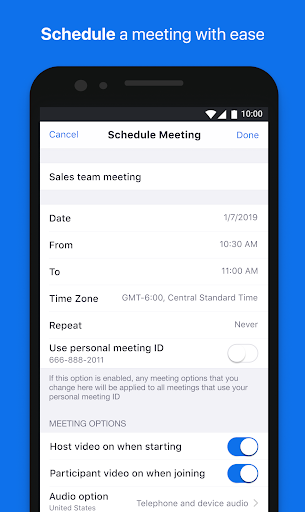




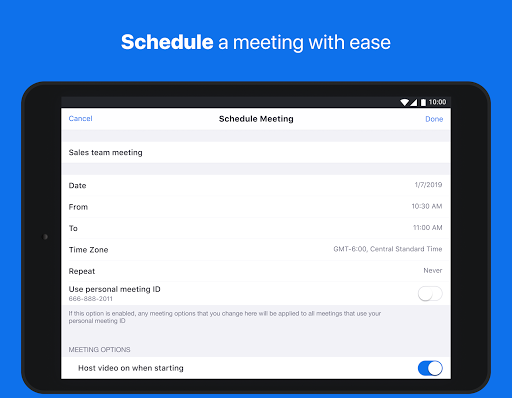
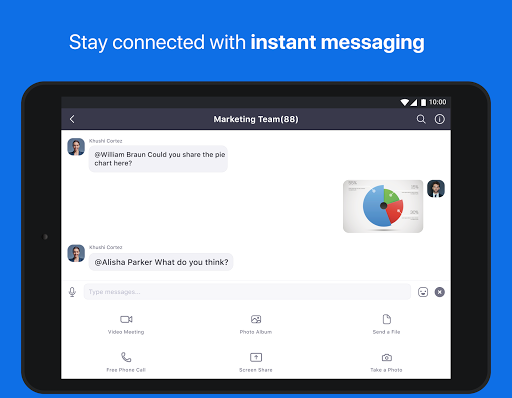
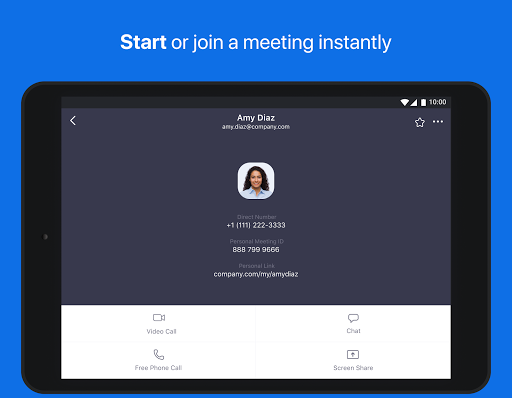

About this app
The Zoom for BlackBerry app solves the problem of secure video conferencing for businesses and individuals using BlackBerry devices, benefiting those who require a reliable and feature-rich meeting solution. Compared to alternatives in the Business category, Zoom for BlackBerry stands out with its seamless integration with BlackBerry's security features, making it an attractive option for enterprises prioritizing data protection. However, its limited availability on other platforms might be a drawback for some users. Overall, the app's strong user rating and large download base indicate a well-regarded product.
Pros
- With over 1 million downloads and a 4.0-star rating, Zoom for BlackBerry has demonstrated its reliability and user satisfaction, making it a trustworthy choice for video conferencing needs.
- The app's integration with BlackBerry's security features provides an additional layer of protection for sensitive business communications, which is a significant advantage for security-conscious users.
- The absence of ads and in-app purchases ensures a distraction-free experience, allowing users to focus on their meetings without interruptions.
- Zoom's reputation as a leading video conferencing platform translates to a feature-rich experience, including high-quality video and audio, screen sharing, and meeting recording capabilities.
- The developer's commitment to regular updates, as indicated by the version number, suggests a dedication to maintaining and improving the app's performance and security.
Cons
- The app's requirement for Android 11 might limit its compatibility with older devices, potentially excluding some users who have not updated their operating system.
- Despite its strong security features, the lack of transparency about data collection and usage might raise concerns among privacy-conscious users, especially in light of the app's access to device resources.
- The app's limited platform availability, being specifically designed for BlackBerry devices, restricts its use across different ecosystems, which could be a drawback for users with diverse device portfolios.
- Some users might find the app's interface and features less intuitive compared to other video conferencing solutions, potentially leading to a steeper learning curve.
Best for: The ideal user for the Zoom for BlackBerry app is a business professional or individual who values secure, high-quality video conferencing and is already invested in the BlackBerry ecosystem, likely requiring a reliable solution for remote meetings and collaborations that integrates well with their existing device security features.
Developer Description
It takes advantage of Zoom features in a secure BlackBerry deployment.
If you are not a BlackBerry customer, you can download the main Zoom Android application from the Google Play here: https://play.google.com/store/apps/details?id=us.zoom.videomeetings
Stay connected wherever you go – start or join a secure meeting with flawless video and audio, instant screen sharing, and cross-platform instant messaging - for free!
Zoom is #1 in customer satisfaction and the best unified communication experience on mobile.
It's super easy! Install the free Zoom app, click on "New Meeting," and invite up to 100 people to join you on video! Connect with anyone on Android based phones and tablets, other mobile devices, Windows, Mac, Zoom Rooms, H.323/SIP room systems, and telephones.
VIDEO MEETINGS FROM ANYWHERE
-Best video meeting quality
-Easily join a meeting or start an instant meeting with phone, email, or company contacts
COLLABORATE ON-THE-GO
-Best Android device content and mobile screen sharing quality
-Co-annotate over shared content
-Real-time whiteboard collaboration on Android tablets
UNLIMITED MESSAGING (WITH PHOTOS, FILES, AND MORE)
-Reach people instantly to easily send messages, files, images, links, and gifs
-Quickly respond or react to threaded conversations with emojis
-Create or join public and private chat channels
MAKE, RECEIVE, AND MANAGE PHONE CALLS
-Effortlessly make or receive calls with your business number
-Get voicemail and call recording with transcripts
-Use call delegation to make/receive calls on behalf of others
-Setup auto-receptionists to autonomously answer and route calls
AND MORE….
-Safe driving mode while on the road
-Use your Android app to start your meeting or for direct share in Zoom Rooms
-Join Zoom Webinars
-Works over WiFi, 5G, 4G/LTE, and 3G networks
ZOOM LICENSE INFORMATION:
-Any free or paid license can be used with the app
-Zoom Phone is an add-on to paid Zoom licenses
-A paid Zoom subscription is required for certain product features
Follow us on social @zoom!
Have a question? Contact us at HTTP://support.zoom.us.
Privacy
Given that the app requests no permissions, it appears to operate within a secure sandbox, minimizing potential risks to user data. However, users should still be cautious when sharing sensitive information during meetings and ensure they are using the app on a secure, trusted network. Regularly reviewing Zoom's privacy policy and terms of service can also help users understand how their data is handled.
Tips
For first-time users, setting up a meeting involves a straightforward process of creating an account and inviting participants, but exploring the app's settings to customize notification preferences and video quality can enhance the overall experience. To optimize performance, closing unnecessary apps and ensuring a stable internet connection before joining a meeting is recommended. Additionally, users can take advantage of Zoom's screen sharing feature to enhance collaboration and presentation capabilities during meetings.
What's New
-Minor bug fixes
-Security enhancements
Version Information
- Version
- 6.5.10.32620
- Downloads
- 1M+
- Updated on
- Sep 29, 2025
- Released
- Sep 21, 2018
- Requires
- Android 11
Statistics
Google Play Rating History
Rating Distribution
Downloads Over Time
Zoom for BlackBerry has been downloaded times. Over the past 30 days, it averaged downloads per day.
Shaded area shows 30-day prediction based on historical trends
Historical data collection started recently. More data points will be available over time.
Zoom for BlackBerry users say on Google Play
 Punam Punam
Address: Street, Apt, City, Country/Region, Province, Postal codes
 Michael Osborn Kwasi Osei
Very good
 Gary Jones
Great when it works. Two issues: Frequent "not responding" crashes as described by others. When connecting to Bluetooth and playing audio using another app (such as podcasts), device switches to being in a call with my own phone number. Force closing Zoom for BlackBerry fixes it every time. Seems to have begun with this latest update.
 Deepthika Rathwatte
Zoom has a very slow process.lt has to be streamlined and manipulated.Much more efficient service is desired.
 Chris Brown
Zoom is not responding. Zoom is not responding. Zoom is not responding. Edit: Seriously. I get this error even more often now than I did 7 months ago. This app is terrible and I have no idea how it has a 4.4 review average. I've used different phones and OS versions and experience the same behavior.
ApkTrusted Ratings & Reviews
More from zoom.com
See more apps




Similar Apps

Zoho Meeting - Online Meetings
Free

Webex
Free

Imou Life
Free

Slack
Free

Whova - Event & Conference App
Free

Webex Intune
Free

HR Cloud
Free

GoTo
Free

VooV Meeting
Free

LinkedIn Recruiter
Free

Moodle
Free

Duo Mobile
Free

Zoho Cliq - Team Chat
Free

V380
Free

Comera - Video Calls & Chat
Free

IPC360 Home
Free
Scan this QR code to download

Forwarding you to the page at Google Play market in seconds...
Open Google Play market now