
Save Copy v2.0.0.r42.4dd12a8
Xingchen & Rikka

About this app
Developer Description
A very simple app that makes a copy of the opened file.
One of the biggest changes of Android 11 is that all apps targeting 30 can only access its' private folder. In the future, all updated apps are subject to this restriction.
However, some apps do not give users a good experience. For example, some chat apps, save "files received from other users" to their private folder. In the future, private folders can only be accessed by the app itself, and other applications (including the file manager) and the file selector of the system cannot be accessed. This means that the user must open the app to open the file. This is very inconvenient and unreasonable. The correct approach is to save user files to a public folder (such as the "Download" folder).
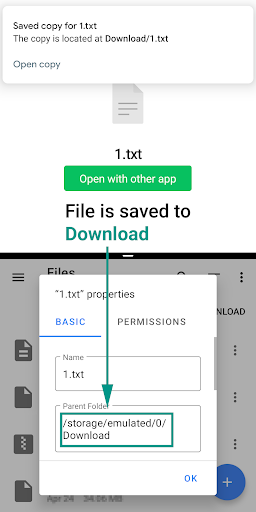
At least those apps allow the user to open files with other apps. So we have a chance. This app does a very simple job, declares that it can open all types of files and copying the opened file to a public folder. From this, users can easily find these files.
How to use:
Select this app in "open with" and the file will be copied to the "Download" folder.
On Android 10 and lower, storage permission is required.
Note:
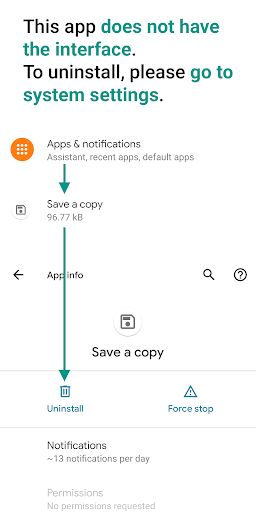
This app does not have an interface, to uninstall, you may need to go to system settings.
Source code:
https://github.com/RikkaApps/SaveCopy
What's New
Version Information
- Version
- 2.0.0.r42.4dd12a8
- Downloads
- 10K+
- Updated on
- Oct 15, 2021
- Released
- Apr 27, 2020
- Requires
- Android 6.0
Statistics
Google Play Rating History
Rating Distribution
Downloads Over Time
Save Copy has been downloaded times. Over the past 30 days, it averaged downloads per day.
Shaded area shows 30-day prediction based on historical trends
Historical data collection started recently. More data points will be available over time.
Save Copy users say on Google Play
 J C
J C
This app adds the "save a copy” action to "open with" menus. When you open a file with this app ("save a copy"), a copy of the file will be copied to the "Download" folder.
 Pankaj Lath
Thanks for this app bro.. I wanted to download a video from my Google drive to my phone storage. But the only problem is.. I manually had to go to download folder and change the file name and add (.mp4) to make that video visible in my gallery. I wish it save original file name as it is.
 blexh94
I like the idea behind this app, but there is something wrong with the copied images. They do not show a thunbnail in the file manager and trying to open with the native gallery produces an error "cannot open that file". Some apps can open the files, but some can't.
 Kadir Miha
কপিটি ডাউনলোড/ এ সংরক্ষণ করুন।
 Francis Cinelli III
Loves this app it has not worked for awhile now though. Not sure what's causing it and I have googled the issue and found nothing. I am rooted, on an older phone on android 7.0 and I know I used to use it on other phones for forever and had no problems. Now when I choose the save a copy option in the share or.open with prompt it throws up a window that save copy crashed. I've tried older versions and they aren't working either. Such a useful and unique app....I hope I can get some help on this
ApkTrusted Ratings & Reviews
More from Xingchen & Rikka
See more apps



Similar Apps

Lib of Dev
Free

Unmutify
Free

Quick Bill Admin
Free

TAP Kiln Control Mobile
Free

AppDash: App Manager & Backup
Free

Intellifi by Adtran®
Free

ASTRO File Manager & Cleaner
Free

Status: Ethereum Crypto Wallet
Free

Trezor Suite
Free

Swift Backup
Free

AI Chart Analysis
Paid

Tattoo AI Design Generator INK
Paid

CLG Color
Paid

CircuitMess Playground
Free

SentientMate
Paid

CSV File Viewer - Smart CSV
Free
Scan this QR code to download

Forwarding you to the page at Google Play market in seconds...
Open Google Play market now