
Video Converter:Compress Video v3.0.5
DictionaryAndTranslator











About this app
The Video Converter:Compress Video app effectively solves the problem of converting video files into audio formats, making it a useful tool for individuals who need to extract audio from videos for various purposes, such as creating podcasts or audiobooks. This app benefits most users who frequently work with video and audio files, such as content creators, educators, and media professionals. Compared to alternatives in the Video Players category, this app stands out with its specific focus on video conversion rather than playback, although it falls short in terms of advanced editing features. Its high user rating and significant download numbers indicate a well-received and reliable application.
Pros
- With over 5 million downloads and a 4.3-star rating, the Video Converter:Compress Video app demonstrates strong social proof and user satisfaction, indicating a reliable and efficient tool for video conversion needs.
- The app's simple and focused feature set allows for easy navigation and use, making it accessible to a wide range of users, including those who are not tech-savvy.
- The developer, DictionaryAndTranslator, provides a professional website and support email, suggesting a commitment to customer support and updates, which is crucial for an app that requires regular functionality updates.
- The app's ability to convert MP4 to MP3 and perform reverse video to audio conversions is a specific and valuable feature that addresses a common need among users who work with multimedia content.
- Given its small size and lack of required permissions, the app is lightweight and does not pose significant privacy or security risks to users, making it a safe choice for those concerned about data protection.
Cons
- The presence of ads and in-app purchases might detract from the user experience, especially for those who prefer ad-free environments or are sensitive to additional costs, potentially leading to a less seamless conversion process.
- The app's functionality, while useful, is somewhat limited to conversion tasks and lacks advanced editing features that might be desirable for professional users or those seeking more comprehensive video and audio manipulation tools.
- Although the app has a high rating, some users might find the interface or conversion options limited compared to more feature-rich video editing apps, which could lead to a learning curve or dissatisfaction for power users.
- The requirement for Android 7.0 or higher might exclude users with older devices, limiting the app's accessibility to a broader audience, including those in areas with less access to newer technology.
Best for: The ideal user for the Video Converter:Compress Video app is likely a tech-savvy individual or professional, possibly in the fields of education, content creation, or media production, who frequently needs to convert video files into audio formats for podcasts, lectures, or other multimedia projects, and values a straightforward, easy-to-use tool with a strong focus on this specific functionality.
Developer Description
Convert MP4 to MP3, Reverse Video to Audio Converter with Video Converter App.
Want to compress Video File Size without Losing Quality, Reverse Video and Convert Video to MP3?🤔 Convert & Compress videos with ease while preserving quality. Convert MP4 to MP3, Cut Video and Audio, Merge Music, Reverse Video to Audio Converter for Free with over 5M+ Video Converter App's Users Community👪.
Cut and Trim Video Files, Merge Audio and Convert Video to MP3 with the Fastest Extract Audio from Video to MP3 converter App. Extract Audio from Video with Single Tap.
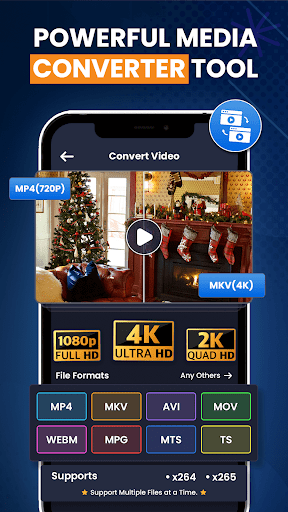
Video to MP3 Converter - MP4 to MP3 Video Converter for android will compress videos smaller automatically without losing quality and convert almost any format & extract audio from videos including MP4, MKV, AVI, MOV, 3GP, FLV, MTS, MPG, M4V. Video Converter app is a powerful Reverse Video to Audio Converter, video to MP3 Converter for android, Video Editor, Video Trimmer, MP4 converter, Video Compressor, Video size reducer & video merger etc.
Video to MP3 Converter is a utilizable app for converting any mp4 to mp3, Video Format Files into MP3 and Audio Files. You Can Trim, Cut Video Files, Merge Audio, and Convert MP4 to MP3. This Video Converter app Also can extract mp3 songs from HD and full HD videos. This is the Fastest Performing Video to Audio Converter, Video to MP3 Converter for android, Video Merger, Video Cutter, Video Compressor and converterblack app in the market that supports almost all video formats: MP4, MKV, AVI, 3GP, MOV, MTS, MPEG, MPG, WMV, M4V, VOB, FLV etc. Video Converter app Supports Converting, compressing, Frame rate(FPS), Bitrates of a Reverse video files. It can also convert Video files into Audio formats like MP3, AAC, AC3, OGG, M4A, WAV etc.
🎥Video to MP3 Converter🎶
Transform your videos into beautiful MP3 soundtracks with MP4 to MP3 Converter Today. Convert Video File into high-quality MP3 audio.
📽️Video Compressor✨
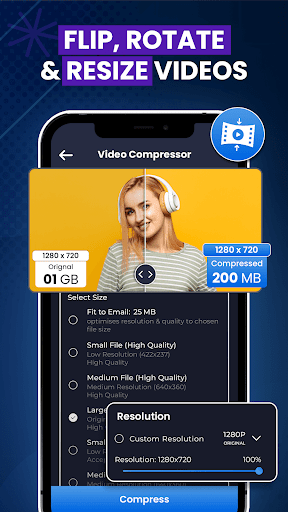
Compress Video effortlessly without losing quality with Video Compressor! Save storage space, share videos faster, and customize file sizes with ease. Perfect for all your sharing needs.
🔝ALL in One media Converter
Our App Supports Video cutter, MP3 cutter, audio editor, Ringtone Maker and MP4 to MP3.
✂️Video Trimmer & Video Cutter
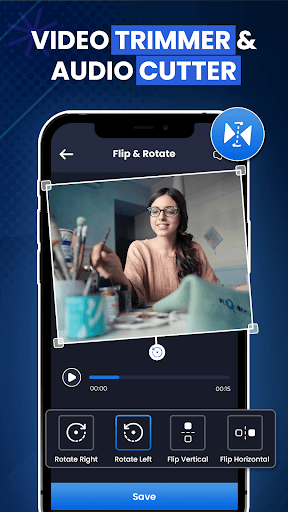
Say goodbye to lengthy introductions or Boring Endings. Cut and trim video to the length you need with Easy-to-use Video Cutter App & MP4 to MP3 file Converter.
Accelerate Your Videos⏩
Adjust the Playback speed of your videos from 1x to 10x with allowing you to create captivating visual experiences with Video Converter App for Free.
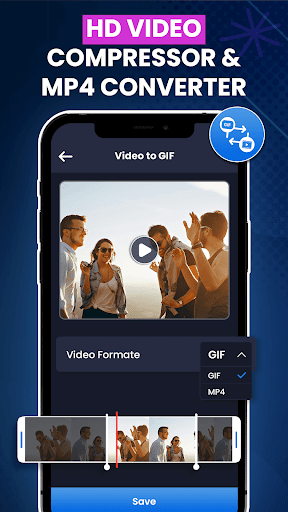
🎞️Video to GIF and GIF to Video🔄
Effortlessly Convert your Favorite Moments from Videos into shareable GIFs & Convert existing GIFs back into Video Format Seamlessly.
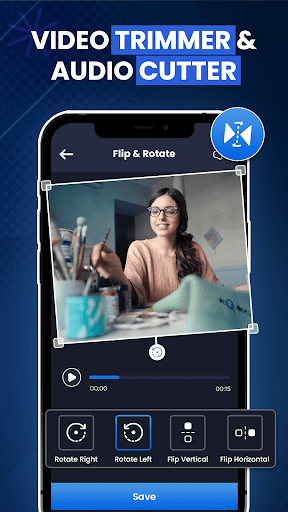
🔄Flip & Rotate Video📽️
You can easily Flip your Videos horizontally or vertically and rotate them to any desired angle.
🔇Mute Video🎬
Remove unwanted audio from your videos and create a seamless, silent visual experience with Video to Audio Converter.
Reverse Video⏪
Showcase a unique Perspective & Create Captivating Visual Effects by Playing your Videos in Reverse.
Privacy
Given that the Video Converter:Compress Video app requires no permissions, it presents a low risk in terms of data collection and privacy invasion. However, users should still be cautious when using free apps with ads, as they may collect anonymous usage data. To maximize privacy, users can consider using the app in airplane mode when not needing to access external resources, though this may limit some functionality.
Tips
To get the most out of the Video Converter:Compress Video app, users should first explore the different conversion options available to understand the full range of functionalities. Additionally, for optimal performance, it's recommended to close other resource-intensive apps while using the video converter to prevent slowdowns or crashes. Lastly, users can check the developer's website for tutorials or FAQs that might offer tips on how to use the app more efficiently or troubleshoot common issues.
What's New
100% Free,
- Small bugs fixes and performance improved.
In-app purchases
$0.99 - $99.99 per item
Version Information
- Version
- 3.0.5
- Downloads
- 5M+
- Updated on
- Oct 13, 2025
- Released
- Mar 4, 2021
- Requires
- Android 7.0
Statistics
Google Play Rating History
Rating Distribution
Downloads Over Time
Video Converter:Compress Video has been downloaded times. Over the past 30 days, it averaged downloads per day.
Shaded area shows 30-day prediction based on historical trends
Historical data collection started recently. More data points will be available over time.
Video Converter:Compress Video - Google Play Rankings
Top Rankings
| Rank | Country | Category | List | Change |
|---|---|---|---|---|
| — |
Ranking History in
No ranking data available yet. Rankings are updated daily.
#66 in Top Grossing Video Players in Egypt
 Gallery Vault-Hide Photo Video
Video Converter:Compress Video
Gallery Vault-Hide Photo Video
Video Converter:Compress Video
 Smart IPTV Pro: TV M3U Player
#74 in Top Grossing Video Players in Australia
 Instory | Story Video Maker
Video Converter:Compress Video
Instory | Story Video Maker
Video Converter:Compress Video
 Filmora AI: AI Video Generator
Video Converter:Compress Video users say on Google Play
 Mitchell Klein
does everything I need, its free. a few 10 second adds. no big deal. used this app for years.
 Aron Davidsson
highly recommend This app I CHANGED MY RINGTONE 3 TIMES AND IT SAVES AUDIOS SO IF U WANNA PUT AN AUDIO IN UR PLAYLIST BUT U FORGOT THE NAME NO WORRIES but there are so many adds though
 Seth Roos
way too many ads, can't do any step without running into an ad
 Ahmed
Ahmed
it's adds is ALOT
ApkTrusted Ratings & Reviews
More from DictionaryAndTranslator
See more apps
Cute Kitten Wallpaper
Free

Memo - Sticky Notes Writer
Free
Diary - Note, Journal, Plans
Free

Compress Video - Size Reducer
Free

Battery Health & Life Checker
Free

Manifest: Daily Affirmations
Free

English Quotes Status Maker
Free
CITIZEN CALCULATOR - Loan EMI
Free
CITIZEN CALCULATOR - Loan EMI
Free

Translator Keyboard All Chats
Free

Speak & Translate All Language
Free

Blood Pressure Tracker: BP Log
Free

English to Arabic Translation
Free
English to Tagalog Dictionary
Free

Trace Anything with AR Drawing
Free
Adding Machine With Tape Calc
Free
Similar Apps

Video to MP3 - Video to Audio
Free

Add Music To Video & AI Editor
Free

Smart Video Crop - Video Cut
Free

Smart Video Downloader
Paid

BeatSync: Photo & Music Videos
Free

Visha-Video Player All Formats
Free

Focus Video - Video Compressor
Free

MP4Fix Video Repair Tool
Free

ActionDirector - Video Editing
Free

LightCut -AI Auto Video Editor
Free

Ringtone Maker Wiz
Free

Video Player All Format
Free

KMPlayer - All Video Player
Free

Video Editor VideoShowLite
Free

Dolby On: Record Audio & Music
Free

Up Tempo: Pitch, Speed Changer
Free
Scan this QR code to download

Forwarding you to the page at Google Play market in seconds...
Open Google Play market now