CAD Drawing | 3D Tool v4.2
Sebastian Kemper






About this app
Developer Description
Drawing & Modeling in 3D, DIY CAD Tool, Building, Crafting & Developing
A CAD drawing is a 2D or 3D representation of the components of an engineering or construction project. CAD ("Computer Aided Design") uses software to create drawings for the entire process of a design project, from conceptual design through construction or assembly.
CAD drawing APP
Do you need an app with which you can design products in 3D quickly and easily? Would you like to create drawings yourself and have a component list created automatically so that you can easily order all the necessary components from a hardware store or online? Do you love developing DIY products yourself? Then CAD Drawing will help you, with CAD Drawing you can easily draw your product using drag & drop.
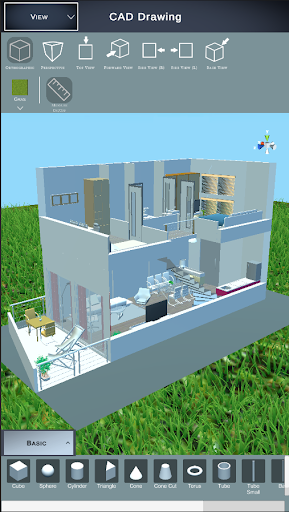
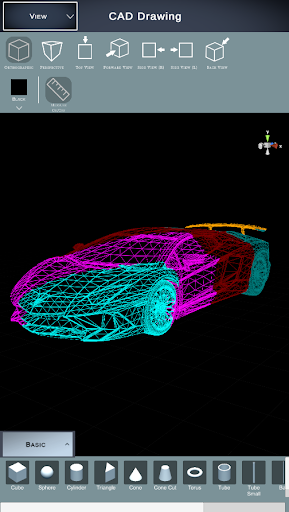
It doesn't matter whether you design your own furniture, want to construct buildings or want to try your hand at automotive or aviation. With CAD Drawing you have the right tool at hand. CAD Drawing has numerous libraries, each of which is specially designed for wooden constructions, metal constructions or in construction, i.e. architecture. But even small projects can be realized without any problems, such as drawing a tree house for the children or a new carport. Take your projects into your own hands and install CAD Drawing.
Put simply, you have an app for all your needs. Regardless of whether you are a draftsman, designer, technical draftsman, model maker, architect, carpenter or hobbyist (DIY). You benefit from the intuitive user interface and draw your product quickly and easily.
Advantages
• Use numerous 3D objects and simply drag and drop them into your drawing
• Choose between wooden, metal, stone or concrete components
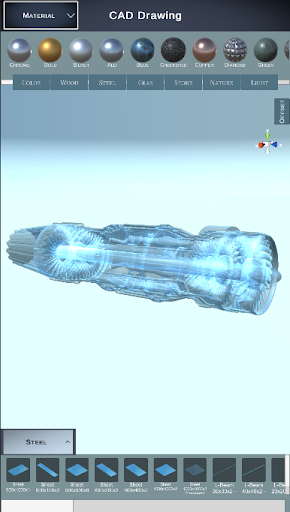
• Numerous materials are used to make your project as realistic as possible
• With the integrated CAD import you can import and use various 3D data (FBX, OBJ, GLTF2, STL, PLY, 3MF, DAE).
• With the photo function you can create high-resolution images of your project
• Export a BOM as PDF from your design
CAD Drawing is used to create digital construction models including the provision of information about the material from which the desired product is made. The aim is to make drawing processes as easy as possible for the user, such as dimensioning, assembling components or adjusting scaling. By using CAD tools, repetitive work processes can be simplified, in advanced phases of the design process it is easy to make changes, so that information loss and errors do not arise in the first place.
characteristics
• 3D design view
• 2D view including dimensions
• Create, edit and dimension 3D drawings
• Modification of materials
• Insertion of 3D objects by drag & drop
• Photo function
• Creation of parts lists
• Import of 3D CAD data
• Tools for drawing and editing geometry
• Annotation and dimensioning tools
Who works with CAD software?
CAD drafting software is used in all industries from design to finished product.
architecture
Architects design, construct and model buildings and landscapes using CAD tools. They develop their ideas from the concept phase to the finished building.
contractor
Contractors also use 3D CAD drawings to view construction plans in three dimensions and implement their projects. The drawings contain information about the floor plans, materials and dimensions.
hobbyist
CAD drawing tools are also being used more and more by private individuals in order to be able to better plan their ideas, especially in the DIY sector. Every idea starts with a draft, which eventually grows into the finished product.
engineer
The engineer and the technical draftsman use 3D tools every day to carry out their projects. 3D models also help with communication with colleagues or customers.
Install the CAD Drawing App today and test all functions!!!
Additional Information:
Website: https://cad-floor-plan.com
In-app purchases
$11.99 - $38.99 per item
Version Information
- Version
- 4.2
- Downloads
- 100K+
- Updated on
- Oct 9, 2025
- Released
- Jun 12, 2023
- Requires
- Android 7.0
Statistics
Google Play Rating History
Rating Distribution
Downloads Over Time
CAD Drawing | 3D Tool has been downloaded times. Over the past 30 days, it averaged downloads per day.
Shaded area shows 30-day prediction based on historical trends
Historical data collection started recently. More data points will be available over time.
CAD Drawing | 3D Tool users say on Google Play
 Usha Dhavarani
I'm not sure about this, I've rated this app for five stars due to in this app it shows that if I rated only it will unlock the textures . So that's why I have rated five stars.
 Tukan Smith
not yet been able to use it yet cause nothing is unlocked unless you Pay or do something like rate the app but we will see
 Xavier Rosette
man i really wanted to love this. few things there is a manual via help. joy sticks are too sensitive needs 2-b just a bit slower. major thing... can't edit beyond scale (stretch), rotate, or move. can't cut in half, hollow out, pinch middle in ect. so if u can't make from there shape then... oh well! compared to real cad this is VERY LIMITED.
 Da Mario Marais
Useless without upgrading to pro version. Don't waste your time.
ApkTrusted Ratings & Reviews
More from Sebastian Kemper
See more apps
Smart Home Design | Floor Plan
Free

3D Floor Plan | smart3Dplanner
Free

Home Designer - Architecture
Free

DIY CAD Designer
Free
Home Design | Floor Plan
Free

Floor Plan Augmented Reality
Free
HOUSE SKETCHER | 3D FLOOR PLAN
Free

CAD Drawing (CAD Program)
Free
Home Design | Floor Plan PRO
Paid

smart3Dplanner2
Free
Similar Apps

ArcSite
Free

magicplan
Free
ZWCAD Mobile - DWG Viewer
Free
Moblo - furniture 3D modeling
Free
AutoCAD - DWG Viewer & Editor
Free
DrawPlan
Free

Polycam: 3D Scanner & Editor
Free

Homestyler - Home Design Game
Free

Renovate AI : House Design
Free

HomeByMe
Free

Remodel AI - Home Renovation
Free

AI Home Design - Arch
Free

Nomad Sculpt
Free

Sketchar AR Drawing Sketchpad
Free
GeoGebra Geometry
Free

Desmos Graphing Calculator
Free
Scan this QR code to download

Forwarding you to the page at Google Play market in seconds...
Open Google Play market now