
Move to iOS v4.0.3
Apple
About this app
The Move to iOS app effectively solves the problem of transferring data from an Android device to an iPhone or iPad, benefiting those who switch from Android to iOS the most. Compared to other tools in the category, this app stands out due to its simplicity and the trust associated with the Apple brand. However, it falls short in terms of flexibility and customization options, which might limit its appeal to power users. Overall, it's a straightforward solution for a common issue, backed by a reputable developer.
Pros
- With over 100 million downloads and a good user rating of 3.7 out of 5, the Move to iOS app boasts significant social proof and a level of quality assurance.
- The app is free to use, does not contain ads, and does not offer in-app purchases, which enhances the user experience by eliminating potential distractions and additional costs.
- Given that it requires no permissions, the app presents a minimal risk in terms of data privacy and security, which is a significant advantage for users concerned about their personal data.
- The app's simplicity and the fact that it is developed by Apple ensure a certain level of performance and compatibility, especially for those deeply integrated into the Apple ecosystem.
- The absence of a complex permission set makes the app more accessible and less intimidating for less technically savvy users.
Cons
- One of the primary concerns is the app's limited functionality, as it is designed for a very specific task and might not offer the flexibility or additional features that some users require.
- Despite its simplicity, the app requires Android 6.0 or later, which might exclude older devices and could be seen as a limitation for users with older hardware.
- There's a potential for data loss or incomplete transfer if the process is not followed carefully, which could be a concern for users with large amounts of data to transfer.
- The lack of customization options and detailed control over what data is transferred might be a drawback for users who prefer more granular control over their data migration process.
Best for: The ideal user for the Move to iOS app is someone who is switching from an Android device to an iPhone or iPad, likely an individual who values ease of use and is looking for a straightforward, risk-free method to transfer their personal data, contacts, and other information from their old device to their new one, with minimal technical expertise required.
Developer Description
Transfer your data securely from Android to iPhone and iPad.
Apps
Calendars
Call logs
Contacts
Camera photos and videos
Mail accounts
Message history
Voice memos
WhatsApp content
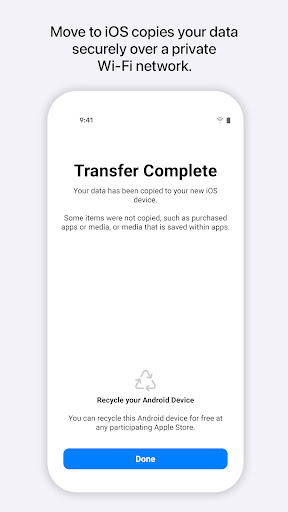
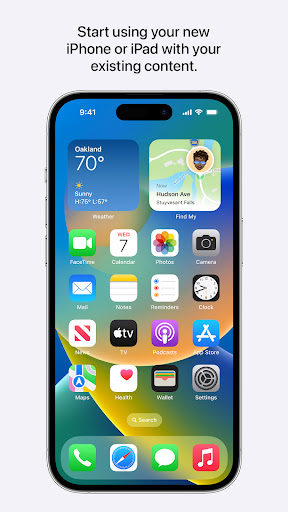
Make sure to keep your devices nearby and connected to power until the transfer is complete. When you choose to migrate your data, your new iPhone or iPad will create a private Wi-Fi network and find your nearby Android device running Move to iOS. After you enter a security code, it will begin transferring your content and put it in the right places. Just like that. Once your content has been transferred, you’re ready to get going. That’s it — you can start using your new iPhone or iPad and experiencing its endless possibilities. Enjoy.
Required App Permission
Location: To establish a Wi-Fi connection between the Android device and the iPhone or iPad, which is needed to migrate the data.
Optional App Permission
- SMS: To migrate your text messages, including multi-media messages and group chats, on iPhone or iPad.
- Photos and Videos: To migrate your photos, videos, and related metadata to iPhone or iPad.
- Notifications: To allow local Android notifications about the status of your migration to iPhone or iPad.
- Contacts: To migrate your contacts to iPhone or iPad.
- Music and Audio: To migrate your downloaded media, audio recordings, and voice memos to iPhone or iPad.
- Phone: To migrate your SIM and carrier information so you can make and manage phone calls on iPhone or iPad.
- Calendar: To migrate your calendar events to iPhone or iPad.
- Call Logs: To migrate your call history to iPhone or iPad.
You can use Move to iOS even without providing consent to any of the above optional app permissions. However, some features of the service may not be available.
Privacy
Given that the Move to iOS app requires no permissions, it poses a minimal risk to user data privacy and security. However, users should still be cautious with the data transfer process, ensuring they are transferring data to a trusted device and following the instructions carefully to avoid any potential data loss. It's also advisable to review Apple's privacy policy to understand how transferred data might be used.
Tips
To get the most out of the Move to iOS app, users should first ensure both their Android device and the target iOS device are fully charged and connected to the same Wi-Fi network. It's also beneficial to close other apps on both devices to prevent any potential interference with the transfer process. Additionally, before starting the transfer, users should review what data they wish to transfer, as this can help streamline the process and reduce transfer time.
What's New
• Connect over WiFi or Personal Hotspot
• iOS tips are now displayed during migration
• Call history and Dual SIM labels are now migrated
• Voice recordings are now migrated to the Voice Memos app or the Files app depending on the file format
• New languages supported: Bangla, Gujarati, Kannada, Malayalam, Marathi, Odia, Punjabi, Tamil, Telugu, and Urdu
Version Information
- Version
- 4.0.3
- Downloads
- 100M+
- Updated on
- May 19, 2025
- Released
- Sep 16, 2015
- Requires
- Android 6.0
Statistics
Google Play Rating History
Rating Distribution
Downloads Over Time
Move to iOS has been downloaded times. Over the past 30 days, it averaged downloads per day.
Shaded area shows 30-day prediction based on historical trends
Historical data collection started recently. More data points will be available over time.
Move to iOS - Google Play Rankings
Top Rankings
| Rank | Country | Category | List | Change |
|---|---|---|---|---|
| — |
Ranking History in
No ranking data available yet. Rankings are updated daily.
#7 in Top Free Tools in United States


#7 in Top Free Tools in Australia


#9 in Top Free Tools in Turkey

#12 in Top Free Tools in Mexico


Move to iOS users say on Google Play
 Siddharth Umardand
The app works perfectly fine! At first, I was sceptical about it by reading the reviews but it everything was fine once I started the process! It's just that it takes a bit time to transfer all the things! For this you can keep it on while sleeping at night so that by the time you wake up, everything is ready for you
 sazzad sakil
It really works good.I give 4* for some bugs like time remaining is not practical & within 2-3 min it shows 50.1% done but it actually not.I was move around 30GB including massage, WhatsApp and others apps but not photos & videos from Android to iPhone within 1.5 Hours.Here actual progress show in line.
 Jose Luis Grijalva
not to file transfer
 mohammed javeed
waste app after waiting for 4-5 hrs it shows 1 min which takes 1day even thought data will not get migrated don't waste your time
 Satvik Jain
I'd give it 0 stars if I could. I tried transferring data from my OnePlus 8T to iPhone 17. I have tried 10+ times over last 5 days failing every single time. Sometimes it fails randomly, sometimes it's stuck at random points and sometimes it doesn't even find the iPhone on the wifi network!! I've tried both using cable and wifi. Even tried to move only WhatsApp, but that failed too. I am hopeless at this point.
ApkTrusted Ratings & Reviews
More from Apple
See more apps





Similar Apps

dynamicSpot - Dynamic Island
Free

Xiaomi Community
Free

PodsLink - AirPods Battery
Free
HiOS Launcher - Fast
Free

Samsung Smart Switch Mobile
Free

Action Launcher: Pixel Edition
Free

Smart Transfer: File Sharing
Free
Square Home
Free

Xiaomi Home
Free

Taskbar
Free

Quick Settings app
Free
XOS Launcher -Cool Stylish
Free

Data Transfer - MobileTrans
Free

Launcher OS™ Pro
Paid

Microsoft Launcher
Free

Nice OS Camera, Beauty Camera
Free
Scan this QR code to download

Forwarding you to the page at Google Play market in seconds...
Open Google Play market now