Autostamper custom camera vVARY
GPS Map Camera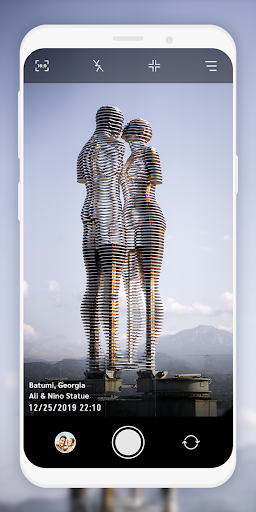


About this app
Developer Description
Add GPS Stamp, datetime stamp, logo stamp, signature stamp on Auto Stamped photo
stamper in-app custom camera specially designed for stamping Activities. You can make your photo informative as well as communicating with the help of an auto Stamping application.
5 different stamps - Date time stamp, Signature stamp, Location stamp, Logo stamp, Sequence stamp available to add on photos clicked with Auto stamper time stamp camera application.
How Autostamper custom camera: Add Geotag & Timestamp Application works?
➽ When you open Application, You will get Custom camera of Auto stamper to click photos.
➽ You can change Camera settings
➽ From Menu, you can ON/OFF Stamps that you require on your photos from Date stamper, Signature stamp, Logo Stamp, GPS location Stamp & Sequence Stamp.
➽ For each stamps, you can set and edit style, format, size, position of stamps
➽ You will get all selected stamps on your photo when you click from date and time stamper camera.
Interesting Features:
You can set or change camera Settings for:
⧪ Ratio
⧪ Grid
⧪ Flash
⧪ Rotate
You can directly turn on/off Date and Time stamp, Location stamp, Logo stamp, Signature stamp on camera screen for stamper photo by clicking on stamp setting option.
In Date and time stamp camera settings following features available:
➤ On/Off Toggle
➤ Change Date & Time Format
➤ Adjustable Stamp Size
➤ Variant Stamp Style
➤ Set Stamp position
➤ Change Stamp color
➤ Check preview by clicking on 👁️.
From signature Stamp settings, following changes are possible:
➤ On/Off Toggle
➤ Add custom signature text
➤ Adjustable Stamp Size
➤ Variant Stamp Style
➤ Set Stamp position
➤ Change Stamp color
➤ Check preview by clicking on 👁️.
For Logo stamp settings, following options are available:
➤ On/Off Toggle
➤ Upload/change logo image
➤ Set transparency level
➤ Adjustable Stamp Size
➤ Variant Stamp Style
➤ Set Stamp position
➤ Check preview by clicking on 👁️
In GPS Location Stamp settings, you can add following changes:
➤ On/Off Toggle
➤ Add custom / current Location
➤ Adjustable Stamp Size
➤ Variant Stamp Style
➤ Set Stamp position
➤ Change Stamp color
➤ Check preview by clicking on 👁️.
In Sequence Stamp settings, you can add following changes:
➤ On/Off Toggle
➤Change Sequence Format
⊿Add Sequence Number
⊿Select Sequence type as increasing / Decreasing
⊿Set suffix/ prefix number
⊿Add sequence Repeat number
⊿Select Sequence number Unit
➤ Adjustable Stamp Size
➤ Variant Stamp Style
➤ Set Stamp position
➤ Change Stamp color
➤ Check preview by clicking on 👁️.
Why do you need to have *Auto stamper custom camera : Add Geotag & Timestamp* application in your smartphone?
➽ To Add Date time stamp on Photo
➽ Auto time stamp options with stamper camera
➽ To have GPS stamp & geo tags on clicked pictures
➽ get date stamp, text stamp, image stamp, location stamp easily.
➽ date time stamper for easy photo stamping
➽ Easy picture stamp with Custom camera
➽ Auto stamper for photos - edit your photo having stamps
➽ Timestamp camera with advanced features at one place
Click pictures by using this Application, and share with your family and friends. Use this application for multiple purposes and explore the world with this handy tool easily available in your smartphone.
In-app purchases
$5.49 per item
Version Information
- Version
- -
- Downloads
- 10K+
- Updated on
- -
- Released
- Oct 12, 2020
- Requires
- Android Varies with device
Statistics
Google Play Rating History
Rating Distribution
Downloads Over Time
Autostamper custom camera has been downloaded times. Over the past 30 days, it averaged downloads per day.
Shaded area shows 30-day prediction based on historical trends
Historical data collection started recently. More data points will be available over time.
Autostamper custom camera users say on Google Play
 Reena Savaliya
Optimum performance camera with different stamp details.Very easy setup and use.It stamps the date and time as said it does.
 Amol Malunjkar
Very good
 Blue Chan
Though it works. It works by being a new camera app instead of working with our existing camera app. Not all of my phone's default specialized camera functions are available. UmiDigi Bison has a 48M main camera with several features and functions. This app is a basic camera app. No anti shake, no Boca control, no HDR function, no fillers. Just a basic camera. I normally have 6 resolutions to choose from. This app only has 3.
 Isaac Chua Ming Jie
Had tried this app after photostamper stop working in my phone. After a few times trying and found very useful. So i buy for it to capture the progress of my work. But recently, the photo capturing with this timestamp app are not save or disappeared in my phone. The important photos had gone. Very disappointing
 Anoop Mohammed
It's not responding at all in the middle. Ask to connect to the network📡. Always. I suspect it steal our data. Why's stopping if don't have internet connection???. Don't trust this app
ApkTrusted Ratings & Reviews
More from GPS Map Camera
See more apps

Similar Apps

IAM Yoga Nidra 4 Deep Rest
Paid
GPS Map Camera
Free

NoteCam Lite - GPS memo camera
Free

Timestamp Camera Pro
Paid

Earth Map App - Live Cam View
Paid

PixaGen: Ai image generator
Paid

Hamster News
Paid

MindSync - Therapy Journal
Free

PicMaster - AI Photo Editor
Paid

KiWi Vault: Hide Photos, Video
Paid

eZy Watermark Photos Pro
Paid

Horizon – Shorts/Reels blocker
Free

Smart Video Downloader
Paid

mcpro24fps manual video camera
Paid

Video Recorder
Paid

Candy Camera AI – Find myself
Free
Scan this QR code to download

Forwarding you to the page at Google Play market in seconds...
Open Google Play market now