
Video Stamper: Video Watermark vVARY
GPS Map Camera
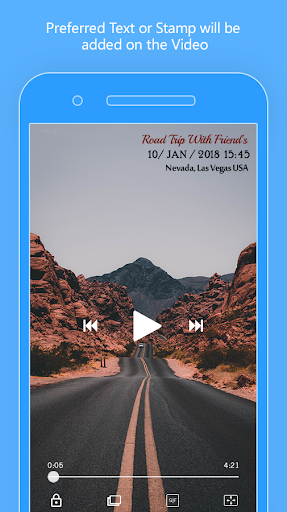


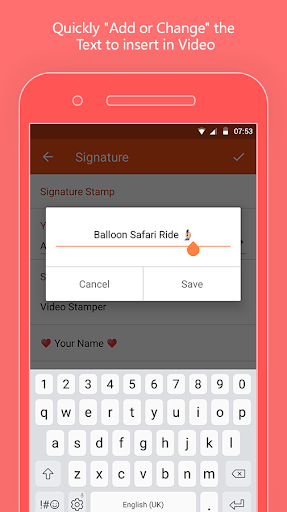
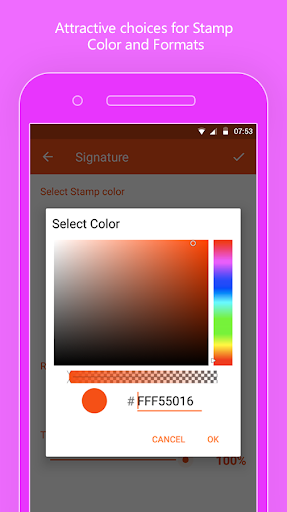


About this app
Developer Description
Add Watermark Logo on Video 📹 with DateTime Stamp, Signature Stamp & GPS Geotag
◇ Just a one-time setup is all you need to do and then you can start video stamping precisely. Simply pick a clip from the ‘Phone Gallery’ and your personalized stamp will be auto-added to it!
🎁 Why Choose Us?
✨ Only Video Timestamp app that adds ‘4 Stunning Stamps’ at a time on Gallery Videos.
✨ Designed, Developed and Managed by an enthusiastic team!
✨ An easy-peasy ‘User Interface’ which comforts you to add text on video like a child’s play.
✎ Let’s pendown the key features of this app:
• Add Watermark Logo on video
• Custom or Original option for DateTime stamp.
• Watermark size (++) or (--) is adjustable
• Changeable font formats
• Selection of Watermark color with background relevancy
• Easily ‘Put text on video’ with Signature stamp
• Watermark position is changeable
• Add Location to videos as ‘GPS Geotag Stamp’!
• Preview before finalizing the stamp!
The best part about Video Timestamp app is that it will crown all your clips in such a stunning way, that no one will resist giving them an applause.
🎁 How to Make Most of this App?
✹ Date and Time stamp
Lock all your moments with ‘DateTime Stamp’ and make them enduring! Adding an accurate time and date to your videos will make you relive all the ‘old is gold’ moments.💖
➺ Perfectly used for:
Stamping Happy Moments, Evidence Tracking, Event Tracking and more
✹ Signature Stamp
Visuals are the fastest mode to convey a message in a short span of time. Adding text over video as a signature will quickly shape up your clips and design them stunningly.
➺ Best used in:
Promotional Videos, Video Security, To Write Text to Videos, To Create a Cool Signature
✹ GPS Geotagging Stamp
Smack your wanderlust fantasies by auto stamp a ‘Location Tag’ using ‘Video Stamper App’. Simply switch ON your phone’s GPS to fetch your current location and it will be added instantly.
Moreover, you can even add custom address stamp on your videos if your Android handset’s direction locator cannot reach you.
➺ Beneficial for:
Travel Journals, People Who Love Showcasing Adventures, Business Travellers, Globetrotter
✹ Watermark Logo
It’s an excitingly new feature added in this app just like a ‘Jewel in the Crown’! If you are looking something near to Auto Stamp app, then you will surely like this application to add logo to videos stored in your phone gallery!
Adding a Brand Logo to videos will help you to get recognized by people. In a cluster of videos from all around the world, yours will turn out to be attractively unique!
➺ Pretty much in demand for:
All Youtubers, People who regularly uploads video to Instagram and Facebook, Professional Videographer, Creating Video Label
🎁 How to Use?
✌ Download and Open the App.
✌ Click ‘Date & Time’ and Select Proper ‘Date Format’.
✌ Click ‘Location’ and Customize the ‘GPS Stamp’.
✌ Click ‘Signature’ and Write Text to Videos.
✌ Click ‘Watermark’ and Upload the Logo!
✌ Choose Appropriate Font SIze/ Font Formats/ Watermark Position/ Stamp Color.
✌ Swipe ‘On/Off’ the Toggle for each Stamp as needed!
That’s it! Now select a Video from ‘Phone Gallery’ and your Personalized Stamp will be added on it! Wasn’t that ‘easy-as-pie’?
★ Ultimately, ‘Video Stamper’ accomplished all those qualities which makes it the best ‘Video Timestamp App’ available on the Play Store!
So, without having a second thought, BANG the ‘Install’ button now and embellish your ‘Video Clips’!
In-app purchases
$5.49 - $7.49 per item
Version Information
- Version
- -
- Downloads
- 50K+
- Updated on
- -
- Released
- Jan 30, 2019
- Requires
- Android Varies with device
Statistics
Google Play Rating History
Rating Distribution
Downloads Over Time
Video Stamper: Video Watermark has been downloaded times. Over the past 30 days, it averaged downloads per day.
Shaded area shows 30-day prediction based on historical trends
Historical data collection started recently. More data points will be available over time.
Video Stamper: Video Watermark users say on Google Play
 Akash Lohar
This video stamp app is really good. This app for you can easily add date time stamp, signature stamp and GPS geotag. Great app. I love this app.
 Andrew A
Excellent. Only gave 4 stars for the lack of batch processing. Gdt the ability to process in batches and will upgrade to t stars.
 hyde hakim
Its ok for something simplistic but how the heck did a 7mb video jump to 500mb with just adding 3 line time stamp??😅
 Bhagwan ki Beti
1st. I didnt find it saving d stamped vids in d gallery. 2nd. D stamped vids get saved in d app itself, den i didnt find option to delete it from der. Kindly rectify n gv us options. Othrwise its a gud app.
 Renee Xins
App prompted me to upload a video then cut to an ad and that's it. The ad stays on the screen, there's no way to close it. There's a small tab at the top of the screen that says click to go back to Video Stamper, and when I click it the whole process starts over. Totally useless.
ApkTrusted Ratings & Reviews
More from GPS Map Camera
See more apps



Similar Apps
GPS Map Camera
Free

Live Earth Map, GPS Navigation
Free

Timestamp Camera Pro
Paid

IAM Yoga Nidra 4 Deep Rest
Paid

Emaldo
Free

Eventer - Unforgettable Events
Free

Family Nest: Private Locator
Free

CompanyCam
Free

Quick Share: File Transfer
Paid

Video Recorder
Paid

Glympse - Share GPS location
Free

Aegis Proxy - Safe Web Access
Free

NoteCam Lite - GPS memo camera
Free

eZy Watermark Photos Pro
Paid

Groundwire: VoIP SIP Softphone
Paid

Kyro AI
Free
Scan this QR code to download

Forwarding you to the page at Google Play market in seconds...
Open Google Play market now