
Avast Password Manager v1.0.1
Avast Software







About this app
Avast Password Manager solves the problem of securely storing and managing sensitive information, benefiting individuals who struggle with password complexity and security. Compared to alternatives in the Tools category, Avast Password Manager stands out with its strong reputation and lack of ads or in-app purchases, making it a trustworthy choice. However, its limited feature set and lack of offline capability might make it fall short for power users. Overall, it's a solid option for those seeking a simple, secure password management solution.
Pros
- With a 4.5/5 user rating and over 10,000 downloads, Avast Password Manager has demonstrated its effectiveness and gained social proof, indicating a well-received and reliable tool.
- The app's free model without ads or in-app purchases ensures an uninterrupted user experience, aligning with Avast's reputation for prioritizing user security and convenience.
- Avast Password Manager's simplicity and ease of use make it accessible to a wide range of users, including those who are not tech-savvy, providing a straightforward solution for managing passwords and sensitive information.
- The developer's strong reputation and commitment to security, as evidenced by their website and support email, provide assurance of the app's integrity and support.
- The lack of permissions requested by the app suggests a focus on privacy and minimal data collection, which is a significant advantage for users concerned about their personal data.
Cons
- The app's limited feature set might not cater to advanced users who require more complex password management features, potentially limiting its appeal to a broader audience.
- The requirement for Android 8.0 or higher might exclude users with older devices, limiting accessibility for those who cannot upgrade their operating system.
- Despite its strong security features, the app's effectiveness relies on users' adherence to best practices, such as using strong, unique passwords and enabling two-factor authentication, which might not be explicitly guided within the app.
- There is a lack of information on how the app handles password encryption and storage, which could raise concerns for users who prioritize transparency in security protocols.
Best for: The ideal user for Avast Password Manager is an individual seeking a straightforward, secure solution for managing their passwords and sensitive information, likely someone who values simplicity and ease of use over advanced features, and is willing to trust a reputable developer like Avast to handle their security needs.
Developer Description
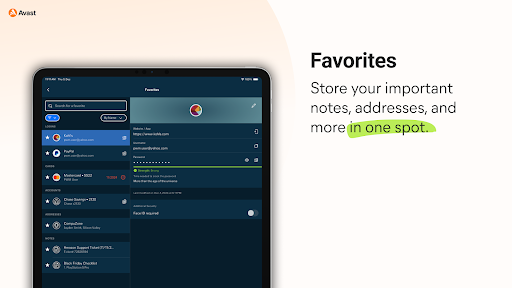
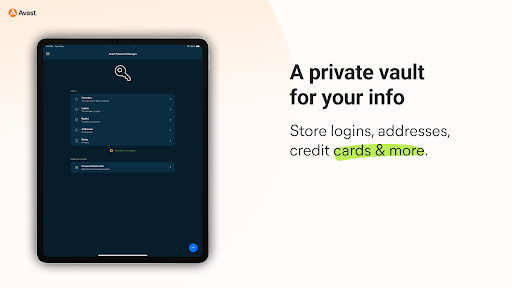
Easily secure all your passwords, credit cards and sensitive information.
SIMPLIFY YOUR LIFE
You no longer have to remember all your passwords or account emails, Avast Password Manager does it for you with our built-in auto-fill feature that pre-fills your login information with a tap.
SECURE YOUR DIGITAL LIFE
Secure your digital life from online threats with our end-to-end, zero-knowledge encryption password vault and built-in password generator that allows you to create strong and unique passwords on the go. With zero-knowledge encryption and two-factor authentication, only you can unlock and access your data, not even Avast has access to your vault. These security measures help keep your data safer from cybercriminals and hacking attempts.
WEAK PASSWORD DETECTION
Our security checks for weak passwords and easily detects and suggests unique, strong passwords, so you don’t have to spend time creating new passwords.
* Requires your device to have an internet connection. You can easily import your passwords from other browsers and other password managers to Avast Password Manager. All you need is to be on a Mac or Windows and have the extension on your browser. For more details go: https://support.avast.com/en-us/article/2730/
With the free version, we reserve the right to limit the number of entries (like passwords) at any time. This limitation won’t affect any existing entries in your vault.
PRIVACY POLICY
AVAST respects the privacy of our users and carefully safeguards personal data.
By using this add-on, you have read and agree with our General Privacy Policy (https://www.avast.com/privacy-policy) and Products Policy (https://www.avast.com/products-policy).
Privacy
Given the app requests no permissions, the risk of data collection is minimal, but users should still be cautious about the information they store within the app. It's essential to use strong, unique passwords for the app itself and enable any additional security features offered, such as two-factor authentication, to maximize protection. Users should also regularly review and update their stored information to ensure it remains secure and relevant.
Tips
To get the most out of Avast Password Manager, users should start by securely setting up the app with a strong password and exploring its features to understand how to effectively manage their sensitive information. Regularly reviewing and updating stored passwords and credit card information is also crucial for maintaining security. Additionally, users can optimize the app's performance by ensuring their device is updated to the latest Android version and closing unnecessary apps to conserve battery life.
What's New
Version Information
- Version
- 1.0.1
- Downloads
- 10K+
- Updated on
- Apr 3, 2025
- Released
- Dec 9, 2024
- Requires
- Android 8.0
Statistics
Google Play Rating History
Rating Distribution
Downloads Over Time
Avast Password Manager has been downloaded times. Over the past 30 days, it averaged downloads per day.
Shaded area shows 30-day prediction based on historical trends
Historical data collection started recently. More data points will be available over time.
Avast Password Manager users say on Google Play
 Khalifa Almoayyed
Need Help i have "Avast Passwords" old version and its amazing.. love it if it can be moved to the new Version. Can't export and import it to this version.
 Shane Barnes
Pretty nice app, it keeps track of all my passwords and it's easy to navigate. Knocking off 1 star because the "one touch login" request from my browser actually goes through about 2/3 of the time. Also you can't turn off notifications in the app(there is a button in settings but nothing happens when you press it)
 Lee Harman
should have an auto start feature. some sites need a second. click on the password
 Darrin Solomon
I was able to install Avast Password Manager on both my laptop computer and my cell phone and import my passwords from the old Avast Passwords app with no problems. And Avast Password Manager works perfectly on my laptop. *** However the auto-fill function is not working on my Android cell phone. ***
 theblitz9
My one star is for the Windows version. There is no way to define an autolock time. Once it is unlocked, it remains unlocked forever unless you exit the browser. This is totally unacceptable. May be time to go elsewhere.
ApkTrusted Ratings & Reviews
More from Avast Software
See more apps



Similar Apps

2FA Authenticator (2FAS)
Free

SafeInCloud 1
Paid

F-Secure: Total Security & VPN
Free

Bitdefender Antivirus
Free

Aegis Authenticator - 2FA App
Free

Avira Security Antivirus & VPN
Free

RoboForm Password Manager
Free

Antivirus AI - Virus Cleaner
Free

F-Secure Mobile Security
Free

Bitdefender Central
Free

Anti-virus Dr.Web Light
Free

LastPass Password Manager
Free

Enpass Password Manager
Free

Bitwarden Password Manager
Free

XPENG
Free

IronVest - Security & Privacy
Free
Scan this QR code to download

Forwarding you to the page at Google Play market in seconds...
Open Google Play market now