
Handwriting Font Maker v1.0.201
KreativityAppsSRL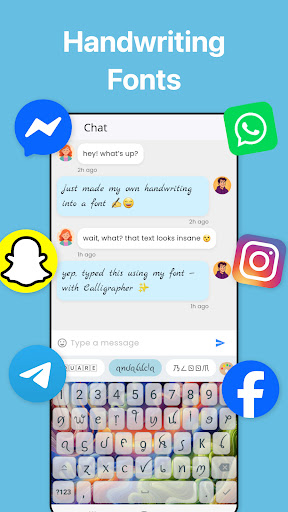


About this app
The Handwriting Font Maker app solves the problem of creating personalized fonts by allowing users to design their own handwriting fonts, benefiting individuals who value unique typography and custom designs. Compared to other productivity apps, Handwriting Font Maker stands out with its specialized feature set, but may fall short in terms of broader functionality. With a moderate download count and generally positive user rating, this app has established a niche presence in the productivity category. Its lack of permissions requests is a notable advantage, as it alleviates concerns about data collection and privacy.
Pros
- The app's ability to create custom handwriting fonts is a significant advantage, allowing users to add a personal touch to their digital documents and designs, which is not commonly found in other productivity apps.
- With over 500,000 downloads, the app has demonstrated a moderate level of social proof, indicating a sizable user base and potential for community support.
- The developer, KreativityAppsSRL, has established a professional online presence with a dedicated website and contact information, which can inspire trust in users.
- The app's offline capability, inferred from its lack of permissions requests, is a significant pro, as it allows users to work on their font designs without internet connectivity.
- The variety of in-app purchases, ranging from $1.99 to $114.99, provides users with flexibility in terms of upgrading their experience and accessing additional features.
Cons
- The presence of ads in the free version may detract from the user experience, potentially disrupting the creative workflow and causing frustration.
- The monetization model, which combines ads with in-app purchases, may be perceived as aggressive, especially if the ads are intrusive or frequent.
- Some users may find the app's functionality limited compared to more comprehensive design or productivity tools, which could lead to disappointment or a lack of engagement.
- The app's rating of 3.6/5, while generally positive, suggests that some users have encountered issues or have unmet expectations, which the developer should address to improve overall satisfaction.
Best for: The ideal user for the Handwriting Font Maker app is a creative individual, likely in the age range of 18-45, with a basic understanding of design principles and a desire for unique, personalized typography, who is looking for a specialized tool to enhance their digital documents, designs, or artistic projects.
Developer Description
Penmanship calligraphy fontmaker: Your own font by the handwriting font designer
The calligrapher app can help you generate a custom font from your own handwriting with ease on your device and use it to write your papers. If you are looking for a calligraphy fonts app for handwriting fonts design maker app for fonts drawing with your own writing style, then this font writer app might be for you. Check out what the font can do to impress your friends.
Use our efficient font maker or font writer tool to convert your images to cursive once and then use your style forever. Create your own font with the intuitive fontmaker.
How to Use this Handwriting Font Creator App:
Extract each letter one-by-one from images with text written by you or draw them by hand. You can always come back later to modify your alphabet. It’s a font writer app that allows you to create the entire alphabet with your personal touch and style. You can also select from different beautiful fonts from the app and also import fonts apart from your handwriting. Start using your own handwriting style or choose from our many preloaded fonts collection. Add a paper in the interface using the “Add paper” button, and start writing in your own unique style.
In a nutshell, you can easily make fonts with this handwriting fonts drawing app and also use preloaded or imported fonts. This fonts design maker app will allow you to create unique fonts that won’t match any other person and it’s really easy to use and understand. If you are looking for a fonts design maker app or fonts lettering app that enables you to create your own font or use so many unique fonts, then this font writer app is definitely worth a try!
Some Key Features of the Handwriting Font Maker App:
Create Beautiful Calligraphy Fonts:
Create font art with the simple calligrapher font editor. This custom fonts creating application will allow you to create your own fonts easily through a very simple process. You can create fonts by yourself, or you can also create fonts with your friend’s help who might have a beautiful handwriting. Create beautiful texts and blow the mind of everyone who sees your writings.
Experiment with the font generator to create your font style.
Easy to Use Font Maker Keyboard App:
Make your own keyboard with all the fonts art at your fingertips. Add the most unique styles to your keyboard through this font writer application. The app is really easy to use and you won’t have any trouble creating fonts or using the preloaded fonts or importing them.
An Efficient Interface with Many Options:
You can also import fonts from .otf or .ttf files.
With the paper writer you can customize how the page looks like.
In the text editor you can change:
- page dimension, type, colour, you can even set your own background
- lines, type, colour, opacity
- pen colour, letter size, spacing between letters, words, lines
- set margin, odd-even pages to look the same or in mirror
Draw by hand any shapes and colours you like.
The page will look like it was just written by your hand with pen in your notebook.
Export your work as pdf, images or print it right away.
Also, you can share it with whoever you want!
This font writer app is ideal for busy students in homework assignments, essays, note taking, but also for designers in lettering and calligraphy.
What are you waiting for? Convert your text to handwriting!
Surprise your friends, send messages with a unique personal twist.
Share eye-catching stories with your original handwriting showcasing your penmanship.
Subscribe to the premium offer to remove ads, automatically scan your font, export your own font without restrictions.
Font Usage License:
Fonts you create with this app are for personal use only. To use your font commercially an active subscription is required.
Download The HandWriting Font Maker, a font creator app and enjoy writing in your own style.
Privacy
Given that the Handwriting Font Maker app requests no permissions, the risk of data collection or privacy breaches appears to be low. However, users should still be cautious when making in-app purchases and ensure they are using a secure payment method. To further protect their data, users can review the developer's privacy policy on their website and adjust their device settings accordingly.
Tips
To get the most out of the Handwriting Font Maker app, users should start by experimenting with the free version to understand its capabilities and limitations. They can then consider upgrading to access additional features or remove ads, enhancing their overall experience. For optimal performance, users should ensure their device meets the minimum Android requirement of 7.0 and consider closing other resource-intensive apps while using the Handwriting Font Maker.
What's New
Premium keyboard themes
In-app purchases
$1.99 - $114.99 per item
Version Information
- Version
- 1.0.201
- Downloads
- 500K+
- Updated on
- Nov 30, 2025
- Released
- Oct 29, 2021
- Requires
- Android 7.0
Statistics
Google Play Rating History
Rating Distribution
Downloads Over Time
Handwriting Font Maker has been downloaded times. Over the past 30 days, it averaged downloads per day.
Shaded area shows 30-day prediction based on historical trends
Historical data collection started recently. More data points will be available over time.
Handwriting Font Maker - Google Play Rankings
Top Rankings
| Rank | Country | Category | List | Change |
|---|---|---|---|---|
| — |
Ranking History in
No ranking data available yet. Rankings are updated daily.
#107 in Top Free Productivity in Russia

Handwriting Font Maker users say on Google Play
 Teferi Mamo
Even if i am not an IT man to my knowledge it is the best I have seen . BUT INSTEAD OF PICKING EACH CHARACTER ONE BY ONE IF IT possible APPLY ALL IN SEQUENCE at once , IT WOULD MINIMIZE LENGTHY TIME EXPENDED
 Killian Hatfield
I like how you can import your own fonts & edit them! And how you can add extra letters!
 Ashley Agbim
The fonts don't work on most of the app I want to use it on
 Christian Skye (Dracomenda)
This app, just like the only other 'handwitten font app" is a scam for $5/week and will NOT make a font file ypur phone can actually use or send What it can do is take your font and allow you to send it as an image or screenshot
 Jaylyn Carr
Every 2 letters of me drawing letters, it shows me 2 60 second unskipabel adds, 𝒶𝓃𝒹 𝒾𝓉 𝓉ℴℴ𝓀 𝓂ℯ 𝟤 𝒽ℴ𝓊𝓇𝓈 to export my font i made. and when i ginaly exported it fully it was a pitchure when i typed with my font, i had to type a pitcture. why advertize a ℱ𝒪𝒩𝒯 typer when you type pitctures. andvwhen i tryed putting a pitchure as a font it was full black screen as the font. if there was a rating below -2000 stars a would rate it that.
ApkTrusted Ratings & Reviews
More from KreativityAppsSRL
See more apps

Similar Apps

Stylish Name: Fancy Text Style
Free

Letterly: Write by Voice & AI
Free
Keyboard - Emoji, Emoticons
Free

Typewise Custom Keyboard
Free

MultiTimer: Multiple timers
Free

Sketchar AR Drawing Sketchpad
Free
Mint Keyboard:Fonts,Emojis
Free

Learn Emotional Intelligence
Paid

Healthy Dose of Gratitude
Paid
Shortcut Maker
Free

PlayKeyboard - Fonts, Emoji
Free
Icon Pack Studio
Free

AI Vocabulary Builder - Vokab
Paid

Minimalist Challenge
Paid

Logo Maker Design AI Generator
Free
Twos: Remember & Share Things
Free
Scan this QR code to download

Forwarding you to the page at Google Play market in seconds...
Open Google Play market now