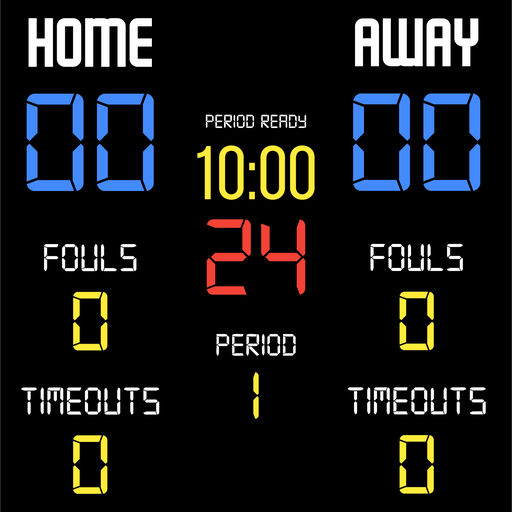
BT Basketball Scoreboard v1134
The Basketball Temple LLC


About this app
Developer Description
One of the most beautiful basketball scoreboard apps on the market.
Download the free BT Controller app to remotely control this scoreboard. Open the connect menu on the BT Controller app, the scoreboard is automatically detected, hit the WiFi or Bluetooth button next to the scoreboard name on the BT Controller app to connect.
BT Scoreboard Features:
- Clean design, no ads
- Intuitive direct tap and swipe controls
- Remotely control scoreboard with WiFi or Bluetooth using free BT Controller App
- Convenient Presets (International, US Pro, College, High School, and more...)
- Convenient timers: pregame timer, period timer, rest timer, timeout timer, overtime, etc.
- Fully customizable game in the settings
- Practice modes configured in settings is great for running practices
- Audio buzzers for shotclock violation, end of period, substitutions, etc.
- Warning beep near end of pregame, timeout, or rest times (customizable)
- BT Scoreboard App can also act as a controller similar to BT Controller App
For the best experience, use the application on a large tablet, or hook your phone/tablet up to a large display or video projector. You'll feel like you have just bought a professional scoreboard!
Synchronize the scoreboard with our BT Shotclock app to run a full-blown basketball game with scoreboard and shotclocks.
The BT Scoreboard app was created by The Basketball Temple Company. The Basketball Temple Company focuses on high quality basketball academies, basketball leagues, and technologies that are used to support those academies and leagues. We open our technology to the public so everyone in the basketball community can experience the same technologies that we use within our institutions.
YouTube Tutorial Video
# Quick Start Documentation:
Score Controls:
- Tap score to increase quickly
- Swipe up/down score to increase/decrease
- Hold down on team names to adjust name and color of teams
Time Controls:
- Tap period timer to start/pause
- Tap pregame, timeout, rest timers to early transition to next stage
Shotclock Controls:
- Tap shotclock to reset/go
- Swipe shotclock up/down to reset/go to short shotclock
Timeout Controls
- Tap timeout number to call timeout
- Swipe up/down timeouts to adjust numbers
- Red indicates violation when calling timeout with no timeouts left
Fouls Controls
- Swipe up/down fouls to adjust numbers
- Red indicates bonus situation (customizable in settings)
- Purple indicates double bonus situation (customizable)
Scoreboard as a Remote Controller
IMPORTANT: only needed when using the scoreboard as a controller for shotclocks and other devices, if you are using the BT Controller app to remote control the scoreboard then the steps below should be done on the BT Controller instead:
- Tap on top-left icon to open connect menu
- Hit "Refresh" to find devices
- Tap on WiFi or Bluetooth icon to connect, green icon indicates connected
- If unable to connect or having connection errors try one of the following:
1) please ensure all devices are on the same WiFi network
2) please ensure bluetooth is turned ON on all devices
3) lastly, try to restart the app on all devices
Time and Game Settings:
- Tap on top-right icon to open settings menu
- Edit and save the many settings available
Audio Buzzer:
- There are two faint colored bell icons next to the period number
- Tap to play buzzer or energy horn
What's New
Please submit any issues to support@basketballtemple.com and we will try to handle it promptly. Hope you enjoy the app and thank you very much!
Version Information
- Version
- 1134
- Downloads
- 500+
- Updated on
- Dec 23, 2025
- Released
- Jul 27, 2020
- Requires
- Android 5.0
Statistics
Google Play Rating History
Rating Distribution
Downloads Over Time
BT Basketball Scoreboard has been downloaded times. Over the past 30 days, it averaged downloads per day.
Shaded area shows 30-day prediction based on historical trends
Historical data collection started recently. More data points will be available over time.
BT Basketball Scoreboard users say on Google Play
 Jeffrey Rzepski
i have been using this app for nearly two years, and was using it for soccer also, which did the job, but a recent upgrade to the app now allows you to change the labels (i.e. fouls to shots on goal) which allows it to look and feel more soccer specific, which is great. it also now allows you to type a banner you can use to put your team name or anything you want which appears across the top of the scoreboard. Its simple to use especially when u use the remote app. awesome app
 Kenny Tham
There is some issue on the sound of buzzer. The sound did not function after a while.
ApkTrusted Ratings & Reviews
More from The Basketball Temple LLC
See more apps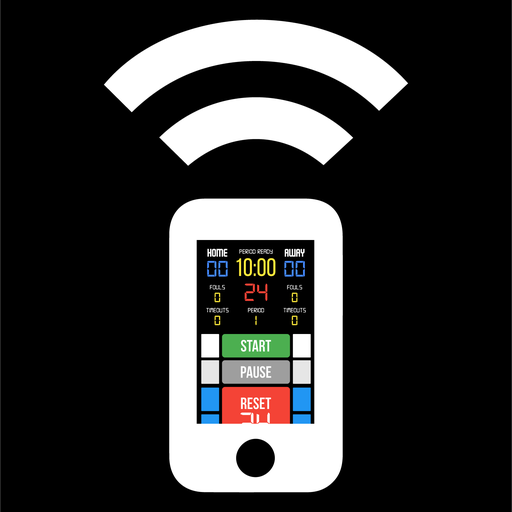



Similar Apps

MLB
Free

MotoGP™
Free

Cosmic Kids Yoga
Free

Abler
Free

WNBA - Live Games & Scores
Free

MTNTOUGH+
Free

The Athletic: All Sports News
Free

Roping.com
Free

NBA: Live Games & Scores
Free

OneFootball: All Soccer Scores
Free

FC Bayern München
Free

ESPN Tournament Challenge
Free

NHL
Free

Get Set - Train Smarter
Free

NFL
Free

VBTV - Stream Volleyball Live
Free
Scan this QR code to download

Forwarding you to the page at Google Play market in seconds...
Open Google Play market now