Live Home 3D: House Design v4.11.0 (1690)
Belight Software




About this app
Developer Description
All-in-one home design app: draw floor plans, decorate rooms and design gardens.
Step into the world of advanced 3D home design with Live Home 3D, the ultimate app for turning your interior design ideas into reality. Whether you’re planning a stylish redecoration or a full house remodel, Live Home 3D offers powerful tools to design, visualize, and perfect your dream home. With over 5,000 3D models, predesigned houses, and interiors, you can create breathtaking home designs in an immersive digital environment. Furthermore, this home design 3D app is perfectly suitable for working on your home design offline and online.
Live Home 3D is not just a home design app—it’s a comprehensive tool that caters to both professional architects and DIY house designers. Whether you’re crafting intricate 3d home plans or decorating rooms, Live Home 3D lets you express your creativity fully and realize designs of different complexity levels.
Realize Your Design Potential: Key Features of Live Home 3D
✅ Floor Plan Creator
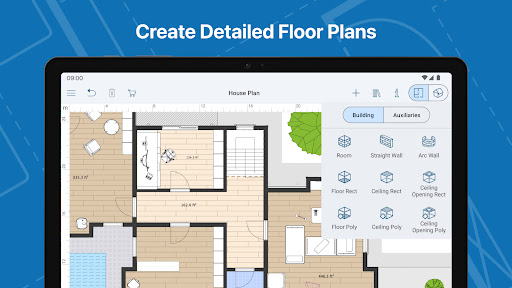
Use Live Home 3D as a floor planner to create detailed layouts for your home. Customize room designs and bring your vision to life, whether you’re a professional house designer or a first-time home planner. Draw inspiration from predesigned houses or room interiors—such as kitchens, bathrooms, living rooms, and bedrooms—and modify them to suit your style.
✅ Master 3D House Design
Access a library of over 5,000+ 3D models, including furniture, appliances, and decor elements. Design rooms or entire 3D house designs with ease. You can even enhance your project with free models from Trimble 3D Warehouse.
✅ Material Library
Bring your designs to life with over 3,000 textures and materials. Capture the desired textures from photos and apply them directly to your 3D models, achieving a perfect, personalized look.
✅ Landscape Planning & Garden Design
Live Home 3D extends beyond interiors—it’s also ideal for landscape planning. With a wide range of trees, plants, and landscaping elements, design your ideal garden or patio. Visualize your outdoor space in full 3D to get the perfect layout.
✅ Immersive 3D Walkthroughs
Take a virtual walk through your home design, exploring every detail in 3D. Experience your space like never before and ensure the design is exactly as you imagined.
✅ Advanced Lighting & Geolocation
Perfect your lighting with features that adjust light fixtures, time of day, and weather conditions. Live Home 3D even allows you to create realistic lighting scenarios based on your home’s location.
✅ Seamless Sharing and Collaboration
Share your design projects with contractors, family, or social media followers. Export your 3D home design, floor plans, realistic renderings, and even videos of your room redecoration or garden design.
Pro Features for Advanced Designers
Unlock powerful tools for professional 3D house design and landscape planning with Live Home 3D’s Pro Features. These include:
-Terrain Editing: Create custom elevations, depressions, and features like pools or ponds for your landscape design.
-2D Elevation View: A rare tool for architectural design, it lets you view side profiles of walls and roofs—perfect for detailed interior architecture and niches.
-Multi-Purpose Building Blocks: Design architectural elements such as columns and beams, or create custom furniture, enhancing both interior and exterior spaces.
Your Ultimate Floor Plan Creator,Home and Interior Design Solution
This home design 3D app is the all-in-one solution for professionals and homeowners that helps to realize all design dreams. Whether you’re designing a new home, remodeling rooms, or planning a garden or landscape, this app provides the tools to bring your vision to life. Customize every space, from kitchens and bathrooms to offices and bedrooms, all with the flexibility to work offline.
What's New
• Bug fixes and stability improvements.
In-app purchases
$5.99 - $99.99 per item
Version Information
- Version
- 4.11.0 (1690)
- Downloads
- 500K+
- Updated on
- Nov 5, 2025
- Released
- Nov 6, 2024
- Requires
- Android 10
Statistics
Google Play Rating History
Rating Distribution
Downloads Over Time
Live Home 3D: House Design has been downloaded times. Over the past 30 days, it averaged downloads per day.
Shaded area shows 30-day prediction based on historical trends
Historical data collection started recently. More data points will be available over time.
Live Home 3D: House Design - Google Play Rankings
Top Rankings
| Rank | Country | Category | List | Change |
|---|---|---|---|---|
| — |
Ranking History in
No ranking data available yet. Rankings are updated daily.
#36 in Top Grossing House And Home in United States


#97 in Top Free House And Home in United States


#8 in Top Grossing House And Home in Italy


#17 in Top Grossing House And Home in Canada

Live Home 3D: House Design users say on Google Play
 Biruk Sol
Guys if you are having problem opening a file re install app & rename file " .lhzd " format. i like the feature where you can import files from sketch up.
 Yakitaki
its a good House building app. it would be much much better if the third floor is free 🥲.
 Breanna Jones
it was a great app to use because I'm GARBAGE at house design so it really helps with comics, but is it really necessary for me to pay to open up an old blueprint. is gaining our money that important? 😐
 Hayley
I wanted to design a home to build in the future, while makin good progress after working on it all day, i exited it, tapped it again and it told me i can only open the most recent one. I did not open any new ones, i just edited that one project, then tried to go back in it to edit it, that was my most recent one, my only one. Is there any way i can open that again and continue working on it without having to spend money upgrading it. I spent a lot of effort into it and dont want to lose it.
 junodragon6780 (Junodragon6780)
STEER CLEAR of this trash excuse of an app because if you decide to start another project, they will lock you out of your previous project, and will have to pay them $100 just to get back into your old project. This is such a big scam do not fall for it!
ApkTrusted Ratings & Reviews
More from Belight Software
See more apps
Similar Apps

Planner 5D: AI Home Design
Free
Moblo - furniture 3D modeling
Free
Floor Plan Creator
Free

Home Planner AI: Room Interior
Free

HomeByMe
Free

3D Modeling App: Sculpt & Draw
Free

ArcSite
Free

Nomad Sculpt
Free
DrawPlan
Free

AR Plan 3D Tape Measure, Ruler
Free

DWG FastView-CAD Viewer&Editor
Free

magicplan
Free

AI Home Design: Interior DecAI
Free

Creality Cloud - 3D Printing
Free

Home AI - AI Interior Design
Free

AutoCAD - DWG Viewer & Editor
Free
Scan this QR code to download

Forwarding you to the page at Google Play market in seconds...
Open Google Play market now