DWG FastView-CAD Viewer&Editor v5.15.15
Gstarsoft Co., Ltd.





About this app
The DWG FastView-CAD Viewer&Editor app solves the problem of viewing and editing CAD files on-the-go, benefiting professionals in architecture, engineering, and construction who need to access and modify designs on their Android devices. With over 10 million downloads and a 3.7-star rating, it stands out in the Productivity category for its support of 30+ CAD formats and conversion capabilities. However, its performance and feature set may fall short for power users accustomed to desktop CAD software. Compared to alternatives, DWG FastView-CAD Viewer&Editor's offline capability and accessibility features make it a strong contender.
Pros
- With over 10 million downloads, DWG FastView-CAD Viewer&Editor has established a strong user base, indicating a high level of social proof and trust in the app's functionality.
- The app's support for 30+ CAD formats, including conversion between PDF and DWG, makes it a versatile tool for professionals working with diverse design files.
- The developer, Gstarsoft Co., Ltd., has a dedicated website and email support, suggesting a commitment to customer service and updates, which is reflected in the app's regular version updates.
- The app's offline capability allows users to access and edit CAD files without an internet connection, making it useful for fieldwork or areas with poor connectivity.
- The lack of permission requests is a significant advantage, as it minimizes potential privacy concerns and ensures that the app only accesses necessary device resources.
Cons
- The app's monetization model, which includes ads and in-app purchases, may be seen as aggressive by some users, potentially disrupting the workflow and user experience.
- Some users may find the app's feature set limited compared to desktop CAD software, which could be a concern for power users requiring advanced editing capabilities.
- The presence of ads may also raise concerns about data collection and targeted advertising, which could be a drawback for users prioritizing privacy.
- The app's compatibility with certain devices or Android versions may be limited, as indicated by the requirement of Android 6.0 or later, which could exclude some users from accessing the app.
Best for: The ideal user for DWG FastView-CAD Viewer&Editor is a professional in the architecture, engineering, or construction industry, likely with intermediate to advanced technical skills, who requires a reliable and feature-rich CAD viewer and editor for Android devices to access, modify, and share design files on-the-go.
Developer Description
* Support 30+ kinds of 2D/3D CAD formats, Convert PDF to DWG or vice versa
DWG FastView has over 100 million installs across over 200 countries and regions worldwide.
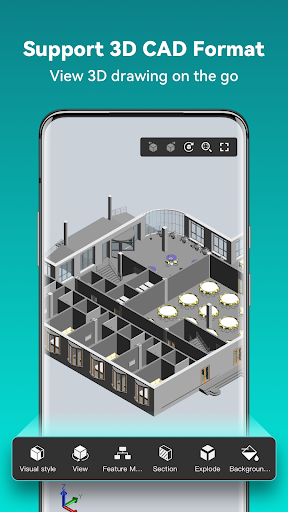
[3D Modeling]: Supports BIM, Revit, Solidworks, NX, CATIA, Inventor, SolidEdge, ACIS, Pro/E, and other mainstream 3D design software models. Supports browsing over 30 formats of 3D drawings, including .rvt/.sldprt/.sldasm/.asm/.prt/.prt.*/.asm.*/.stp/.step.
3D Features include 3D model assembly part preview, scaling, rotation, sectioning, and explosion; 3D measurement (distance measurement between points, lines, and surfaces, arc length, etc.), 3D annotation; PMI display and hiding; free color matching; viewing and multiple views;
DWG FastView is a cross-platform CAD software that meets designers’ demands in all kinds of situation, and fully compatible with DWG, DXF. Various of CAD features such as: Edit, View, Measure, Dimension, Find text, etc. enables you to do real CAD work on the go and enjoy the best mobile CAD experience.
View, Edit, Create & Share all your CAD drawings, synchronize to cloud from multiple devices by one click, enjoy design anytime anywhere together with more than 70 million users around the world.
DWG FastView Highlights
(1) Accurate and fast access your drawings.
•Creating, viewing and editing with easy-to-use advanced tools.
• Supports of AutoCAD all DXF&DWG versions with no file-size limit
• View AutoCAD DWG&DXF file easily.Fully compatibility with AutoCAD.
(2) No registration & Offline drawings.
• Simply download DWG FastView and use it immediately with NO REGISTRATION needed.
• Without internet, you are able to save your masterpieces in the local workspace.
• Drawings from E-mail, Cloud Service or Network Disk like Dropbox, OneDrive, Google Drive, Box or WebDAV can be opened, viewed, edited and shared as well with Internet.
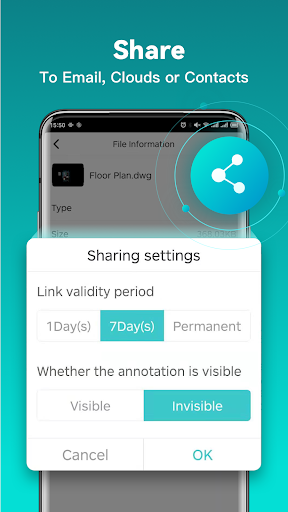
(3) Support export to PDF, BMP, JPG and PNG, and share it to anyone freely.
• Transfer CAD drawings into PDF format and customize its paper size, orientation, color and so on.
•Convert CAD drawings to different versions.
•Convert PDF to DWG.
(4) Do real CAD work on mobile.
• Move, Copy, Rotate, Scale, Color, Measure object, record management results, manage layers and use Layout.
• Advanced drawing and editing tools such as trim, offset, dimension and find text.
•Set precision and display formats of coordinates, distance and angle.
• Zoom in or zoom out a CAD drawing by adjusting the space between two fingers.
• Import or download the CAD drawing with its fonts and symbols to the font’s folder in order to display all uncommon fonts.
(5) Easily switch between 2D Visual mode and 3D Visual mode, 3D mode includes: 3D Wireframe, Realistic and 3D Hidden with the powerful tools of Layer, Layout, and ten different perspectives viewing.
• View 3D models, View different CAD file formats including: RVT, Solidworks, Creo, NX, CATIA, Inventor, SolidEdge and more than 20 formats;
• Rotate 3D CAD drawing by touching the drawing area and moving to view the 3D mode comprehensively in 360 degrees. Click the screen to stop rotating and locate the 3D mode at the best perspective.
• Open a magnifier by touching the drawing area to display the enlarged graph of touched area which is a convenient way for users to view details and snap objects.
(6)Precise Drawing available, e.g., user can change the number of the coordinates to move the points precisely.
• Support 2D absolute coordinates, relative coordinates and polar coordinates and 3D Spherical coordinates and Cylindrical coordinates.
• Draw Line, Polyline, Circle, Arc, Text, Revcloud, Rectangle, and Sketch and create Notation.
Upgrade to DWG FastView Premium to get advanced editing and advanced tools. DWG FastView subscription plans are available in the following options:
•Premium/Super monthly
•Premium/Super annual
Privacy
Given the app's lack of permission requests, users can be relatively confident in its privacy and security. However, as with any app, it's essential to be cautious when making in-app purchases or clicking on ads, as these may collect data or lead to external websites. To minimize potential risks, users should review the app's terms and conditions, as well as the developer's privacy policy.
Tips
To get the most out of DWG FastView-CAD Viewer&Editor, users should first explore the app's various format support options and conversion features to understand its full capabilities. Additionally, taking advantage of the app's offline capability by downloading necessary files in advance can enhance productivity in areas with poor connectivity. Regularly checking for updates can also ensure access to the latest features and security patches.
What's New
2. User interactions optimized.
3. Known bugs or issues fixed.
4. Some minor languages improved.
In-app purchases
$0.99 - $69.99 per item
Version Information
- Version
- 5.15.15
- Downloads
- 10M+
- Updated on
- Nov 25, 2025
- Released
- May 14, 2013
- Requires
- Android 6.0
Statistics
Google Play Rating History
Rating Distribution
Downloads Over Time
DWG FastView-CAD Viewer&Editor has been downloaded times. Over the past 30 days, it averaged downloads per day.
Shaded area shows 30-day prediction based on historical trends
Historical data collection started recently. More data points will be available over time.
DWG FastView-CAD Viewer&Editor - Google Play Rankings
Top Rankings
| Rank | Country | Category | List | Change |
|---|---|---|---|---|
| — |
Ranking History in
No ranking data available yet. Rankings are updated daily.
#11 in Top Free Productivity in Turkey

#11 in Top Free Productivity in Egypt

#13 in Top Free Productivity in Vietnam
#18 in Top Grossing Productivity in Turkey


DWG FastView-CAD Viewer&Editor users say on Google Play
 Shreya Enterprises
very good app in engineering field iam using this app last 3 years very helpful and you are giving free of cost and very good quality very helpful iam seeing everybody is using this one more time iam seeing thanks thanku very much super
 shah rajput
Super
 Hải Đồng
ads is annoy and hard to skip
 Nigel Denning
I paid for the subscription to the app, but cancelled in my first month. Incredibly basic, doesn't have a colour or hatching function. Basic shapes and drawings okay, export to pdf too, but also unable to scale compound shapes?
 Affan Farooqi
Too many frustrating ads. You must view 2, 3 ads before opening it and 2, 3 ads before exiting the app. There are other aps in Play Store with less ads and even without ads. Would not suggest anyone to download it.
ApkTrusted Ratings & Reviews
More from Gstarsoft Co., Ltd.
See more apps
Similar Apps

3D Modeling App: Sculpt & Draw
Free

AR Plan 3D Tape Measure, Ruler
Free

Planner 5D: AI Home Design
Free
Creality Cloud - 3D Printing
Free
AutoCAD - DWG Viewer & Editor
Free
Floor Plan Creator
Free

xOne: 3D Scanner & 3D Editor
Free

ArcSite
Free

Clip Studio Paint
Free

Nomad Sculpt
Free

Coding X : Learn Python, Java
Free
ZWCAD Mobile - DWG Viewer
Free

Notewise - AI Notes, PDF, Docs
Free
PROTO - circuit simulator
Free
Prisma3D - Animation, Modeling
Free
Moblo - furniture 3D modeling
Free
Scan this QR code to download

Forwarding you to the page at Google Play market in seconds...
Open Google Play market now