
Wifi Launcher v3.9.1
AAWireless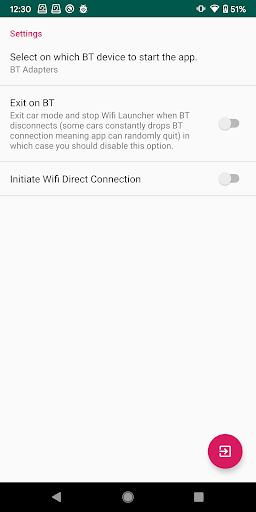
About this app
Wifi Launcher is a specialized tool designed to work with Headunit Reloaded and AAGateWay, providing a unique solution for Android Auto users. This app solves the problem of seamless integration between Android devices and car head units, benefiting drivers who want a more streamlined in-car experience. Compared to other tools in the category, Wifi Launcher stands out due to its specific focus on compatibility with these two systems, although its limited scope may not appeal to all users. Its moderate download numbers and mixed user ratings suggest a need for further refinement to meet the diverse needs of its target audience.
Pros
- With over 100,000 downloads, Wifi Launcher has demonstrated a moderate level of social proof, indicating its utility for a significant number of users.
- The app's lack of permissions requests is a notable advantage, suggesting a low-risk installation for users concerned about privacy and data security.
- Given its free model without ads or in-app purchases, Wifi Launcher offers an uninterrupted user experience, which is a significant pro for users who value simplicity and ease of use.
- The developer's provision of a website and email contact information enhances transparency and support, which can be reassuring for users seeking assistance or having questions about the app.
- Wifi Launcher's specific design for use with Headunit Reloaded and AAGateWay fills a niche that might not be addressed as comprehensively by more general tools in the category.
Cons
- The mixed user rating of 3.3/5 suggests that while Wifi Launcher meets the needs of some users effectively, others may experience issues or have unmet expectations, potentially due to compatibility problems or limitations in the app's functionality.
- The app's limited scope, focusing only on users with specific head units and software configurations, restricts its broader appeal and versatility compared to more universally applicable tools.
- Without a clear update history provided, there's a concern about the developer's commitment to maintaining and improving the app, which could impact its long-term reliability and compatibility with evolving Android versions.
Best for: The ideal user for Wifi Launcher is a tech-savvy driver who has invested in an Android Auto-compatible head unit and utilizes Headunit Reloaded and AAGateWay, seeking a seamless and integrated in-car infotainment experience, and is willing to navigate the potential complexities and limitations of a specialized tool to achieve this goal.
Developer Description
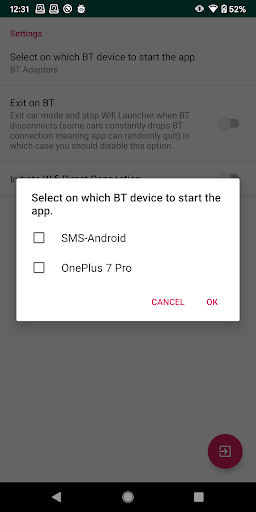
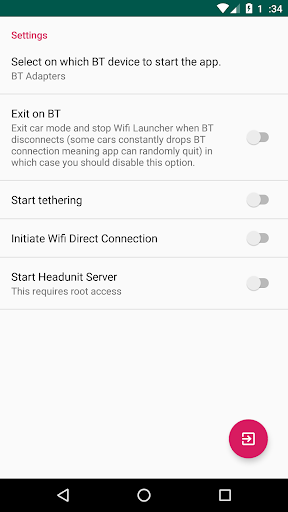
Wifi Launcher for Android Auto to be used with Headunit Reloaded and AAGateWay
This app CANNOT be used to gain Wireless Android Auto connection to different cars and head units, it is only to be used with the above mentioned apps.
For Android 10 and above users please make sure you allow access to location all the time, otherwise app will not be able to detected Wifi networks from the background.
Also Android 10 users you will need to grant DRAW OVER OTHER apps permission, without the permission app can't start Android Auto from the background.
Privacy
Given that Wifi Launcher requests no permissions, it presents a minimal risk in terms of data collection and privacy concerns. However, users should still be cautious about the data that might be collected indirectly through its operation with other systems. To ensure privacy, users should review the privacy policies of all connected systems and services.
Tips
For optimal use, first-time users should ensure their head units and Android devices are fully compatible with Wifi Launcher, and follow the setup instructions carefully to avoid connectivity issues. Regularly checking for updates, although not directly through the app's details, can help ensure compatibility with the latest Android versions and security patches. Additionally, consulting the developer's website or contacting their support can provide valuable insights and troubleshooting tips.
What's New
Version Information
- Version
- 3.9.1
- Downloads
- 100K+
- Updated on
- Oct 3, 2023
- Released
- Jan 28, 2020
- Requires
- Android 8.1
Statistics
Google Play Rating History
Rating Distribution
Downloads Over Time
Wifi Launcher has been downloaded times. Over the past 30 days, it averaged downloads per day.
Shaded area shows 30-day prediction based on historical trends
Historical data collection started recently. More data points will be available over time.
Wifi Launcher users say on Google Play
 Dino Baua
A lot has changed recently, and I changed my review to 5 stars. Audio settings now include the ability to enable compressed audio, and since then, connecting wirelessly has been more reliable, audio quality has also been improved. It no longer stutters as it used to last year.
 Paul Banfield
on android 16 (pixel 8 pro) I thought the battery optimization error was a bug, but eventually I found the setting. Go to apps, WiFi launcher, app battery usage, enable allow background usage, then click the title allow background usage and you see a new setting screen. Change setting to unrestricted. WiFi launcher is then happy. Problem is, android 16 won't allow to automate hotspot on so have to do this manually. I now use macrodroid using auto hotspot app and WiFi launcher to connect
 Shane Parker
I was able to use this with no issue on my old S21. Ever since getting an S23 I cannot get audio to play from the vehicle speakers. I can still navigate and skip songs using the headunit but just no audio. I've checked that all apps (AndroidAuto, WiFi Launcher, and Headunit Reloaded) are all up to date. I'm hoping it's just a setting error somewhere but I can't figure it out. Anyone have any idea?
 Space Cowboy
I NEVER leave reviews. Especially if something works as it should or doesn't work at all. Just not worth my time. But this is different. This is something that worked flawlessly with head unit reloaded doing android auto wirelessly until the latest 3.9 update. Whatever yall changed with the wifi connection settings isn't working. Hur will not recognize the device at all when your phone is creating the Hotspot. Which is how most of your users are using this app. I had to go back to old version.
 Steve Carter
Simply doesn't work. It is stuck in loop asking for permissions. It doesn't need permission for everything, but even when I give it the app is still asking for permissions. Tells me to turn off battery saver, it wasn't on. If I just tap outside the permissions dialog to close it the app still can't find HUR. or the hot spot on my phone. Phone is a Pixel 6, tablet is a Galaxy A7. Between this app and the Head unit app I've wasted multiple hours. This is a badly thought through app.
ApkTrusted Ratings & Reviews
More from AAWireless
See more apps
Similar Apps

Home V
Free

Nedis SmartLife
Free

Plume Home
Free

NETGEAR Orbi – WiFi System App
Free

Yubii Home
Free

FlexiRoam: eSIM & Data Plans
Free

eero wifi system
Free

AutoZen-Car Dashboard&Launcher
Free
Chargehub EV & Tesla Charging
Free
AntennaPod
Free

Home + Control
Free

Ajax PRO: Tool For Engineers
Free

Yatse: Kodi remote and cast
Free

HeadTrack
Paid

Froling Connect
Free

EcoNet
Free
Scan this QR code to download

Forwarding you to the page at Google Play market in seconds...
Open Google Play market now