
CleanTool:file manager vVARY
Prosperous Connection Studio


About this app
Developer Description
Efficient organization, easy control.
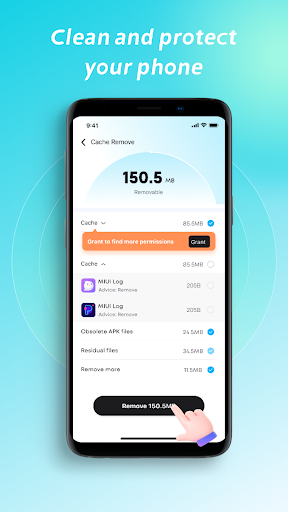
🗑️ File Smart Cleanup
Automatically identify file types such as pictures, videos, documents, and installation packages, saying goodbye to messy folders.
Support file sorting to quickly locate the "big players" that take up space.
Accurately detect invalid content including cache files, duplicates, and residual installation packages, support batch deletion, assisting in removing unnecessary data.
📁 Large file management
Quickly scan files that take up a lot of space in the device (such as high-definition videos and large documents), and support individual processing or batch cleaning.
Provide the file path and source information to facilitate the determination of whether it needs to be retained.
📸 Similar photo and screenshot cleaning
Identify and delete similar photos.
📊 Network usage
Monitor traffic consumption, intelligently warn of over-limit, and avoid waste.
Data security commitment
To ensure the normal implementation of the file management function, the following permissions need to be used during the operation process.
MANAGE_EXTERNAL_STORAGE:Allows users to view and manage installed applications, including uninstalling, disabling, and optimizing background apps.This permission is only used for file cleaning. All operations will be carried out locally and no files of yours will be collected, uploaded or shared. You can revoke the permission at any time through the system Settings.
Let CleanTool be your file manager and say goodbye to chaos, easily managing your files with confidence!
Privacy Policy: https://brisk-signal.com/privacy
Terms of service: https://brisk-signal.com/terms
Version Information
- Version
- -
- Downloads
- 100K+
- Updated on
- -
- Released
- Oct 20, 2024
- Requires
- Android Varies with device
Statistics
Google Play Rating History
Rating Distribution
Downloads Over Time
CleanTool:file manager has been downloaded times. Over the past 30 days, it averaged downloads per day.
Shaded area shows 30-day prediction based on historical trends
Historical data collection started recently. More data points will be available over time.
CleanTool:file manager users say on Google Play
 Camila Martin
too much intrusion from other apps it's confusing.
 todd Carter
very helpful,it cleaned out things I could not have known was there.
 Victor Burch
it's not removing anything. it's like I'm wasting my money
ApkTrusted Ratings & Reviews
More from Prosperous Connection Studio
See more apps
Similar Apps

Avast One – Privacy & Security
Free

Uprise Health
Free

Norton Cleaner – Junk removal
Free

Hamster News
Paid

MiraClean - File Manager
Free
AT&T Device Help
Free

AT&T Personal Cloud
Free

Macrorify - Image Auto Clicker
Free

Verizon Home
Free

AppClose: Co-Parent Essentials
Free

myPhonak
Free

Ace Hardware
Free

SharkClean
Free

Unified Care+
Free

DAVx⁵ – CalDAV CardDAV WebDAV
Paid

Fitbit Ace
Free
Scan this QR code to download

Forwarding you to the page at Google Play market in seconds...
Open Google Play market now