Brother Color Label Editor 2 v1.1.5
Brother Industries, Ltd.

About this app
The Brother Color Label Editor 2 app solves the problem of designing and printing custom labels by providing a user-friendly interface and a wide range of templates and design tools. This app benefits most small business owners, crafters, and individuals who need to create professional-looking labels for their products or projects. Compared to other apps in the Art and Design category, Brother Color Label Editor 2 stands out for its ease of use and seamless integration with Brother printers. However, it falls short in terms of advanced design features and compatibility with non-Brother printers.
Pros
- The app has a high user rating of 4.3 out of 5, indicating a well-received and reliable tool for label design and printing.
- The app is free to download and use, with no in-app purchases or ads, making it a great option for those on a budget.
- The developer, Brother Industries, Ltd., is a reputable company with a long history of producing high-quality printing products, which adds to the app's credibility.
- The app's simple and intuitive interface makes it easy for users to create and print custom labels, even for those with limited design experience.
- The app's compatibility with Android 11 ensures that it can run smoothly on the latest devices.
Cons
- The app's limited compatibility with non-Brother printers may be a drawback for users who prefer other brands.
- Some users may find the design features and templates to be limited, which could restrict their creativity and flexibility.
- The app's lack of advanced features, such as layering and effects, may not make it suitable for professional designers or those with complex design needs.
- The app's size and performance may vary depending on the device and Android version, which could impact the user experience.
Best for: The ideal user for the Brother Color Label Editor 2 app is a small business owner, crafter, or individual who needs to create professional-looking labels for their products or projects, and has a basic understanding of design principles and Android device operation, but may not require advanced design features or compatibility with non-Brother printers.
Developer Description
Dream It. Create It. Print It!
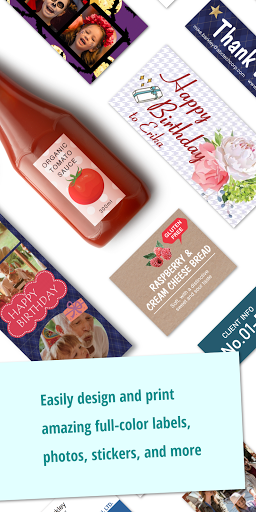
Brother Color Label Editor 2 is a free application that lets you print full-color labels and photo labels using your mobile device and a Brother ColAura (VC-500W) printer via a wireless network. You can enjoy creating, editing, and printing using a variety of art, backgrounds, fonts, frames and your photos, all from your mobile device.
[Key Features]
1. Create and print full-color labels and photo labels.
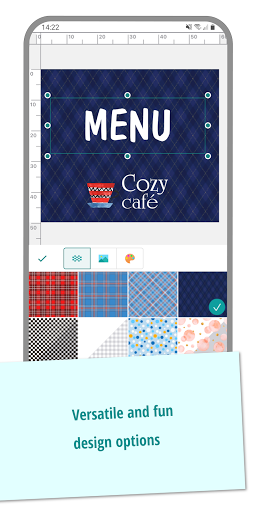
2. Design your own labels using a variety of attractive art objects, backgrounds, frames, and alphabetical fonts.
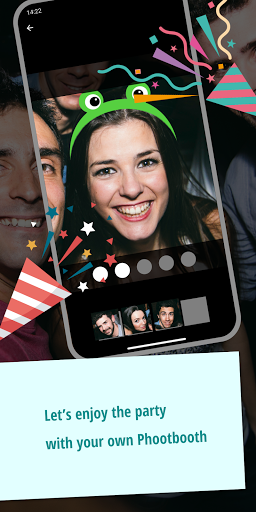
3. Enjoy the Photobooth feature to print photo strips.
4. Create and print professional labels using the pre-design templates.
5. Create and print labels with photos by linking to your Instagram or Facebook.
6. Create labels up to 17" long.
7. Save the label designs you create.
8. Helps you configure the Wi-Fi and other settings on your ColAura (VC-500W) .
[Compatible machines]
ColAura (VC-500W)
[Supported OS]
Android 11 or later
To help us improve the application, send your feedback to Feedback-mobile-apps-lm@brother.com. Please note that we may not be able to respond to individual emails.
Privacy
Since the app requires no permissions, it is a relatively safe and private tool for designing and printing labels. However, users should still be cautious when downloading and installing apps from unknown sources, and ensure that they are using the official Brother Color Label Editor 2 app from the Play Store. Additionally, users should review the app's terms and conditions to understand any data collection or sharing practices.
Tips
To get the most out of the Brother Color Label Editor 2 app, users should start by exploring the various templates and design tools to familiarize themselves with the interface. They can also optimize the app's performance by closing other resource-intensive apps and ensuring that their device has sufficient storage and memory. Furthermore, users can improve their label design skills by watching tutorials and online courses, and by experimenting with different design elements and layouts.
What's New
- Bug fixes
Version Information
- Version
- 1.1.5
- Downloads
- 50K+
- Updated on
- Apr 21, 2025
- Released
- Nov 3, 2021
- Requires
- Android 11
Statistics
Google Play Rating History
Rating Distribution
Downloads Over Time
Brother Color Label Editor 2 has been downloaded times. Over the past 30 days, it averaged downloads per day.
Shaded area shows 30-day prediction based on historical trends
Historical data collection started recently. More data points will be available over time.
Brother Color Label Editor 2 users say on Google Play
 Jana Bergevin
Better ease of use and easier to connect to the printer than the original app. I would like to see the content transferred over though since the new app seems to have limited content.
 Jo M
Jo M
This app is alright, I prefer that there was a pc version of the app. I would rather not have to pull out my cell at work to print a label. The only way around it was to mirror my phone screen to my monitor at work.
 Chimene Lambert
I have had this label printer for a couple of years now and have it on my phone and a tablet. It has been great. I need to use it today for my work, and the app has decided not to work. I uninstalled it and now it says it is not suitable for my tablet and all my labels are gone off the phone app. Cannot talk to anyone for help today. Really disappointed
 Soul
Soul
Extremely Basic. The colors come out dull af even in vivid mode & using a pdf file. The app is terrible compared to the pervious one, just Emojis, basic backgrounds & frames. The labels themselves come unstuck very quickly pretty much only good on paper & after awhile everything turns a blueish hue. HIGHLY recommend not buying the machine! Most money I've ever wasted.
 Georgia Venema
This is one of the worst apps I have ever used. Anytime I time try to print something, it requires me to login to the WiFi every time, and it doesn't actually connect. The amount of "cannot connect to printer" messages I have seen is ridiculous. I've reset it, uninstalled and reinstalled the app, but the whole thing is a waste of time. Looking forward to returning this product soon.
ApkTrusted Ratings & Reviews
More from Brother Industries, Ltd.
See more apps
P-touch Design&Print 2
Free

Brother Mobile Connect
Free
Brother iPrint&Label
Free

Brother Pro Label Tool
Free
Brother Print SDK Demo
Free

Brother Artspira
Free
Mobile Transfer Express
Free
Brother Mobile Deploy
Free
Brother My Stitch Monitor
Free
Brother iPrint&Scan
Free

Brother My Design Snap
Free
Brother Print Service Plugin
Free
Similar Apps






Scan this QR code to download

Forwarding you to the page at Google Play market in seconds...
Open Google Play market now