Simple mode icon

Simple mode v13.1.5

Simple mode screenshot 0 Simple mode screenshot 1 Simple mode screenshot 2 Simple mode screenshot 3

About this app

The Simple mode app, developed by ColorOS, aims to make smartphones more accessible for the elderly by simplifying the user interface with large text, big icons, and loud sounds, addressing a significant problem of usability for seniors. This app benefits the elderly and individuals with visual or hearing impairments the most, providing them with an easier way to navigate their devices. Compared to other tools in the category, Simple mode stands out with its focus on accessibility and simplicity, though it may fall short in terms of feature richness. Its high download numbers and good user rating suggest a well-received solution, but its impact could be further enhanced with more customization options.

Pros

  • With over 1 billion downloads, Simple mode demonstrates significant social proof, indicating its effectiveness and popularity among users needing simplified interfaces.
  • The app's decision to not include ads or in-app purchases enhances the user experience, ensuring that the interface remains clean and uncomplicated, aligning well with its accessibility goals.
  • The absence of any permission requests is a notable advantage, as it alleviates concerns about data privacy and security, making it a trustworthy choice for sensitive user groups.
  • Simple mode's developer, ColorOS, is a known entity in the Android ecosystem, which can inspire confidence in the app's quality and support.
  • The app's focus on accessibility features such as large text and loud sounds makes it particularly useful for individuals with visual or hearing impairments, fulfilling a specific need in the market.

Cons

  • One concern is the app's limited feature set, which, while beneficial for simplicity, might not offer enough customization options for some users, potentially limiting its appeal to those seeking more control over their interface.
  • The lack of a developer website for direct support or feedback could be a drawback for users seeking more information or having specific queries about the app.
  • While the app is rated as suitable for everyone, the simplicity might not appeal to all users, particularly younger audiences or those accustomed to more feature-rich interfaces, which could affect its adoption rate.
  • There's a potential for the app to be more inclusive by incorporating additional accessibility features, such as text-to-speech or more granular control over display settings.

Best for: The ideal user for Simple mode is an elderly individual or someone with visual or hearing impairments who requires a simplified and accessible smartphone interface to manage basic tasks and communications, and values ease of use and clarity over feature richness and complexity.

Developer Description

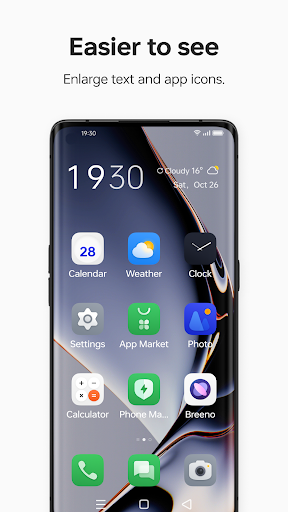
Large text, big icons, and loud sounds. Make your phone easier for the elderly.

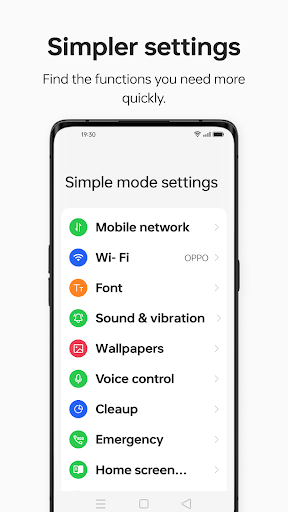
Simple mode is designed to help the elderly use their phone more easily. When you open Simple mode, your phone system automatically switches to larger text, bigger icons, and higher volumes, and uses handwriting as the input method and virtual buttons as the navigation method.

Privacy

Given that Simple mode does not request any permissions, the risk of data collection for malicious purposes is significantly minimized, making it a safe choice in terms of privacy. However, users should still be cautious when downloading and installing apps, ensuring they are from trusted sources like the Google Play Store. Regularly reviewing app updates and changes is also advisable to maintain security and privacy.

Tips

To get the most out of Simple mode, users should explore the app's settings to adjust the interface to their comfort, such as adjusting font sizes or sound levels. Additionally, pairing Simple mode with other accessibility features offered by Android, like font size adjustment or display zoom, can further enhance the user experience. For first-time setup, it's recommended to explore all the simplified features to understand how they can assist in daily phone use.

Version Information

Version
13.1.5
Downloads
1.0B+
Updated on
Feb 19, 2023
Released
Feb 19, 2023
Requires
Android 11

Statistics

Google Play Rating History

Current
Average
Range

Rating Distribution

Total Ratings:

Downloads Over Time

Simple mode has been downloaded times.

Total Downloads
Last 30 Days
Avg Daily Est.

Shaded area shows 30-day prediction based on historical trends

Historical data collection started recently. More data points will be available over time.

Simple mode users say on Google Play

★★★★★
Mohit Tiwari Mohit Tiwari

ok

0 Jan 1, 2026
★★★★
Diyasha Das Diyasha Das

Amazing for those who prefer a clean and easy interface. Large icons, minimal distractions, and very easy to navigate...

1 Dec 10, 2025
★★
Nitish Kumar Nitish Kumar

good

0 Dec 17, 2025
Yogya Malhotra Yogya Malhotra

too much large letter we can adjust them if we enter it 🤮🤢

0 Jan 1, 2026

ApkTrusted Ratings & Reviews

0.0
0 ratings
5
0
4
0
3
0
2
0
1
0
✓ Thank you! Your review has been submitted and will be published after admin approval.
Be the first to write a review...

More from ColorOS

See more apps

Similar Apps

Explore Tags

Browse all tags