Clock v14.0.8
ColorOS




About this app
The Clock app by ColorOS solves the problem of providing a straightforward and user-friendly time-keeping experience, benefiting most those who value simplicity and ease of use. Compared to alternatives in the Tools category, this app stands out with its minimalistic design and lack of ads, making it a great option for those who want an uncluttered experience. However, it may fall short for users seeking more advanced features. With over 1 billion downloads and a 4.5-star rating, it's clear that this app has resonated with a wide audience.
Pros
- The Clock app has an impressive download count of over 1 billion, indicating a high level of social proof and trust among users, which is a significant advantage in the Tools category.
- The app's rating of 4.5 stars suggests a high level of quality and user satisfaction, with many reviewers praising its simplicity and ease of use.
- The fact that the app contains no ads and has no in-app purchases is a significant pro, as it provides an uninterrupted user experience without any monetization-related distractions.
- The app's developer, ColorOS, is a well-known and reputable company, which adds to the app's credibility and trustworthiness.
- The app's small size and lack of permissions required make it a lightweight and secure option for users who are concerned about data privacy and security.
Cons
- One concern is that the app may be too simplistic for some users, who may find it lacking in features compared to other clock apps available in the market.
- The app's lack of advanced features, such as customizable alarms or timers, may limit its appeal to users who require more functionality from their clock app.
- Some users may find the app's design to be too basic or unattractive, which could be a turn-off for those who value visually appealing apps.
- The app's compatibility with older Android versions is not explicitly stated, which may be a concern for users with older devices.
Best for: The ideal user for the Clock app is likely someone who values simplicity and ease of use, such as older adults or those who are new to smartphones, and who require a basic clock app that is easy to navigate and free from distractions, with a focus on core functionality rather than advanced features.
Developer Description
An easy-to-use clock app
- You can customize alarm settings, including ringtones.
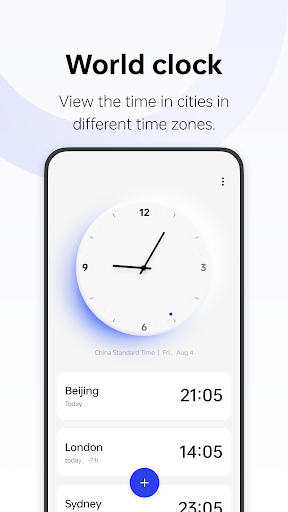
- Add cities in different time zones to view local times at a glance.
- The stopwatch helps you precisely measure time periods.
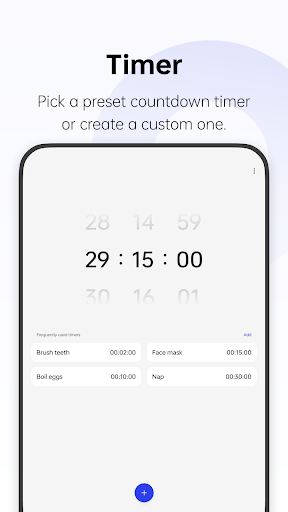
- Preset timers for some daily tasks are provided. You can also create custom timers.
Privacy
Given that the Clock app requires no permissions, it is a very secure option for users who are concerned about data privacy and security. However, users should still be cautious when downloading apps from unknown sources, and always check the app's permissions and reviews before installing. To further protect their data, users can also consider using a VPN or a security app that monitors app permissions and data usage.
Tips
To get the most out of the Clock app, users should first explore the app's settings to customize the clock face and alarm sounds to their liking. Additionally, users can also use the app's built-in timer and stopwatch features to track time intervals and set reminders. To optimize performance, users can also consider closing the app when not in use to conserve battery life.
What's New
Version Information
- Version
- 14.0.8
- Downloads
- 1.0B+
- Updated on
- Feb 15, 2025
- Released
- Aug 17, 2023
- Requires
- Android 9
Statistics
Google Play Rating History
Rating Distribution
Downloads Over Time
Clock has been downloaded times. Over the past 30 days, it averaged downloads per day.
Shaded area shows 30-day prediction based on historical trends
Historical data collection started recently. More data points will be available over time.
Clock users say on Google Play
 Dharamvir Devgan
very Good and the best for clock ⏰ app is brilliant very very easy to use it for all of us are always in the World lot of love appreciation
 Clare Furnevall
Hi, this app has had no updates since 2023. Today the automatic time setting went haywire, setting itself at several hours and many years in the future. l had to manually reset. Could you review the app please.
 Uditveer Singh
App is amazing, lovely graphics and easy interface, the only thing bothers me is that, the alarm service is really lacking in this app, I come from OnePlus phone and on that it was possible to set custom scheduled alarms for custom future dates, but now I switched to Oppo and I found out on Oppo you cannot set alarms for custom future dates, really bothers me.
 Avance
Add a feature to disable a repeating alarm on specific dates in the calendar like oneplus but also a date range for people on vacation
 Wayne bryan Herbas
before this was so fine, but months ago I have a problem with it, the alarm was good actually but when I just press the volume down even if its max and just pressed and just low it the ringtone was gone dead gone but the notif like the vibration was still happening, hope they fix it
ApkTrusted Ratings & Reviews
More from ColorOS
See more apps
OPPO Photos
Free
ColorOS Pictorial
Free
ODialer
Free
Game Space
Free

My Files
Free

Screen recording
Free
Account Center
Free
Wireless Earphones(ColorOS11)
Free
OPPO Clone Phone
Free
Weather
Free

Simple mode
Free
Wireless Earphones
Free

Phone Manager
Free
WeatherService
Free

HeyTap Games
Free
Graphics Enhancement Service
Free
Similar Apps
Simple Alarm Clock
Free
Alarm Clock
Free
Clock Phone 16, Alarm & Timer
Free
Pomotimer - ADHD & Study Timer
Free
Digital Clock Widget
Free

Clock
Free

The Clock: Alarm Clock & Timer
Free

Smart Tutor for SAMSUNG Mobile
Free
Alarm Clock Xtreme & Timer
Free
Simple Alarm Clock
Free

ZenAlarm: Smart Wake Up
Paid

OnePlus Community
Free
Moto Widget
Free
MultiTimer: Multiple timers
Free
WatchCharts
Free
Talking Alarm Clock Beyond
Free
Scan this QR code to download

Forwarding you to the page at Google Play market in seconds...
Open Google Play market now