My TTS: Text-to-Speech v1.5.4
MixxApps


About this app
Developer Description
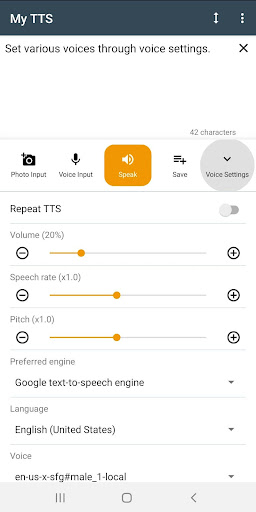
Android reads text you input in various voices
Also you can manage and combine text.
Key features
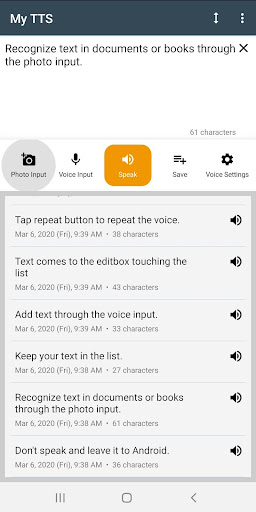
• Android reads text input.
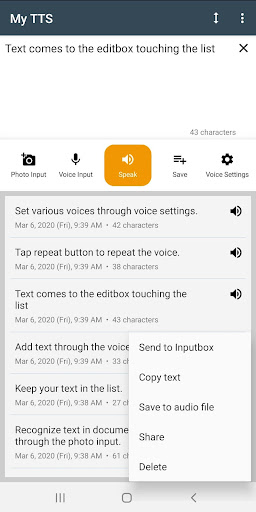
• Manage text in the list and import text in the list into the input box.
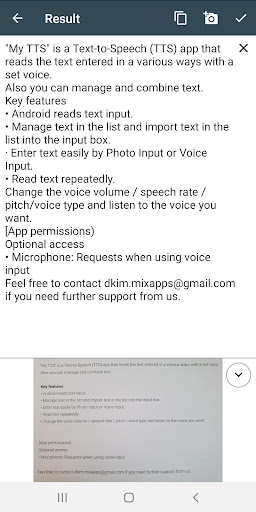
• Enter text easily by Photo Input or Voice Input.
• Convert to an audio file and share it.
• Read text repeatedly.
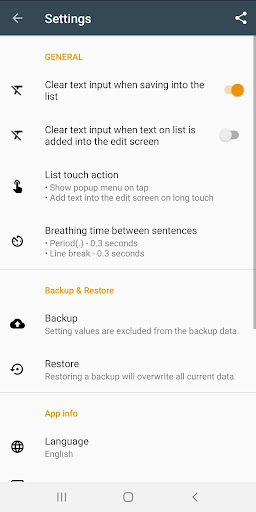
• Change the voice volume / speech rate / pitch / voice type / breathing time and listen to the voice you want.
* Starting from Samsung One UI 7.0, the Samsung TTS engine is no longer available.
[App permissions]
Optional access
• Microphone: Requests when using voice input
Feel free to contact dkim.mixapps@gmail.com if you need further support from us.
What's New
> You can now directly import text files (.txt) as well as Word files (.doc, .docx) and PDF files into the My TTS app for text-to-speech conversion!
> Fixed PDF file conversion error
- Expanded Audio File Storage Capacity:
> You can now save text to audio files of any length without worrying about character limits.
In-app purchases
$0.99 - $21.99 per item
Version Information
- Version
- 1.5.4
- Downloads
- 100K+
- Updated on
- Sep 16, 2025
- Released
- Feb 28, 2020
- Requires
- Android 8.0
Statistics
Google Play Rating History
Rating Distribution
Downloads Over Time
My TTS: Text-to-Speech has been downloaded times. Over the past 30 days, it averaged downloads per day.
Shaded area shows 30-day prediction based on historical trends
Historical data collection started recently. More data points will be available over time.
My TTS: Text-to-Speech users say on Google Play
 Sir Ben Potater
Gr8! Really good updates, well done! *my request: 1) while in "voice settings", after selecting "voice", it would be nice if you could have an on screen button that allows you to test each type of voice while on that screen. Eg. in "Language" > "English UK", the "voice" screen shows 13 options (some male, some female). If you could hear a small sample of any voice before selecting it, this would save a lot of back & forth from the reading screen in order to hear the voice for the style you need.
 A Google user
Required download voice option
 Mar Suarez
This has a potential app if you just update it, with intination like question mart, period, exclamatory point. Make it sound like a real human voice not a robot, and it cant handle large amount of text and cant use a question mark expression. Please update it, make this app perfect for everyone.
 Arghya Panja
This app is not useful as I thought. When i uploaded a handwritten image it converted to a text full of mistakes ( thats ok may be my handwriting is not that good) the minimum audio playback speed is way higher than maximum writing speed. I found this the worst drawback of this app.as the minimum playback speed is very higher so i decided to pause and resume the audio when writing in notebook but every time i resume it starts over from the beginning of the text. There should be writeable speed.
 Pauline Turner
I've not used this app yet but straight away the ads annoyed me so I was going to upgrade to the premium version until I saw that it was a monthly subscription which, over a year, will amount to a lot; something in the region of £15 per year That doesn'tsound very much but comparing it like for like with other apps; daylight robbery and I will be deleting this app as soon as I have finished this review. Save your money people and stop encouraging "legal" robbery!!
ApkTrusted Ratings & Reviews
More from MixxApps
See more apps

Similar Apps

Listening: Text to Speech
Free

Ava: Transcribe Voice to Text
Free
Recorder AI:Voice&Meeting Note
Free

NaturalReader - Text to Speech
Free

Pawline
Paid
Podcast Guru - Podcast App
Free

LiveMic: Bluetooth Mic Speaker
Paid
AI Transcribe. Speech to Text
Free

TicNote: AI Recorder & Agent
Free

Song Detector
Free

AI Cover & Songs: Music AI
Free

ZenAlarm: Smart Wake Up
Paid
SoundHound ∞ - Music Discovery
Paid

Talk & Translate AI Translator
Free

Letterly: Write by Voice & AI
Free

Notta-Transcribe Audio to Text
Free
Scan this QR code to download

Forwarding you to the page at Google Play market in seconds...
Open Google Play market now