
Edge Apps, Multi-window v2.5.0
EdgePro





About this app
Developer Description
Manage your favorite/recent apps with many modes in Edge Panel
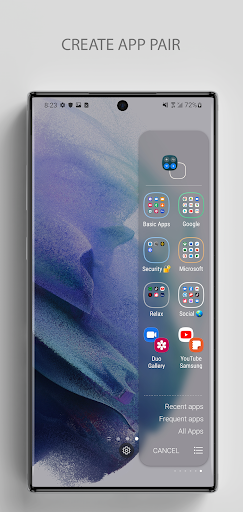
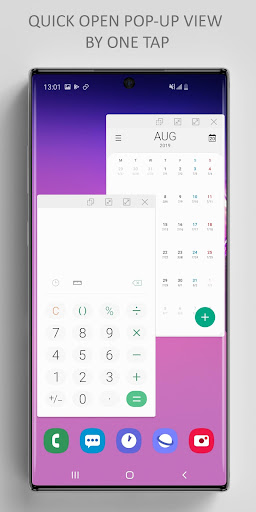
Specially, it’s great for multi-tasking with Pop-up view (Multi-window mode), Split view, App Pair.
** Features are better than defaul Apps Edge:
• Support 5 modes: Pop-up view, Split view, App Pair, App folder, Full screen
• Easily to access Recent apps or Frequent apps in Edge Panel
• Support the unlimited number of app/folder in Edge Panel
• Many options to customize your panel
• Easily to re-order apps in folder: long press on any app to rearrange your folder
• Support Night mode
• Support One UI 4.0
...
** Supported devices:
• Works only on Samsung devices which have Edge Screen such as Galaxy Z, Note, S, A, M... series
** How to use:
• Setting app > Edge Screen > Edge Panels > check Edge Apps panel
• When update a new version: Setting app > Edge Screen > Edge Panels > uncheck Edge Apps panel, then check again.
• In case of any problems, please do 2nd step again (uncheck and check again).
** Permissions:
• Have no permissions required
** Contact us:
• Let us know your thoughts here: edge.pro.team@gmail.com
EdgePro team.
What's New
- Automatically backs up and restores your app list
- Dynamic icons that adapt to your system theme
- Improved performance and stability
Version Information
- Version
- 2.5.0
- Downloads
- 1K+
- Updated on
- Oct 4, 2025
- Released
- Aug 25, 2019
- Requires
- Android 7.0
Statistics
Google Play Rating History
Rating Distribution
Downloads Over Time
Edge Apps, Multi-window has been downloaded times. Over the past 30 days, it averaged downloads per day.
Shaded area shows 30-day prediction based on historical trends
Historical data collection started recently. More data points will be available over time.
Edge Apps, Multi-window users say on Google Play
 Kathleen Eickholt
**Edit: update makes display unusable. Not sure what happened. Now edge panel is fixed finally so I just went back to that. May try it on my Tab S4.** WAS better than built in edge panel on my Samsung Galaxy s10. You can add basically an unlimited number of apps and so far, my experience is that they all work. After my phone updated to android 10, many things on the built in edge panel no longer worked, not to mention you're limited in how many you can have. Well worth the money.
 Sami Jildeh
It is great. You can have as many apps as you want. You can easily switch launch action to fullscreen or pop-up or split screen by one click. Also ability to set pair apps very easy. Also you can have your recent and frequently used apps available easily. Now I wish if we can have more space to show folder's icons or recent or frequent apps icons. It will be perfect. Thanks for the updates ☺️. I much recommend anyone to try it.
 Raystorm
edge apps isn't showing up on the edge panel so I can't even use it. can you guys fix that please? that'll be great, thank you
 Ace Donato
Can you remove that annoying thing " Edge Apps >" menu. It should not be there. Not cool, not seemles. It would be better without it when opening the panel. And also remove the background when opening the panel. Don't blur the background. Annoying flicker transition when switching between panels. Deym.
 Andrea Trammell
Fix the app! I even uninstalled and purchased it again just to give it a reboot. Nothing. I cant update any folders. It goes to the page, but won't let you select the apps listed below. Also, all th app icons are white circles like nothing fully loads anymore. I loved this app, but it's completely useless to me if I can't organize my apps in folders. That's the whole reason I bought this.
ApkTrusted Ratings & Reviews
More from EdgePro
See more apps




Scan this QR code to download

Forwarding you to the page at Google Play market in seconds...
Open Google Play market now