
Quick Settings v2.6.9
EdgePro




About this app
Developer Description
Quickly access useful apps and control your phone's settings with ease!
** Main features
• Toggle settings like Wi-Fi, Bluetooth, Do Not Disturb, Mobile Data, and more.
• Open frequently used apps like Camera, Calculator, and Clock in full-screen or pop-up views.
• Control music playback easily.
• Screen recording with customizable options.
• Take screenshots of specific portions of the screen.
• Adjust sound and brightness levels.
• Lock screen with a single tap.
• Access multiple flashlight levels.
• Pull down the notification bar with one hand.
• Multiple screen timeout options.
• Navigation buttons: Home, Back, and Recents.
• QR code scanning.
• Screen mirroring through Smart View.
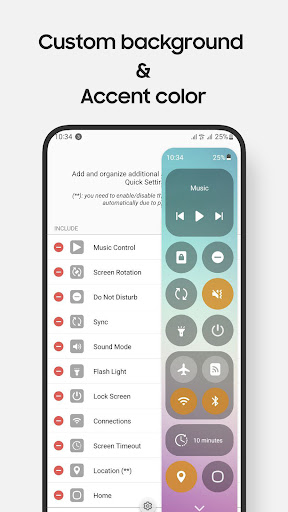
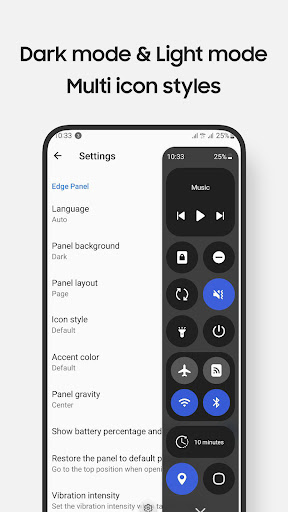
• Customizable control panel design and layout.
• Supports Night Mode.
** Notes:
• Long press on items to bring up control's setting. For example, long press on Lock screen to access the power dialog
• Due to Edge Panel limitations, volume and brightness adjustments are controlled by taps instead of sliders
• Some system-level controls, such as Airplane Mode and Mobile Data,... need to be toggled manually for user protection
• Lock screen feature:
- For devices running operating system 9 (Pie) or later, the Lock screen feature functions normally.
- For devices running versions earlier, a pattern or password will be required, as fingerprint and iris unlock methods are not supported due to system policies.
• The app currently supports phones with Edge Panels and is not designed for tablets or foldable devices (except Z Flip series)
** Supported devices:
• Compatible with Galaxy devices that feature Edge Panels, including models from Note series, S series, A series, and Z Flip series.
** How to use:
• Setting app > Display > Edge panels > enable Quick Settings panel
• After updates, uncheck and recheck the Quick Settings Panel if needed
** Permission
This app requires permissions for certain features, all of which are clearly explained while using them:
• Accessibility permission: this permission is required for the app to perform some controls. To disable this permission , turn off Quick Settings in Settings app > Accessibility > Installed apps. How this permission is used to handle some controls, please refer to official developer documentation: https://developer.android.com/reference/android/accessibilityservice/AccessibilityService. And using this permission in the app: https://www.youtube.com/watch?v=jfOCPhcmrDQ
- Lock Screen: lock the screen or open the power long-press dialog
- Screenshot: take a screenshot
- Home: go to the Home screen
- Recents: view recent apps
- Back: go back
- Notifications: open the notifications in Notification Bar
- Quick Setting Tiles: open the Quick Settings
- Lock automatically: Auto-lock the screen after a period of time
• android.permission.RECORD_AUDIO: allows Quick Settings to record audio, this permission is for Screen Recording control.
• android.permission.CAMERA: required to be able to access the camera device, this permission is for Scan QR Code, Flash Light controls.
• android.permission.READ_PHONE_STATE: allows read only access to phone state, this permission is for Wi-fi, Mobile Data controls.
...
** Contact us:
• Let us know your thoughts here: edge.pro.team@gmail.com
** App originality
• This app is independently developed for use on Galaxy devices and is not affiliated with or endorsed by other platforms or brands.
EdgePro team.
What's New
- Added a new option to customize the QR Code application
- Fixed an issue where the Back button did not work on V OS or higher
- General bug fixes and performance improvements
v2.6.6
- Support Russian, Traditional Chinese, Urdu
- Bug fixes
v2.6.3
- Support Hindi, Malay, Thai, Filipino
- Add new apps: AI app, Translate app
- Bug fixes
v2.6.1
- Bug fix and improvements
- R2L support
- Support Japanese
Version Information
- Version
- 2.6.9
- Downloads
- 10K+
- Updated on
- Aug 25, 2025
- Released
- May 12, 2021
- Requires
- Android 5.0
Statistics
Google Play Rating History
Rating Distribution
Downloads Over Time
Quick Settings has been downloaded times. Over the past 30 days, it averaged downloads per day.
Shaded area shows 30-day prediction based on historical trends
Historical data collection started recently. More data points will be available over time.
Quick Settings - Google Play Rankings
Top Rankings
| Rank | Country | Category | List | Change |
|---|---|---|---|---|
| — |
Ranking History in
No ranking data available yet. Rankings are updated daily.
#11 in Top Paid Tools in South Korea

#22 in Top Paid Tools in Indonesia

#41 in Top Paid Tools in Brazil

#68 in Top Paid Tools in Netherlands

Quick Settings users say on Google Play
 Yurko Fedoriv
Just wanted to give you a good review to dilute all the bad ones from people not knowing how to switch to the paid version or not realizing android limitations. However, why set default icons to iPhone? I was extremely confused, not knowing what icons meant until I found the option to switch to OneUI icons. This app is for Samsung users. I hate iOS and have no idea what their icons look like and what they mean :) You might want to change default to OneUI to smoothen the first impression.
 ammar ilyas
I'm unable to change the brightness and volume slider in the edge panel even after buying the pro version. When I ever press them a message telling me to upgrade to the pro version pops up. Need a quick fix for this or I would like a refund.
 RockyNinja
It's okay. Disappointed you can't slide volume and brightness. you have to tap to go up or down...The only reason I bought it.
 Caleb Agyepong
it's an alright app but i wouldnt say good it is poor in animation as in the feeling you get when youre trying to increase brightness or the volum is just horrible, in my opinion adding more animations to make transactions look more appealing to the user. We are consumers but we dont just consume anything in my opinion it doesnt even deserve 2 stars and it isnt worth it as a premium app or even a free app for it isn't worth it. Until this is fixed ill be getting a refund
 Alice Dzidzah
After paying, I still can't increase or decrease the light and other functions. And please, I selected the quick settings
ApkTrusted Ratings & Reviews
More from EdgePro
See more apps




Scan this QR code to download

Forwarding you to the page at Google Play market in seconds...
Open Google Play market now