
Eventbrite Organizer v9.42.0
Eventbrite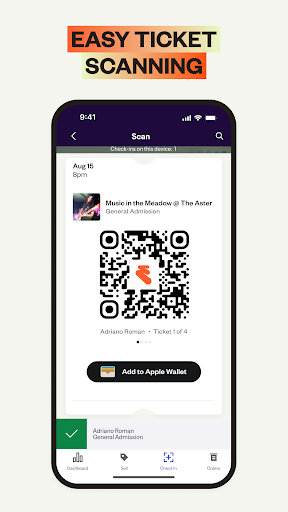
About this app
The Eventbrite Organizer app solves the problem of managing events on the go, allowing users to create and edit events, track and sell tickets, and check-in guests, making it an essential tool for event organizers and planners. This app benefits event professionals, such as conference organizers, festival planners, and venue managers, who need to manage events efficiently. Compared to other business apps, Eventbrite Organizer stands out with its comprehensive feature set and seamless integration with the Eventbrite platform. However, its limited offline capability and lack of advanced analytics features might fall short for some power users.
Pros
- With over 1 million downloads and a 3.5-star rating, Eventbrite Organizer has established a strong reputation for reliability and effectiveness, making it a trustworthy choice for event organizers.
- The app's intuitive interface and streamlined workflow enable users to manage events efficiently, saving time and reducing errors, which is a significant advantage for busy event professionals.
- As a free app with no ads or in-app purchases, Eventbrite Organizer provides a seamless and distraction-free experience, allowing users to focus on managing their events without interruptions.
- The app's integration with the Eventbrite platform ensures that event data is synchronized across all devices and platforms, providing a unified and up-to-date view of event information.
- The developer's reputation for providing regular updates and responsive support ensures that the app stays current with the latest features and best practices, giving users confidence in the app's long-term viability.
Cons
- One concern is the app's limited offline capability, which may hinder event organizers who need to manage events in areas with poor internet connectivity, potentially leading to lost sales or missed check-ins.
- Some users may find the app's feature set to be limited compared to other event management tools, particularly in terms of advanced analytics and reporting capabilities, which could be a drawback for larger or more complex events.
- The app's lack of support for multiple user accounts or roles may be a limitation for larger event teams, where multiple users need to collaborate on event management tasks, potentially leading to confusion or errors.
- The app's rating of 3.5 stars, while generally positive, suggests that some users may have experienced issues or frustrations with the app, which could be related to its functionality, performance, or support.
Best for: The ideal user for Eventbrite Organizer is an event professional, such as a conference organizer, festival planner, or venue manager, who needs to manage events efficiently and effectively, and has a moderate to high level of technical skill, as they will need to navigate the app's features and settings to get the most out of it.
Developer Description
Manage events on the go - create & edit, track & sell tickets, & check-in guests
With the Eventbrite Organizer App, you can:
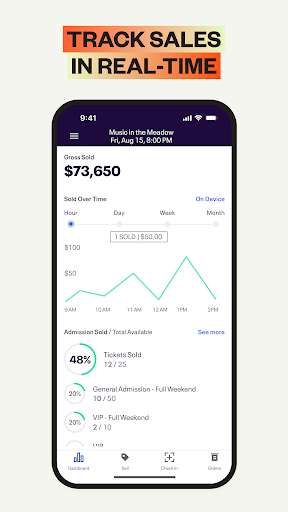
Track ticket sales in real-time to stay on top of your event’s performance
Check-in attendees seamlessly with fast, reliable ticket scanning from your Android device
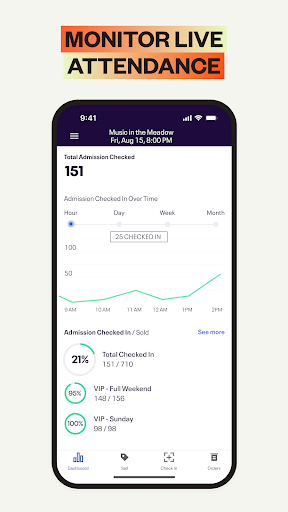
Monitor live attendance to keep your event running smoothly
Easily manage orders with reissues, cancellations, and refunds on the spot
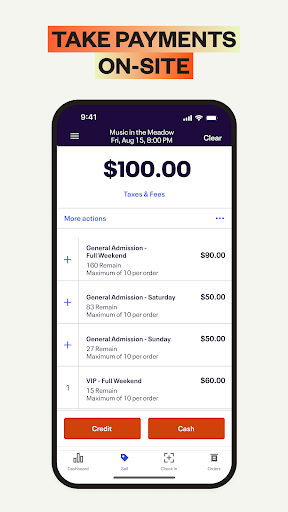
Accept fast, secure on-site payments for tickets and merchandise
Stay coordinated across multiple devices at different entry points with sales and check-in data that instantly syncs in real time
Multilingual? No problem: Eventbrite Organizer App is also available in German, French, Italian, Dutch, Portuguese, Swedish, and Spanish.
Standard credit card processing fee (2.9%) and an Eventbrite Service Fee are charged on all credit card orders sold through the Eventbrite Organizer App.
What is Eventbrite?
Eventbrite is the world’s largest self-service ticketing platform and events marketplace with the mission of bringing people together through live experiences.
Privacy
Since the app requires no permissions, users can be confident that their data is not being collected or shared without their knowledge, and the app's lack of ads and in-app purchases reduces the risk of unwanted data collection or tracking. However, users should still be cautious when using the app to manage sensitive event information, such as attendee data or financial transactions, and ensure that their device and account are properly secured.
Tips
To get the most out of Eventbrite Organizer, users should start by setting up their event details and ticketing information carefully, taking advantage of the app's intuitive interface and streamlined workflow. Additionally, users can optimize the app's performance by ensuring their device has a stable internet connection and sufficient storage space, and by regularly updating the app to take advantage of new features and bug fixes. By following these tips, users can ensure a smooth and efficient event management experience.
What's New
- Numerous minor improvements and fixes!
Version Information
- Version
- 9.42.0
- Downloads
- 1M+
- Updated on
- Dec 11, 2025
- Released
- Nov 14, 2011
- Requires
- Android 8.0
Statistics
Google Play Rating History
Rating Distribution
Downloads Over Time
Eventbrite Organizer has been downloaded times. Over the past 30 days, it averaged downloads per day.
Shaded area shows 30-day prediction based on historical trends
Historical data collection started recently. More data points will be available over time.
Eventbrite Organizer users say on Google Play
 Tellip Studio
Nice app, but please show us where to input our bank details for tickets payment
 Hayden s.p
It's very good for reviewing events. However, I wish it had all of the functionality of the website event organiser.
 Rod Conwell
The app is VERY Quirky on Android devices. Sometimes it works, sometimes it doesn't. It needs to be updated on Android devices because IPHONE allow for more information input. I use both platforms. The Android is easier to use (when it works), but the iPhone always works and provides you input more. Bottom line ...PLEASE UPDATE ANDROID
 Hamish Rodwell
The website and application seem to be designed in such a way that you have to jump back and forward between both in order to set up an event. This seems mostly accidental (buttons that do nothing or pages that don't load) but there is even one button on the app that explicitly tells you that "The app doesn't currently support payment options. You can set or edit this information on the Eventbrite website". I would FAR rather one of the platforms worked fully. Edit: Website is also incomplete
 R Groves
For some reason doesn't like to work to scan from my Galaxy s20 5fe, scans well using Galaxy S7 tablet. There's not much else the app can be useful for. The permissions and limits make it hard to do things. there seems to be no interface option to add a handheld bar scanner via USB or Bluetooth connection to the Android app! this means not being able to use a task specific device to quickly scan codes through their app. just horrible garbage!
ApkTrusted Ratings & Reviews
More from Eventbrite
See more apps
Similar Apps

TicketSwap - Buy, Sell Tickets
Free

Fit by Wix: Book, manage, pay
Free

GlossGenius: Booking, Payments
Free

Setmore Appointment Scheduling
Free

When I Work Team Scheduling
Free

Azazie: Bridesmaid&Formal Wear
Free

Visit A City
Free

Ambassador Cruise Line
Free

Travel Packing Checklist
Paid

Deputy: Employee Scheduling
Free

monday.com - Work Management
Free

Swimply - Rent Private Pools
Free

PackPoint travel packing list
Free

Partiful: Fun Party Invites
Free

Square Appointments: Scheduler
Free

Planning Center Services
Free
Scan this QR code to download

Forwarding you to the page at Google Play market in seconds...
Open Google Play market now