
Filmic Firstlight - Photo App v1.3.10
Mosaic Srl

About this app
Developer Description
Modern photos with analog vibe
-- -- -- -- -- --
Rediscover the joy of capturing life’s moments in photographs you will immediately treasure and want to share.
Firstlight combines custom film simulations, adaptive film grain and Filmic Pro’s famous live analytics to offer an advanced but approachable front end camera experience like no other.
Fast, easy and intuitive, Firstlight lets you envision and capture your best moments in camera, without having to spend hours editing your photos later. Shoot and share, it’s that easy.
-- -- -- -- -- --
ADVANCED IMAGE CONTROLS
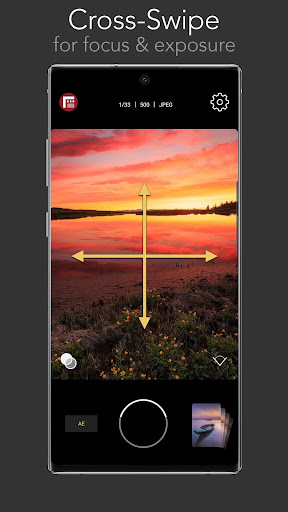
- Fast, intuitive focus and exposure controls: Tap the screen to set focus/exposure, tap again to lock
- AE Mode: Included is our proprietary Auto Exposure mode for setting shutter/iso combination
- Cross-swipe manual controls: The most intuitive way to manually adjust focus and exposure. Swipe across the image to dial in your perfect shot. Swipe up and down to adjust exposure. Swipe left and right to adjust focus.
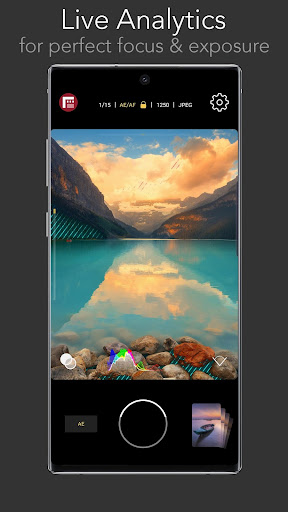
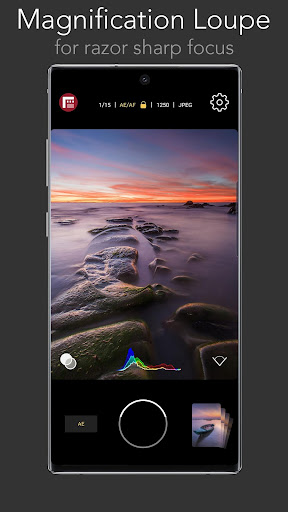
- Reactive analytics: A foundation feature of Filmic Pro and now in a photo app. Manually adjusting your focus and exposure will automatically apply focus peaking or zebra stripes to make sure you get your shot just right.
- RGB Histogram: Dynamically shows the exposure profile of the image across all color channels.
GET THE LOOK YOU WANT
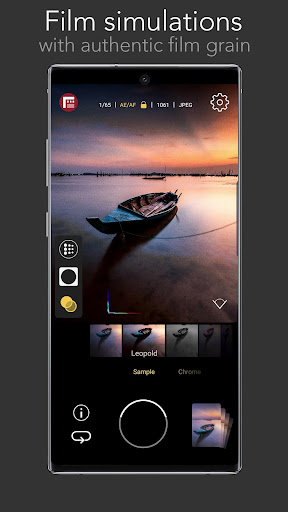
- Vintage film simulations: The magic of Firstlight is in our realistic tributes to authentic film stocks. A range of film simulations are included for free with the app.
- Film grain: Apply natural looking film grain effects to give your photos that ‘film look’. Medium grain is included as a free option.
- Vignette: Apply a subtle dark vignette to your image. Medium vignette is included as a free option.
- Lens selector: Quickly switch between all available lenses on your device. (Note: camera/lens support is device specific).
PROFESSIONAL CAMERA TOOLS
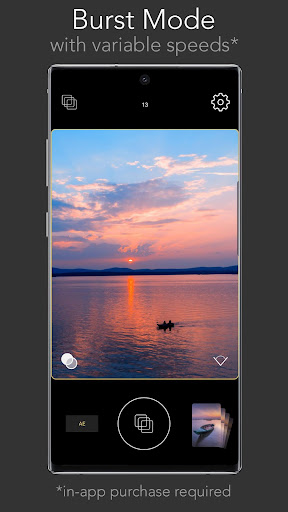
- Burst mode
- Timer
- Flash
- Grid overlays
- Aspect ratios: 4:3, 16:9, 3:2, 1:1, 5:4
- JPG or HEIC Selection
- HDR control (on supported devices only)
- Volume button shutter and support for most bluetooth camera shutter remotes
- Filmic Pro quick launch button (for owners of Filmic Pro)
FIRSTLIGHT PREMIUM (with in-app purchase)
Upgrade to unlock the full potential of Firstlight with the following capabilities:
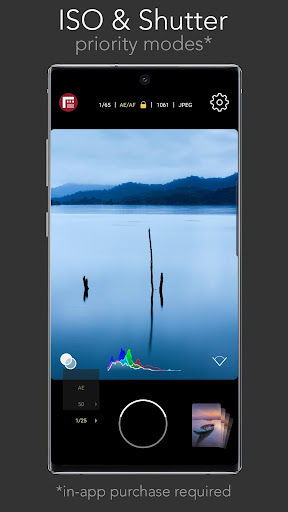
- Shutter and ISO priority modes: In addition to AE you can set specific Shutter Speed or ISO values to adhere to and let the app automatically adjust exposure for the unlocked value.
- Expanded film simulation options: More realistic film simulations and more to be added in the future for paid subscribers.
- Film grain: Fine, coarse and ISO adaptive options in addition to medium
- Adjustable vignette: Low and heavy options in addition to medium.
- Configurable burst mode
- Anamorphic adapter support
- RAW: DNG and TIFF formats
- Custom Function button
- Custom live analytics
- Configurable Focus and Exposure controls
- Embedded copyright
What's New
In-app purchases
$0.99 - $19.99 per item
Version Information
- Version
- 1.3.10
- Downloads
- 100K+
- Updated on
- Jan 31, 2024
- Released
- Feb 11, 2020
- Requires
- Android 8.0
Statistics
Google Play Rating History
Rating Distribution
Downloads Over Time
Filmic Firstlight - Photo App has been downloaded times. Over the past 30 days, it averaged downloads per day.
Shaded area shows 30-day prediction based on historical trends
Historical data collection started recently. More data points will be available over time.
Filmic Firstlight - Photo App users say on Google Play
 Manoj Sajjan
very much nice 🙂
 Policharpus Putro
First of all, it's a good app. Thumbs up for that. But I found that when i try to capture as RAW+JPEG, error message always pop up and said "Error Saving the Image". Only RAW is fine ... Only JPEG is also fine. May I know why this behaviour occurred? Oh yeah ... I don't want an answer like "Oh ... Then you should shoot in RAW then convert it into JPEG!". Because there is something wrong either with my phone or this app. Cheers!
 David Belyea
Edit: FiLMiC team, there are no manufacturer limitations that would limit the Pixel 6 Pro from capturing in RAW. Other apps such as Open Camera use the Camera2 API to allow this feature. Original: Works well for more fine tuned controls but is not allowing me to take raws. On pixel 6 Pro.
 Zach Prichard
Absolutely no medium to low light performance. I'm really confused by this app. Filmic Pro is great and I bought the pro version of this. I love the interface and features. But it literally cannot take a non blurry image in medium light. No matter how absolutely dead still I hold it. I'm on a brand new Pixel 6. It takes amazing photos in the native camera app in the exact same lighting. Not talking about night mode stuff. Just sitting in my living room with four lamps on and a TV. Blurry.
 Siddharth Doshi
App keeps crashing now. You're fixing bugs and stuff but you're not adding new features like support for a truly wide-screen viewfinder in 16:9 mode vs the one in 4:3 mode. When will I get to see that update ? I have been requesting for this seemingly easy task for 3 years - 2020 , 2021 and 2022.
ApkTrusted Ratings & Reviews
More from Mosaic Srl
See more apps
Scan Hero: Scanner App
Free

Weather Live°
Free

Blossom - Plant Identifier
Free

Confide - secure messenger
Free
Alarm Clock for Me
Free

Clime: NOAA Weather Radar Live
Free

Planes Live - Flight Tracker
Free

Pixomatic - Background eraser
Free

Robokiller - Spam Call Blocker
Free

Productive - Habit tracker
Free

Window - Fasting tracker
Free

TapeACall: Call Recorder
Free

Typeright: Grammar Checker
Free

iTranslate Translator
Free

Storm Shield
Free

Filmic Remote Legacy
Free
Similar Apps

3D Photo: Imager
Paid

Lensa: photo editor & AI art
Free
POV – Disposable Camera Events
Free
Presets For LR - Photo Filters
Free

Banano Pro İmage Generator
Paid

eZy Watermark Photos Pro
Paid

PicMaster - AI Photo Editor
Paid

Oji: AI Avatar Photo Generator
Free
MOVA - AI Hug Video & Filter
Free

PICNIC - photo filter for sky
Free

mcpro24fps manual video camera
Paid

AI Photo Editor: AI Expand
Free

MindSync - Therapy Journal
Free

Camera FV-5 Lite
Free

PicWish: AI Photo Editor
Free

Facewow: AI Headshot Generator
Free
Scan this QR code to download

Forwarding you to the page at Google Play market in seconds...
Open Google Play market now