
Game Recorder with Facecam v1.1.4
Jaya Zone Tech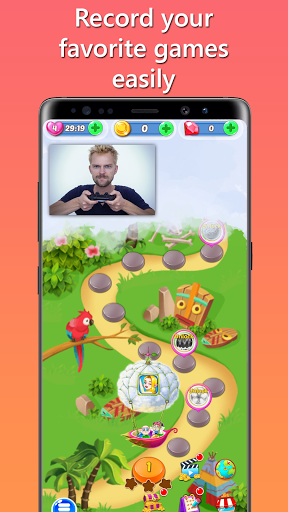


About this app
Developer Description
Record Gameplay and Share Your Gaming Moments with Game Recorder with Facecam!
Capture Every Moment:
With Game Recorder with Facecam, you can easily record your game screen with high-quality video and audio. Showcase your gaming skills, create engaging content, and share your achievements with the world.
Customize Your Recording:
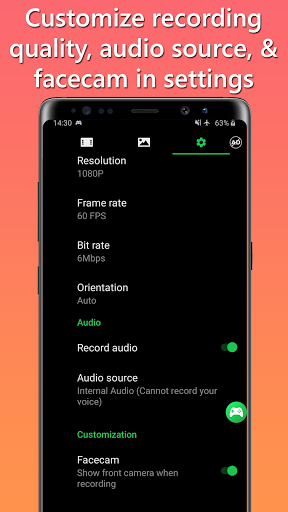
Tailor your recording to perfection! Adjust the video settings, including resolution (720p, 1080p, and more), bit rate (4mbps, 5mbps, and beyond), and orientation (landscape or portrait). Choose the audio source—record game audio, your voice, or both. Plus, enjoy the flexibility to record internal audio if your device is running Android 10 or above.
Facecam Feature:
Take your recordings to the next level with our Facecam feature. Overlay your face on the screen while recording and let your viewers see your genuine reactions and expressions as you conquer gaming challenges. Customize the Facecam size, aspect ratio, and even drag and position it anywhere on the screen to suit your preferences.
Countdown and Floating Button:
Get ready to record with a countdown timer! Set your preferred countdown duration, whether it's 3 seconds or more, and ensure you're perfectly prepared for the action. Our floating button feature allows you to access recording, screenshot, pause, or stop functions from any app, ensuring convenience and ease of use.
Built-in Photo Editor:
Enhance your gaming screenshots with our powerful built-in photo editor. Add text, crop, rotate, adjust brightness, and tweak saturation to make your images stand out. Customize and perfect your screenshots before sharing them with your friends, followers, or on social media platforms.
Share and Save:
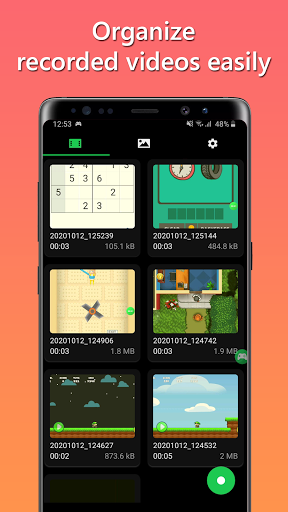
Game Recorder with Facecam makes it simple to share your recorded videos and edited screenshots. Whether it's YouTube, TikTok, Twitch, or other social media platforms, effortlessly showcase your gaming skills and engage with your audience. Choose your preferred storage location, whether internal storage or SD card, for easy access to your recordings.
Unlock Advanced Features:
Unlock even more possibilities with our in-app purchase or subscription options. Remove ads, gain access to the image editor, unlock Facecam functionality, and record internal audio. Enjoy a seamless, ad-free recording experience and take your gaming content creation to new heights.
Record Anytime, Anywhere:
Never miss a gaming moment! Game Recorder with Facecam offers two convenient recording methods. Use the floating button, which remains visible even when you're using another app, for quick and easy access. Alternatively, utilize the notification panel to start, pause, stop recording, or capture screenshots effortlessly.
Please Note:
Respect copyright laws and use Game Recorder with Facecam responsibly. Do not record or distribute copyrighted material without proper authorization. We assume no responsibility for misuse by users.
Have questions or suggestions? We'd love to hear from you! Contact us at jayazonetech@gmail.com and let us know how we can improve your Game Recorder with Facecam experience.
Get ready to unleash your gaming prowess and share your gaming journey with the world—download Game Recorder with Facecam now!
What's New
Performance improvements of Game Recorder with Facecam
V1.0.6
• Processing time for internal audio recording is now 20 times faster. You no longer have to wait long.
• Some other improvements
V1.0.5
• Better facecam
V1.0.4
User can choose to save on SD Card
V1.0.3
Added progress for internal audio recording
V1.0.2
New features added:
• Facecam
• Internal audio recording (For Android 10 (Q) or above)
In-app purchases
$1.99 - $19.99 per item
Version Information
- Version
- 1.1.4
- Downloads
- 100K+
- Updated on
- Dec 2, 2025
- Released
- Oct 11, 2020
- Requires
- Android 6.0
Statistics
Google Play Rating History
Rating Distribution
Downloads Over Time
Game Recorder with Facecam has been downloaded times. Over the past 30 days, it averaged downloads per day.
Shaded area shows 30-day prediction based on historical trends
Historical data collection started recently. More data points will be available over time.
Game Recorder with Facecam users say on Google Play
 Kruz Sherman
it's really good except a records the sounds around you so if you don't want that don't don't download this app and also it saves all the videos to your gallery so it's really good no internet required but if you do have internet has ads
 B-RONE
it could be the App I'm trying to record, every ScreenRec I've used crashes on it. but other Free ones I tried had tools, could name files, trimimg and merge capabilities. the videos are still saved if it does crash just have to restart the Rec. for Free its pretty good, I'll recommend it still.
 Dante Gael Munoz
camera froze
 Karly Mills
the record button is rigged fix it
 Riazul
this is not best app only wasting your time 😤😤😤😤😞
ApkTrusted Ratings & Reviews
More from Jaya Zone Tech
See more apps
Music Recorder - Song Recorder
Free

Sleep Timer for Spotify Music
Free
Photo On Photo Editor
Free

Internal Audio Screen Recorder
Free

Charge Alarm: Full Low Battery
Free

Temperature Today: Weather App
Free

20 20 20: Eye Break Reminder,
Free

Video Audio Remover - Sound Re
Free

Audio Trimmer: Music, Ringtone
Free

Screen Capture for Video & Ima
Free

Stereo Test - Left and Right
Free

Online Meeting Screen Recorder
Free
Decibel Meter - dB Sound Meter
Free

Sleep Timer for Netflix Movie
Free

FaceCam Screen Recorder
Free
Resize Image - Compress JPEG
Free
Scan this QR code to download

Forwarding you to the page at Google Play market in seconds...
Open Google Play market now