Photo On Photo Editor v1.0.8
Jaya Zone Tech




About this app
Photo On Photo Editor solves the problem of overlaying multiple images onto a single background image, benefiting graphic designers, social media enthusiasts, and photographers alike. With a 4.4/5 rating and over 100,000 downloads, it stands out in the Tools category for its simplicity and effectiveness. Compared to alternatives, Photo On Photo Editor's lack of permissions required is a significant advantage, indicating a focus on user privacy. However, its limited feature set and presence of ads may deter some users.
Pros
- The app's high user rating of 4.4/5 indicates a well-received and stable product, suggesting that the developer has made efforts to address user concerns and provide a quality experience.
- With over 100,000 downloads, Photo On Photo Editor has demonstrated moderate social proof, implying that it has been tested by a sizable user base and found to be useful.
- The app's minimal permission requirements, with a total of 0 permissions, is a significant advantage in terms of user privacy and security, as it reduces the risk of data collection and misuse.
- The presence of in-app purchases, ranging from $1.99 to $39.99 per item, provides users with the option to upgrade their experience and support the developer, while the free version with ads offers an accessible entry point for new users.
- The developer's website and email provide a clear channel for user feedback and support, indicating a commitment to customer satisfaction and ongoing development.
Cons
- The presence of ads in the free version may detract from the user experience, potentially leading to interruptions and distractions, especially for users who intend to use the app for professional or creative purposes.
- The limited feature set of Photo On Photo Editor may not be sufficient for advanced users or those requiring more complex image editing capabilities, potentially leading to disappointment or frustration.
- The app's reliance on in-app purchases may be seen as aggressive by some users, particularly if the free version is too limited or the ads are too intrusive, potentially leading to a negative perception of the developer's monetization strategy.
- The lack of information about the app's data collection and usage policies, despite the minimal permission requirements, may still raise concerns among privacy-conscious users, who may prefer more transparency about the app's data handling practices.
Best for: The ideal user for Photo On Photo Editor is a tech-savvy individual, likely between the ages of 18 and 40, who requires a simple and intuitive tool for overlaying multiple images onto a single background, such as a social media influencer, graphic designer, or photographer, and who values ease of use, flexibility, and privacy in their image editing software.
Developer Description
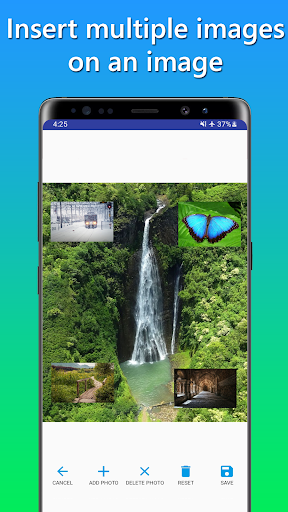
Insert multiple images on an image and edit the image with Photo On Photo Editor
Insert image on another image
Select an image as the background, and then insert the image above the background image.
Insert image directly from camera
With this feature, you can insert an image from your camera.
Photo editor
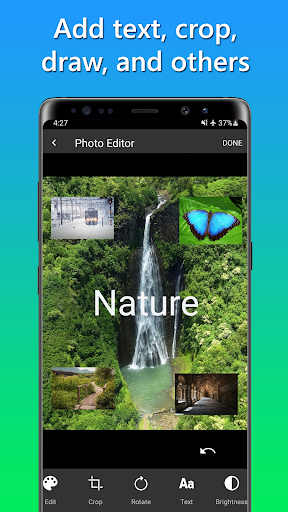
Draw, crop, rotate, add text, and change brightness or saturation with the built-in *photo editor.
*To edit an image, click on the image and then click the edit button.
History
View all saved images inside Photo On Photo Editor app.
Share
Share the saved image easily.
*To share an image, long click the image, and then the option to share the image will appear.
If you have any questions or suggestions about Photo On Photo Editor, please email us.
Privacy
Given the app's minimal permission requirements, users can be relatively confident that their data is not being collected or misused. However, it is still essential to review the app's terms of service and privacy policy, if available, to understand any potential data collection or usage practices. Additionally, users should be cautious when making in-app purchases, ensuring that they are aware of the costs and benefits associated with each item.
Tips
To get the most out of Photo On Photo Editor, users should start by exploring the app's tutorials or guides, if available, to understand the full range of features and capabilities. Additionally, users can optimize their experience by adjusting the app's settings, such as turning off ads or customizing the interface, to suit their preferences. Finally, users can integrate Photo On Photo Editor with other image editing or social media apps to enhance their overall creative workflow.
What's New
In-app purchases
$1.99 - $39.99 per item
Version Information
- Version
- 1.0.8
- Downloads
- 100K+
- Updated on
- Nov 22, 2025
- Released
- Feb 16, 2022
- Requires
- Android 6.0
Statistics
Google Play Rating History
Rating Distribution
Downloads Over Time
Photo On Photo Editor has been downloaded times. Over the past 30 days, it averaged downloads per day.
Shaded area shows 30-day prediction based on historical trends
Historical data collection started recently. More data points will be available over time.
Photo On Photo Editor users say on Google Play
 Nuella
Thanks to the developers. This app does exactly what it says it'll do. I've added images to pictures and it's amazing. I encourage you to download.
 Onel
Onel
Very easy and simple to use. It will be a 5 star if only the second photo (after adding background photo) can be resized. The second photo (foreground photo) is too small. If you guys can make it a little bit bigger or resizeable, it will be perfect !!!
 Govtofindia BHARATSARKAR
much more ads
 Barrackpore TAX Firm
need update sub photo circle/ triangle edit erase option need.
 Evelyn Gallo
it's super ugly, it's so struggle to put another one photo again and it has many ads so much.
ApkTrusted Ratings & Reviews
More from Jaya Zone Tech
See more apps
Music Recorder - Song Recorder
Free

Sleep Timer for Spotify Music
Free

Internal Audio Screen Recorder
Free

Charge Alarm: Full Low Battery
Free
Temperature Today: Weather App
Free

Sleep Timer for Netflix Movie
Free

20 20 20: Eye Break Reminder,
Free

Video Audio Remover - Sound Re
Free

Stereo Test - Left and Right
Free

Game Recorder with Facecam
Free

Audio Trimmer: Music, Ringtone
Free

Screen Capture for Video & Ima
Free

Online Meeting Screen Recorder
Free
Decibel Meter - dB Sound Meter
Free

FaceCam Screen Recorder
Free
Resize Image - Compress JPEG
Free
Similar Apps

3D Photo: Imager
Paid
PicCollage: Photo Video Editor
Free

Photobook: Photo Books & Gifts
Free

Background remover - remove.bg
Free

Apowersoft Background Eraser
Free

Geulgram - Text on Photo
Free
Unfold: Story & Reels Maker
Free

Photo Editor - Collage Maker
Free

eZy Watermark Photos Pro
Paid

Cut Cut: Photo Editor & CutOut
Free

Add Text: Text on Photo Editor
Free
Greeting & Birthday Card Maker
Free

Background Eraser - BG Remover
Free

MobiSaver: Data&Photo Recovery
Free

PDF Merge: Scan, Sign & Edit
Free

PicMonkey Photo Editor
Free
Scan this QR code to download

Forwarding you to the page at Google Play market in seconds...
Open Google Play market now