FaceCam Screen Recorder v1.1.2
Jaya Zone Tech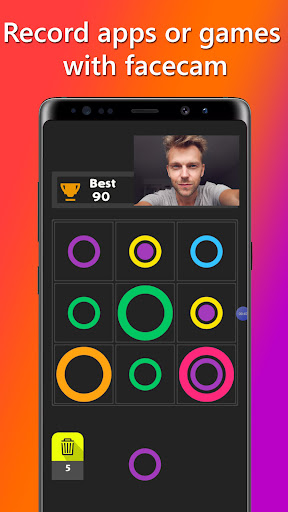


About this app
Developer Description
Record screen with facecam. Customize position, size & quality. Share moments.
Introducing FaceCam Screen Recorder, the ultimate app for live streamers, gamers, and content creators who want to record their phone's screen along with their face using the front camera. With its powerful features and user-friendly interface, you can create engaging videos and share your gaming experiences with the world.
FaceCam Feature
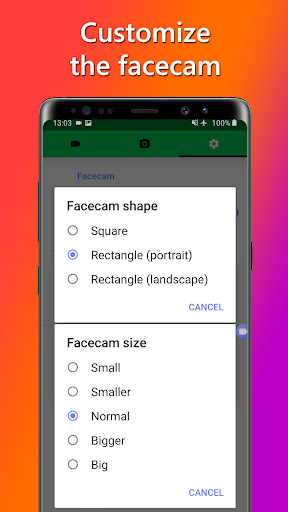
Customize the position, size, and aspect ratio of the face camera to suit your streaming or recording setup. Whether you're a live streamer, gamer, or content creator, you have full control over how your face appears on the screen. Move the face camera anywhere you like to provide your viewers with a personalized and immersive experience.
Adjust Video Quality
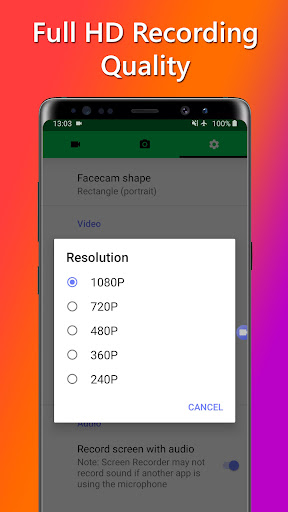
Tailor your videos for optimal streaming and uploading to platforms like YouTube or Twitch. Adjust the video resolution and frame rate to capture your gameplay in stunning detail. Choose from popular options like 720p or 1080p, or customize the settings to match your desired quality and compatibility.
Audio Customization
Enhance your gaming videos with crystal-clear audio. Choose to record in-game sounds and commentary or keep it silent for added flexibility. Select the audio source from your Android device's microphone or internal audio* to capture the excitement of your gameplay.
*(requires Android 10 or above)
Built-in Screenshot Editor
Capture and highlight the best moments of your gaming sessions using the built-in screenshot editor. Add text, crop, rotate, adjust brightness, and change saturation levels to create eye-catching thumbnails or share your achievements on social media.
Seamless Sharing
Share your recorded videos effortlessly with your gaming community or online followers. Open them in popular apps for editing or directly share them on social media platforms. Long-press the video or screenshot to access sharing options and connect with your audience in just a few taps.
Please note that FaceCam Screen Recorder should not be used to record copyrighted audio, video, music, or movies without proper authorization. We emphasize responsible usage and disclaim any responsibility for misuse. By installing and using this app, you agree to take full responsibility for your actions.
Unlock Additional Features: Elevate your streaming and recording capabilities with in-app purchases or subscriptions. Unlock features such as ad removal, advanced video editing tools, facecam functionality, and internal audio recording for a seamless content creation experience.
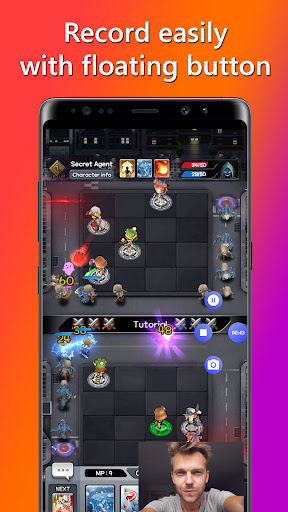
Capture Moments Anywhere: Access the screen recording features even while playing games or using other apps. The floating button remains visible on your screen, allowing you to start or pause recordings, take screenshots, or stop the recording process without interruption. Alternatively, control your recording and screenshot functions from the notification panel.
We value your feedback and are committed to supporting your streaming and recording needs. If you have any questions or suggestions, please contact us via email, and our dedicated team will be happy to assist you.
Download FaceCam Screen Recorder now and unlock the power to record, create, and share your gaming adventures with your audience. Start streaming, gain followers, and make your mark in the gaming community with FaceCam Screen Recorder.
What's New
In-app purchases
$0.99 - $39.99 per item
Version Information
- Version
- 1.1.2
- Downloads
- 100K+
- Updated on
- Dec 4, 2025
- Released
- Sep 6, 2021
- Requires
- Android 7.0
Statistics
Google Play Rating History
Rating Distribution
Downloads Over Time
FaceCam Screen Recorder has been downloaded times. Over the past 30 days, it averaged downloads per day.
Shaded area shows 30-day prediction based on historical trends
Historical data collection started recently. More data points will be available over time.
FaceCam Screen Recorder users say on Google Play
 Zafaran
It's really nice for my channel because it shows my face five star that's my honest opinion I like this app it's just that it has ads
 waseel ali
it's a very good app we can use it to film YouTube videos I like it very much but I don't use it very often because I don't record very often but if somebody records often this is used for them hope you enjoy this app and be happy
 sana hamid
It is good but i want to make try not to laugh chalenge for youtube channel but they have small face scan for this challenge
 رضا محمد طاهر
it's not that good you can't customise your face cam but it's still working
 Lisa Lawson
This is a fake app and it wont let me Livestream it literally says in the name, this is 100 percent a scam. Don't install this app, this is so trash, so trash, in fact, this literally doesn't even work if I don't see this app off the app store I'll put a lawsuit on you
ApkTrusted Ratings & Reviews
More from Jaya Zone Tech
See more apps
Music Recorder - Song Recorder
Free

Sleep Timer for Spotify Music
Free
Photo On Photo Editor
Free

Internal Audio Screen Recorder
Free

Charge Alarm: Full Low Battery
Free
Temperature Today: Weather App
Free

Sleep Timer for Netflix Movie
Free

20 20 20: Eye Break Reminder,
Free

Video Audio Remover - Sound Re
Free

Stereo Test - Left and Right
Free

Game Recorder with Facecam
Free

Audio Trimmer: Music, Ringtone
Free

Screen Capture for Video & Ima
Free

Online Meeting Screen Recorder
Free
Decibel Meter - dB Sound Meter
Free
Resize Image - Compress JPEG
Free
Similar Apps

Loom – Screen and Cam Recorder
Free

Screen Recorder
Free

Video Recorder
Paid

ADV Screen Recorder
Free

Screen Recorder - Vidma Record
Free

Screen Recorder - AZ Recorder
Free

Screen Recorder - Vidma REC
Free

Text & Image to Video AI Gen
Paid

Screen Recorder - XRec Lite
Free

Smart Video Downloader
Paid

Banano Pro İmage Generator
Paid

mcpro24fps manual video camera
Paid

Screen Recorder: Facecam Audio
Free

HQ Video Player & Casting
Paid

Screen Recorder Unlimited
Free

Glip Screen Recorder
Free
Scan this QR code to download

Forwarding you to the page at Google Play market in seconds...
Open Google Play market now