
Internal Audio Screen Recorder v1.1.2
Jaya Zone Tech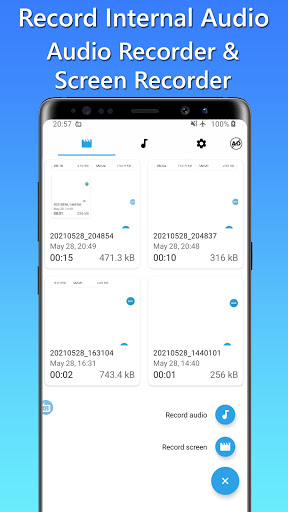


About this app
Developer Description
Record internal audio of music or video easily with Internal Audio Recorder!
Whether you want to create tutorials, gameplay videos, or capture audio from your favorite apps, this app has you covered.
Record and Customize
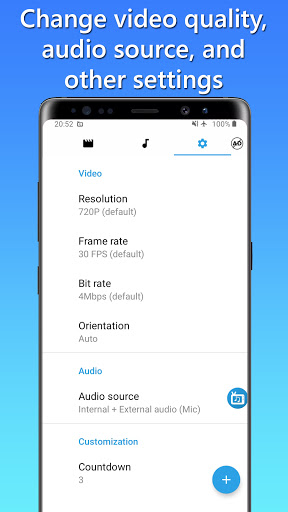
Capture your screen and internal audio at the same time or choose to record internal audio only. Customize your recordings to perfection with options for video quality, including resolution (720p, 1080p, etc.), frame rate (30 fps, 60 fps, etc.), bit rate (5mbps, 6mbps, etc.), and orientation (landscape or portrait).
Audio Source Options
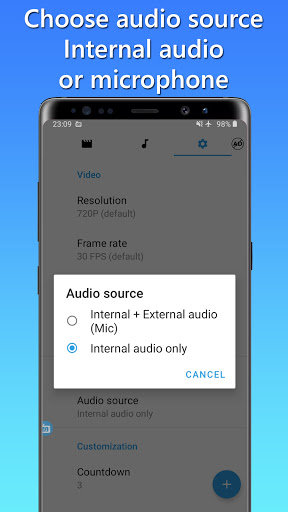
Choose between two audio sources:
• Record internal audio only*, creating a seamless recording experience.
• Record both internal and external audio using the microphone, ensuring clear audio commentary or capturing external sounds.
*Please note that the "Internal audio-only" feature is available for devices running Android 10 (Q) or above. For devices running Android 9 (P) or earlier versions, you can still enjoy recording by selecting the option to record both internal and external audio using the microphone.
Countdown and Save Options
Take control of your recordings with the countdown feature, allowing you to prepare before starting. Choose from a range of countdown durations, such as 3, 5, or 10 seconds. Additionally, you have the freedom to save your recordings either in the internal storage or on an SD card, providing you with flexibility and convenience.
Personalize Your Experience
Switch between different themes to suit your preferences. Select from Auto, Dark, or Light themes to ensure a visually pleasing interface during your recording sessions.
Trim and Edit
Refine your recordings with the built-in audio and video trimmers. Easily cut or trim unwanted parts from your recordings, creating polished content that is ready for sharing.
Floating Button and Easy Access
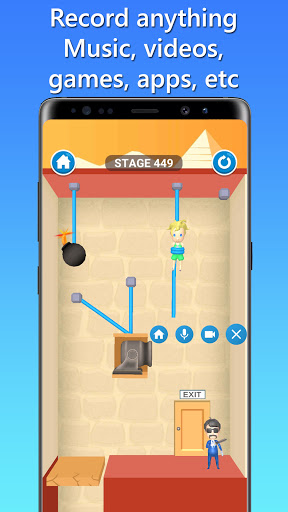
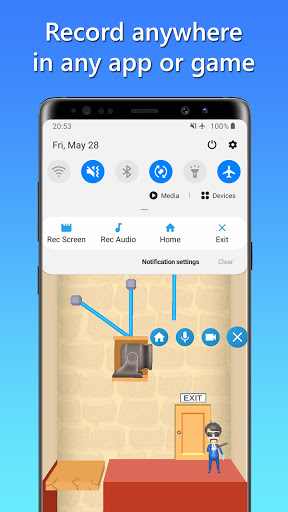
Effortlessly record from any app or game using the convenient floating button. The button remains visible even while you switch between applications. Alternatively, initiate recordings directly from the notification panel for quick and seamless access.
Built-in Media Player
Enjoy the convenience of the built-in media player, allowing you to preview and playback your recorded audio and video files without leaving the app. Easily manage and organize all your recordings within a single interface.
Share and Collaborate
Seamlessly share your recorded audio or video files with friends, colleagues, or on your favorite social media platforms. Use the share feature to distribute your content and engage effortlessly with your audience.
Please note that Internal Audio Screen Recorder should not be used to record copyrighted audio, video, music, or movies without proper authorization. Users are responsible for complying with applicable copyright laws.
For any inquiries or assistance regarding Internal Audio Screen Recorder, please reach out to our support team via email.
Start capturing your screen and internal audio today with Internal Audio Screen Recorder - the ultimate recording solution for Android users.
What's New
Performance improvements of Internal Audio Screen Recorder
V1.0.7
• Video trim feature added.
V1.0.5
• Processing time for internal audio recording is now 20 times faster. You no longer have to wait long.
• Audio trim feature added.
• Some other improvements.
In-app purchases
$0.99 - $39.99 per item
Version Information
- Version
- 1.1.2
- Downloads
- 1M+
- Updated on
- Dec 20, 2025
- Released
- May 28, 2021
- Requires
- Android 7.0
Statistics
Google Play Rating History
Rating Distribution
Downloads Over Time
Internal Audio Screen Recorder has been downloaded times. Over the past 30 days, it averaged downloads per day.
Shaded area shows 30-day prediction based on historical trends
Historical data collection started recently. More data points will be available over time.
Internal Audio Screen Recorder users say on Google Play
 Cassidy Wilkerson
I really like this app though I would much appreciate the ability to search for a particular recording or sort my recordings alphabetically
 Sudheer Kumar
Very unique App to record audio internally, but lack some features like auto stop when there is no internal audio for a certain period of time and ability to record when screen off (lock screen position). Please provide these features so that I go for Pro version even, Thank You Devs n God Bless.
 Chee- “Nickname” Rex
it works for audio recording, but the premium version is too expensive. it shouldn't be a recurring subscription when an audio recorder app for Android doesn't need that much updating.
 RYLAN Harbin
good for screen recording, but It doesn't record the sound. Does anyone know why it won't work?
 Kayla Ana Sofia
not working. completely silent recording even though I already set the source to internal audio.
ApkTrusted Ratings & Reviews
More from Jaya Zone Tech
See more apps
Music Recorder - Song Recorder
Free

Sleep Timer for Spotify Music
Free
Photo On Photo Editor
Free

Charge Alarm: Full Low Battery
Free

Temperature Today: Weather App
Free

20 20 20: Eye Break Reminder,
Free

Video Audio Remover - Sound Re
Free

Stereo Test - Left and Right
Free

Game Recorder with Facecam
Free

Audio Trimmer: Music, Ringtone
Free

Screen Capture for Video & Ima
Free

Sleep Timer for Netflix Movie
Free
Decibel Meter - dB Sound Meter
Free

Online Meeting Screen Recorder
Free
FaceCam Screen Recorder
Free
Resize Image - Compress JPEG
Free
Similar Apps

Screen Recorder
Free

Loom – Screen and Cam Recorder
Free

Dolby On: Record Audio & Music
Free

Screen Recorder - AZ Recorder
Free

Screen Recorder Unlimited
Free

Screen Recorder - Vidma Record
Free

Screen Recorder - Vidma REC
Free

ADV Screen Recorder
Free

Riverside: Record podcasts
Free

Screen Recorder: Facecam Audio
Free

Smart Video Downloader
Paid

Screen Recorder - XRec Lite
Free
n-Track Studio Pro | DAW
Paid

Screen Recorder: Audio & Video
Paid

ASR Voice Recorder
Free

Symfonik
Paid
Scan this QR code to download

Forwarding you to the page at Google Play market in seconds...
Open Google Play market now