Work Shift Calendar v2.0.7.8
LRHSoft

About this app
Developer Description
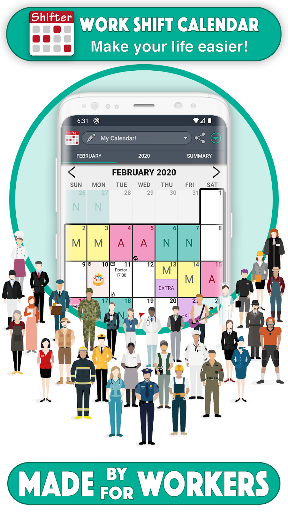
Specially designed for shift workers
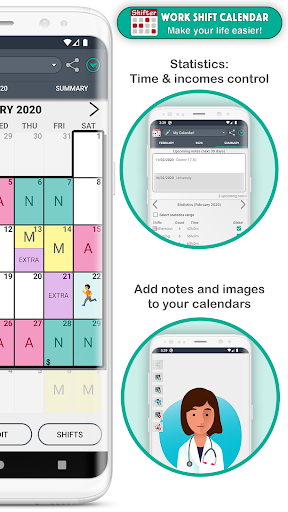
You can carry out an exhaustive control of your working day and your income quick and easily thanks to our statistics system.
SHIFTS 📆
- Create fully configurable shifts ✏️
- Add your workday, with option to include split shift and rest time. Keep track of your schedules 📊
- Enter your income, overtime and early exit. Set up earnings and control working time easily 💰
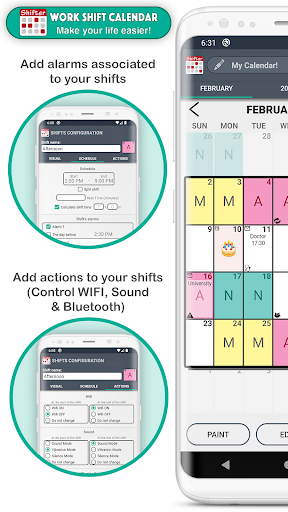
- Create alarms associated with that shift (for that day or for the previous day) and customize its sound 🔔
- Include actions at the beginning or end of the schedule of each shift (WIFI, sound mode, Bluetooth) 🔇
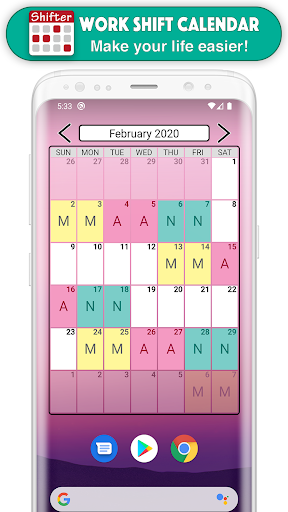
- Paint up to two shifts per day.
- Import your shifts from one calendar to another.
- Add customizable icons associated with a date 🐱
NOTES 📝
- Create notes on each day and add reminders with alarms. Don't ever forget important appointments or notes 🔔
- Customize the sound of alarms.
- Include images and handmade drawings in your notes ️🖼️
WIDGETS 📲
- Create a widget for your desktop and view your calendar even without opening the app.
- Choose between weekly and monthly Widget.
- Choose the size you like more.
TOP FUNCTIONS 🚀
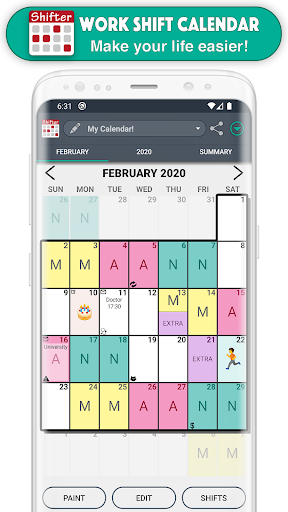
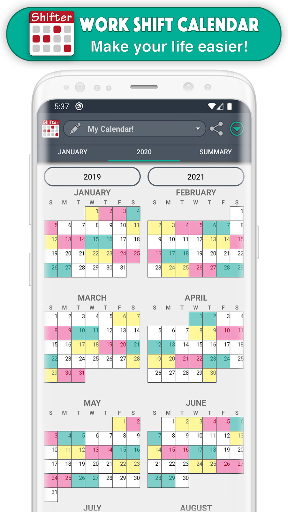
- Enjoy the Monthly and Annual View (which allows you to see all months of the year just by sliding the screen, as well as Annual Statistics).
- Export your calendar to Google calendar.
- Add national holidays directly from Google Calendar 🌴
- Control working time and earnings by selecting a range of dates in the Statistics section.
- View upcoming notes at a glance.
- Compare different calendars.
- Share your calendar (monthly, annual view or comparison of calendars) with your friends via WhatsApp, email, Telegram ... 📧
- Create backups easily.
- Set up to ten different calendars.
- Import other calendars simply.
- Use the icon search to find them quickly 🔎
EASY TO USE
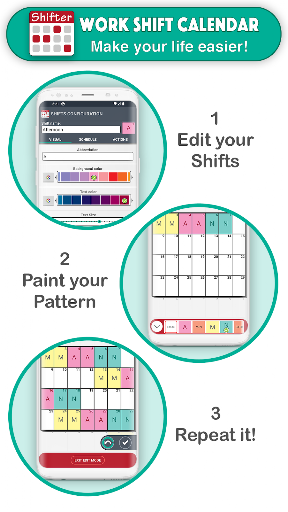
- Modify your calendar in two ways:
(1) Quick mode or Paint: Select an event from the drop-down list and click on the days to paint them with that event 🎨
(2) Edit Mode: Select one or more days and perform actions in the selected day range (repeat, copy, cut, paste, delete or assign shifts) ✂️
- Shifts menu: you can see all the shifts of that calendar, create new ones, edit, reorder or import them.
FEATURED FEATURES ⭐️
- Easy to use.
- Clear interface.
- Customizable.
- PRO version that unlocks great advantages.
- Tutorial with the basic functions of the app and help section (FAQs)
- Fast and personalized customer service ℹ️
- Social networks 👍 enjoy explanatory videos, information about new updates and more visual content by joining our Shifter community.
SUPPORT OUR WORK 💜
We are a very small team of people who make a great effort to develop Shifter. If you like this app, you can help us improving it and continue adding new features. Buying PRO version not only activates all its advantages, but also greatly support the continuous development of the app.
FACEBOOK & INSTAGRAM: @ShifterCalendar
What's New
In-app purchases
$0.99 - $10.99 per item
Version Information
- Version
- 2.0.7.8
- Downloads
- 10M+
- Updated on
- Sep 28, 2025
- Released
- Jun 26, 2015
- Requires
- Android 5.0
Statistics
Google Play Rating History
Rating Distribution
Downloads Over Time
Work Shift Calendar has been downloaded times. Over the past 30 days, it averaged downloads per day.
Shaded area shows 30-day prediction based on historical trends
Historical data collection started recently. More data points will be available over time.
Work Shift Calendar - Google Play Rankings
Top Rankings
| Rank | Country | Category | List | Change |
|---|---|---|---|---|
| — |
Ranking History in
No ranking data available yet. Rankings are updated daily.
#30 in Top Grossing Productivity in Spain


#46 in Top Free Productivity in Russia


#54 in Top Free Productivity in Spain


Work Shift Calendar users say on Google Play
 Chris C
Ever since I started medical work, this app has help me see my schedule better and predict. now having been promoted i am having to make schedules. wish there was a way to add more than two shifts, even four or five would be great for one day. aside from that, this app is great and highly recommend.
 David Williamson
easy to use, i paid for the extras. one thing I'd like is. I do a repeat shift pattern. 5 days on 3 days off. is it possible to replicate this over the whole calendar year ? ,
 Georgia Morley
Nifty little app, but like most others I've tried it doesnt quite suit my needs :( I can't sync my work calendar to the app for security reasons, but I work a 7 week rotation and cannot find a way to duplicate it to automatically fill the calendar with my shifts as the edit feature is month by month and I haven't found an option to say, input week 1 and set it to repeat every 7 weeks, or do something similar with the whole rota. Devs if I'm wrong please tell me how! If not maybe consider adding?
 Sarah Smith
Doesn't update itself if you use the widget to put it on the home screen.
 Alex Chow
I've been using this for many years and like its simplicity for colour coding. Paid for the Pro to support the developers. When the alarm stopped working, I tried everything possible to fix it. Nothing worked so I emailed the developers. Sent a few emails, waited months in between but got crickets. This doesn't have to go public to get your attention.
ApkTrusted Ratings & Reviews
More from LRHSoft
See more apps
Similar Apps

Supershift Shift Work Calendar
Free
Simple Calendar - easy planner
Free
Weekly Planner - Diary, Notes
Free
DigiCal Calendar Agenda
Free

TimeTune - Schedule Planner
Free

Business Calendar 2 Planner
Free
Simple Calendar
Free
Calendar 2026: Simple Calendar
Free
Payroll, Payslip & Timesheet
Free
Calendar Widget: Month/Agenda
Free

Calendar Planner - Agenda App
Free
Sectograph. Day & Time planner
Free
Birthday calendar
Free

Calendly Mobile
Free

Daybook - Diary, Journal, Note
Free

Attendance App | ubiAttendance
Free
Scan this QR code to download

Forwarding you to the page at Google Play market in seconds...
Open Google Play market now