
Supershift Shift Work Calendar v2026.2
Supershift GmbH




About this app
Supershift Shift Work Calendar effectively addresses the needs of individuals with non-traditional work schedules by providing a comprehensive shift planner and calendar, making it an excellent tool for those in the service industry, healthcare, or transportation. With its high user rating and significant download numbers, it stands out among productivity apps for its ease of use and feature set tailored to shift work management. Compared to alternatives, Supershift's focus on shift scheduling and its clean interface set it apart. However, its reliance on in-app purchases for additional features might be a drawback for some users.
Pros
- Supershift boasts an impressive 4.8-star rating, indicating a high level of user satisfaction with its functionality and usability, which is a significant advantage in the productivity category.
- With over 1 million downloads, Supershift has demonstrated strong social proof, suggesting that it is a reliable and useful tool for managing shift work schedules.
- The app's developer, Supershift GmbH, maintains a professional website and provides a direct email for support, showing a commitment to user feedback and support.
- The absence of permission requests is a notable pro, as it alleviates concerns about data privacy and security, making it a trustworthy choice for users.
- Regular updates, as indicated by the version number, suggest that the developer is actively working to improve and expand the app's features.
Cons
- The monetization model, which includes in-app purchases ranging from $3.99 to $39.99, might be seen as aggressive by some users, potentially limiting access to full functionality for those who are not willing to pay.
- Although the app has a high rating, some users might find the presence of ads intrusive or distracting, especially in a productivity tool where focus is key.
- The lack of detailed information about what each in-app purchase offers could lead to confusion or dissatisfaction among users who are considering purchasing additional features.
- There is a potential concern regarding the long-term support and updates for the app, as the success of such apps can sometimes lead to neglect after reaching a certain level of popularity.
Best for: The ideal user for Supershift Shift Work Calendar is an individual, likely between the ages of 20 and 50, working in industries that require non-traditional scheduling, such as nurses, retail workers, or transportation employees, who have a basic understanding of smartphone apps and are looking for a simple, effective tool to manage their work schedules without needing advanced technical skills.
Developer Description
Work Schedule Calendar / Shift Planner
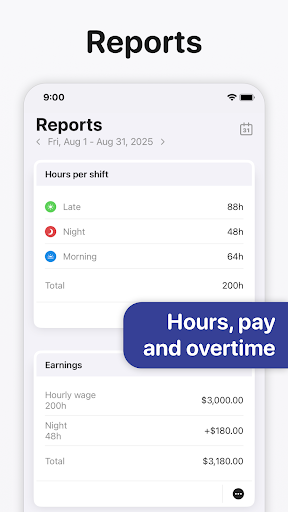
• REPORTS
Create reports for earnings, hours per shifts, overtime and shift counting (e.g. vacation days).
• DARK MODE
A beautiful dark mode makes viewing your schedule at night more comfortable.
• ROTATION
Define rotations and apply them for up to 2 years in advance.
Supershift Pro features:
• CALENDAR EXPORT
Export / sync shifts to the external calendars (e.g. Google or Outlook calendar) to share your schedule with friends and family.
• PDF EXPORT
Create and share a PDF version of your monthly calendar. The PDF can be customized with title, times, breaks, duration, notes, location and total hours worked.
• CLOUD SYNC
Use cloud sync to keep all your devices in sync. If you get a new smartphone or tablet cloud sync can be used to restore your data.
• CALENDAR EVENTS
Birthdays, appointments and other events from external calendars (e.g. Google or Outlook calendar) can be shown alongside your shifts.
Privacy
Given that Supershift does not request any permissions, it appears to be a safe choice in terms of data privacy. However, users should still be cautious when clicking on ads or making in-app purchases, ensuring they understand what they are buying. It's also advisable to review the developer's privacy policy on their website for comprehensive information on data handling.
Tips
For the best experience with Supershift, users should start by thoroughly exploring the app's free features to understand its capabilities. Setting up a routine to regularly update the shift calendar can help in maintaining an organized schedule. Additionally, users might find it helpful to visit the developer's website for any tips or FAQs that could enhance their use of the app.
What's New
• Flexible notification timing: get alerts after an event starts, before it ends, or after it ends.
• You can now manually apply template changes to shifts that were already added to the calendar.
In-app purchases
$3.99 - $39.99 per item
Version Information
- Version
- 2026.2
- Downloads
- 1M+
- Updated on
- Jan 13, 2026
- Released
- Oct 7, 2021
- Requires
- Android 9
Statistics
Google Play Rating History
Rating Distribution
Downloads Over Time
Supershift Shift Work Calendar has been downloaded times. Over the past 30 days, it averaged downloads per day.
Shaded area shows 30-day prediction based on historical trends
Historical data collection started recently. More data points will be available over time.
Supershift Shift Work Calendar - Google Play Rankings
Top Rankings
| Rank | Country | Category | List | Change |
|---|---|---|---|---|
| — |
Ranking History in
No ranking data available yet. Rankings are updated daily.
#46 in Top Grossing Productivity in Germany

Supershift Shift Work Calendar users say on Google Play
 Michael Cronin
So far so good. I've had this app for a couple weeks. It is great, I paid for it. Great low prices, worth it. But still totally usable and worth thr download for the free version, with enough features that make it miles better than similar apps. I paid for the ease it incoporates other calendars rather than spending time repesting this, google calendar is time consuming for this. this works a treat and once in google, can easily be shared with whomever you need. I love the reports feature too!!!
 Daniel A.
Buggy App App always appears to be buggy. Issues with syncing calendar. Error message "appears to be offline" eventhough I have active internet connection. please fix. Thank you Update: Upgraded to 5 Stars for swift customer support service. I emailed developer and they contacted me immediately. They are currently working on fixing this issue.
 Kyle Malkus
great app ! but please add the feature to allow rotations to continue after a period. for example us shift workers are normally on say a 10 or 12 week rotating pattern so then the following period of 10 or 12 weeks would follow that same drop down of shifts.
 Holly Wong
I have many part time jobs with different hourly pay. In this app I can only enter one hourly pay which is not very useful to track earnings for different jobs.
 Jamie Frost
Very dodgy... I put my roster in then I looked at my future calender. And just randomly six months down the track they change your roster for no reason at all but to screw you over.
ApkTrusted Ratings & Reviews
More from Supershift GmbH
See more apps
Similar Apps
Work Shift Calendar
Free

Calendly Mobile
Free
DigiCal Calendar Agenda
Free

TimeTune - Schedule Planner
Free
SupaTask - Daily Planner, Todo
Free
Simple Calendar - easy planner
Free
Sectograph. Day & Time planner
Free

Business Calendar 2 Planner
Free

Bitrix24 CRM And Projects
Free

TimeTree - Shared Calendar
Free

Setmore Appointment Scheduling
Free

monday.com - Work Management
Free

Settle Up – Group Expenses
Free

Agendrix Employee Scheduling
Free

Timeshifter Jet Lag
Free

MeisterTask - Task Management
Free
Scan this QR code to download

Forwarding you to the page at Google Play market in seconds...
Open Google Play market now