
Wave AI Note Taker & Recorder v3.5.1
Mohrer Associates



About this app
The Wave AI Note Taker & Recorder app solves the problem of ineffective note-taking during meetings and lectures by providing a robust voice note system with transcription capabilities, benefiting students, professionals, and individuals with busy schedules. Compared to alternatives in the Productivity category, Wave AI stands out with its excellent user rating and moderate download numbers, indicating a solid reputation. However, its lack of permissions requests might raise questions about data handling. The app's top-tier status and regular updates demonstrate the developer's commitment to quality and user experience.
Pros
- With over 100,000 downloads and a 4.6/5 user rating, Wave AI has established a strong reputation for reliability and effectiveness, making it a trustworthy choice for users.
- The absence of ads and minimalistic in-app purchases model ($6.99 - $139.99 per item) ensures an uninterrupted user experience, allowing users to focus on note-taking without distractions.
- The app's offline capability and accessibility features make it an excellent option for users who require flexibility and ease of use.
- Regular updates and a responsive developer (Mohrer Associates) ensure that the app stays up-to-date with the latest Android features and security patches, providing users with a secure and stable experience.
Cons
- The app's limited free features and aggressive in-app purchase model might deter some users, especially those who are not willing to invest in premium features.
- The lack of transparency regarding data collection and storage might raise concerns among privacy-conscious users, despite the app's zero-permission policy.
- Some users might find the app's user interface and feature set to be less intuitive or comprehensive compared to other note-taking apps in the Productivity category.
Best for: The ideal user for Wave AI is a busy professional, student, or individual with a high demand for note-taking and transcription, likely aged 18-50, with a moderate to high technical skill level, seeking a reliable and efficient solution to streamline their workflow and improve productivity.
Developer Description
Voice notes for meeting minutes, lecture notes: meeting summaries & transcribe
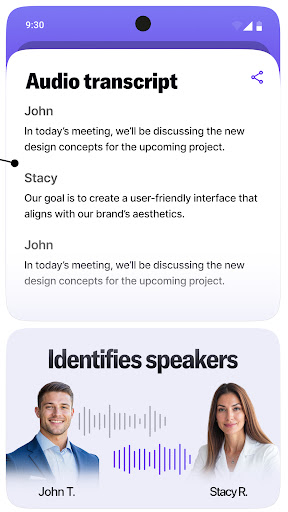
Use it to transcribe audio recording and speech to text in real time so you can focus on the conversation, not the keyboard.
Transcribe audio record to text with Wave AI Meeting Note Taker
🎙 Crystal-Clear Audio Recording – Record every word from lectures, calls, and meetings and transcribe audio recording to text.
🤖 Smart AI Note Taker – With speech to text function, transcribe your meeting notes in real time.
📝 Lecture Note Taker Mode – Perfect for students to use it as a lecture note taker who need quick, organized study materials.
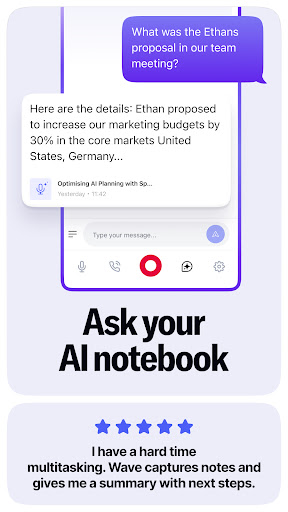
📋 Meeting Notes in Seconds – AI-powered meeting summary and transcription so you never miss key points.
🔄 Voice Notes AI – Transforms spoken ideas with speech to text into a structured AI notebook.
📂 Wide App Integrations – Sync with Notion, OneNote, Evernote, Google Docs, and more.
📞 Phone Call Recording via VOIP – Record, transcribe audio, and get key summaries
💻Web + Mobile Access – Use Wave AI Notebook seamlessly across devices.
📅 Calendar Integration – Link meetings automatically for easy retrieval.
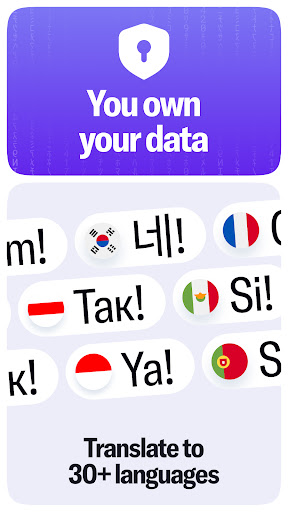
🌍 Multi-Language Support – Ideal for global teams and diverse classrooms.
With Wave, you don’t just get voice notes — you get a searchable, shareable, and AI-optimized transcription archive of your most important conversations.
Using Wave AI Note Taker is simple:
Record directly from your phone, web app, or through integrated meeting bots.
Transcribe speech to text with cutting-edge AI for fast, accurate audio to text.
Summarize to highlight the most important insights automatically.
Share instantly with teammates, classmates, or your favorite productivity tools.
Whether you’re capturing meeting notes, recording a lecture, or using voice notes AI for brainstorming, Wave handles everything behind the scenes so you can focus on listening.
Perfect for Students & Professionals
Wave bridges the gap between classroom and office productivity. Students love it as a lecture note taker that turns complex notes into easy-to-review summaries with AI note taker. Professionals rely on it for meeting notes that capture every decision and action item. For journalists, researchers, and content creators, Wave is the go-to AI note taking for fast audio to text conversion and accurate speech to text documentation.
From one-on-one interviews to large conference calls, Wave ensures your AI note taker is always up to date, organized, and ready for action.
Many apps can record. A few can transcribe and create meeting notes. But Wave AI combines AI note taker power, seamless integrations, and advanced meeting summary into one ecosystem. Unlike basic transcription tools, Wave delivers structured meeting notes, searchable archives, and automatic syncing with your favorite platforms. That means less manual work, more productivity, and zero missed details.
Stop juggling multiple tools. Let Wave AI Note Taker Transcribe audio records, or use speech to text to get instant transcriptions. It’s not just a meeting note taker, it’s your meeting assistant.
Download now to experience effortless note-taking.
Privacy
Given the app's zero-permission policy, users can be relatively assured that their data is handled securely, but it is still essential to review the developer's privacy policy (available on their website) to understand how data might be collected and used. To further ensure security, users should keep their app and Android version up-to-date.
Tips
For optimal performance, users should regularly review and organize their notes, and consider exploring the app's hidden features, such as customizable transcription settings. Additionally, users can optimize battery life by disabling unnecessary features and limiting background activity. To integrate Wave AI with other apps, users can explore the developer's website for compatible services and plugins.
In-app purchases
$6.99 - $139.99 per item
Version Information
- Version
- 3.5.1
- Downloads
- 100K+
- Updated on
- Jan 13, 2026
- Released
- Mar 15, 2024
- Requires
- Android 8.0
Statistics
Google Play Rating History
Rating Distribution
Downloads Over Time
Wave AI Note Taker & Recorder has been downloaded times. Over the past 30 days, it averaged downloads per day.
Shaded area shows 30-day prediction based on historical trends
Historical data collection started recently. More data points will be available over time.
Wave AI Note Taker & Recorder - Google Play Rankings
Top Rankings
| Rank | Country | Category | List | Change |
|---|---|---|---|---|
| — |
Ranking History in
No ranking data available yet. Rankings are updated daily.
#47 in Top Grossing Productivity in United States

Wave AI Note Taker & Recorder users say on Google Play
 John Lindsay
Yeah. Very impressive. Very intuitive. Far better transcriptions than others I've used. Virtually error-free. The AI summary feature is nice as well. The ads are a bit too aggressive although relevant. They throw me out of the flow of the program. The transcript can be edited but the phone keyboard covers all the text of the transcript so I can't actually see what I'm trying to edit.
 Eleanor Gee
Great meeting summaries. It would be an improvement to be able to change the titles of the waves, though, because they're not terribly informative and I keep losing track of what meeting each refers to. The change title in summary option doesn't work on my phone, it un-changes itself when I leave the summary.
 AD Stafford
I decided on Wave because of the feature to take pictures. Firstly, I love this app 90% of the time. But every so often it glitches out badly and I lose huge chunks of recording time. The camera spazzes and won't focus. While trying to get the camera to focus, the app will crash. Or, if I use my phone camera not attached to the app, the app will crash. Then it gets stuck on that recording and won't let me start a new recording. It also sometimes makes my phone glitch when playing back audio.
 J Brady
I tested Wave with a one-week subscription and ran into some problems. When connected to my Chevy, having notifications enabled in the app causes my car to think I’ve dialed voicemail. The audio cuts out, shows a voicemail call for about 10 seconds, then disconnects before music resumes—this cycle repeats constantly. I also had to disable microphone access to stop the interruptions. Otherwise in my shorts trial, I have been pleased with it. but no way I can justify a subscription.
 Arafat
Unreliable! It crashes in the middle of meetings leaving you with useless recordings and no transcript or summary. It's great when it works but it's not consistent. I just lost another important meeting today because of it. The technical support didn't help, attributing this to Android issues! Why do you release apps if you know it's not optimized for whatever system? I cancelled my account today.
ApkTrusted Ratings & Reviews
Similar Apps

OtterAI Transcribe Voice Notes
Free
AI Transcribe Speech to Text
Free

TicNote: AI Recorder & Agent
Free
Recorder AI:Voice&Meeting Note
Free

Letterly: Write by Voice & AI
Free
Smart Noter - AI Note Taker
Free

Transcribe Speech to Text
Free

Plaud: AI Notetaker
Free
RecCloud - AI Speech to Text
Free

Notta-Transcribe Audio to Text
Free

NaturalReader - Text to Speech
Free

Riverside: Record podcasts
Free
AI Transcribe. Speech to Text
Free

Speechify – Voice AI Assistant
Free
SCRIBZEE®
Free

Ava: Transcribe Voice to Text
Free
Scan this QR code to download

Forwarding you to the page at Google Play market in seconds...
Open Google Play market now