
KopieID v3.3.5-beta0002
Rijksoverheid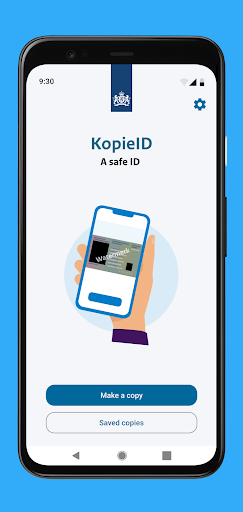





About this app
Developer Description
Do not let others copy your documents without a good reason.
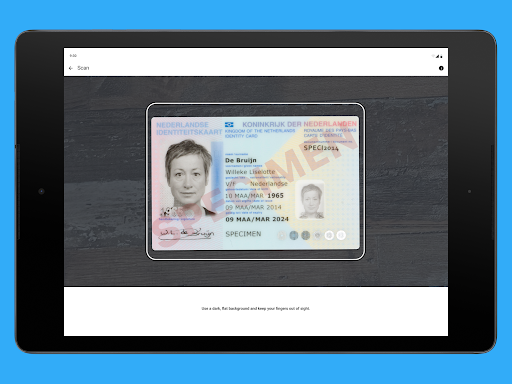
- Take a photograph of your identity document.
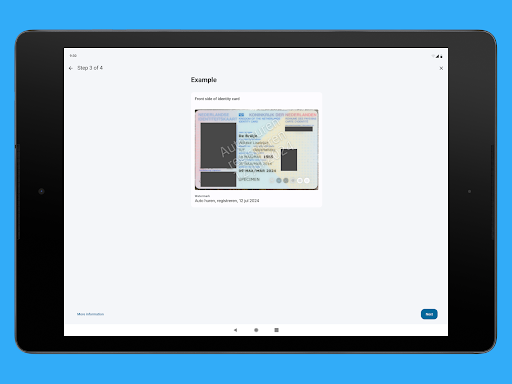
- Cross out information that is not relevant for the recipient.
- Enter for whom the copy is intended and for what purpose the copy is required. This text is superimposed with the date on the copy, as a watermark.
- You can then send, print or save the copy for subsequent use.
You can only store the copy if your telephone or tablet is password protected.
What rules apply to the use of the KopieID-app?
Definitions
App
An application that can be used on a mobile telephone or other portable device.
Identity document
The KopieID app recognises the following Dutch identity documents and documents of Bonaire, St. Eustatius and Saba (BES):
- Dutch ID card
- National passport
- Dutch driving licence
- Travel documents for refugees
- Travel documents for foreign nationals
- Residence documents
- Foreign nationals documents
- Service passport
- Diplomatic passport
- Facility passport
- Business passport
- BES driving licence
- Sedula – Bonaire – St. Eustatius – Saba
National Office for Identity Data (RvIG)
RvIG is an implementing organisation that reports to the Ministry of the Interior and Kingdom Relations (BZK). RvIG is the authority and manager for the safe and reliable use of identity data. For more information visit our website.
Conditions of use
General
These conditions of use apply to users of the KopieID-app. By using the app, you agree to these conditions of use.
Use of the KopieID-app
You may only use the app for non-commercial purposes. You manage supply of provide the app to third parties without receiving prior written permission the National Office for Identity Data (RvIG). You may not disammble the app, decompile the app to its original code of subject the app to reverse engineering.
You may not use the app in an improper manner of in a manner that could in any way have negative consequences for RvIG.
For the recognition of ID documents, the KopieID app uses the Google MLKit. Because of the importance it attaches to privacy, RvIG has adjusted the settings for the use of the Google MLKit in such a way that no personal details are shared with Google.
Availability and functioning
For RvIG, it is important that the app functions correctly and can be used by everyone. Nevertheless, we are unable to guarantee that the app will always be available in the future, and will function faultlessly.
Automatic crossing out
Using the KopieID-app, you can make your own copy of your identity document and select which data the app should automatically cross out. After crossing out selected data and adding a watermark, you can share the copy with third parties or save the copy.
Personal responsibility
It is up to you to check whether the correct data have been crossed out. Subsequently, you decide for yourself with whom and how you wish to share a copy of your identity document. This is beyond the responsibility of RvIG. RvIG accepts no liability for any damages that may arise from the use of this app. You are personally responsible for the correct use of the app.
About the copy
A copy is securely saved within the app. The saved copies can be consulted via an access code. It is your personal responsibility to manage the access code and to ensure that it is not shared with anyone else. Saving a copy outside the app is your personal responsibility.
Privacy statement
RvIG can gather anonymous statistical data about the use of this app. For example how often the app is downloaded each month. This data is only used to improve the app and cannot be derived to an individual. You can withdraw your permission for this data use at any time.
Changes to the conditions of use
RvIG is entitled to make changes to these conditions of use.
What's New
Version Information
- Version
- 3.3.5-beta0002
- Downloads
- 1M+
- Updated on
- Nov 7, 2025
- Released
- Jan 15, 2015
- Requires
- Android 7.0
Statistics
Google Play Rating History
Rating Distribution
Downloads Over Time
KopieID has been downloaded times. Over the past 30 days, it averaged downloads per day.
Shaded area shows 30-day prediction based on historical trends
Historical data collection started recently. More data points will be available over time.
KopieID - Google Play Rankings
Top Rankings
| Rank | Country | Category | List | Change |
|---|---|---|---|---|
| — |
Ranking History in
No ranking data available yet. Rankings are updated daily.
#15 in Top Free Tools in Netherlands


#98 in Top Free Apps in Netherlands

KopieID users say on Google Play
 Marten Janssen
Works smooth, and selecting which information you'd like to hide is clear. This does limit the usage to only the documents it is able to recognise. In an older version, it was possible to manually hide information. I'd like to be able to use this app for foreign documents as well, so please reintroduce a manual option to hide information
 Anton Beerda
de kwaliteit, resolutie, van de foto zou een stuk beter kunnen
 Tonny Wildeman
Om data nog te editen die je geselecteerd hebt om af te schermen, kan je de blokjes niet individueel aanpassen. Deze zitten vaak net mis en niet op de juiste plek. Er zit namelijk een lichte variatie in de locatie van gegevens op het paspoort per paspoort versie. Tevens kan je niet inzoomen. Erg onhandig met dikke vingers en een telefoonschermpje.
 Alisa T
Super handy app & a nice idea. Sadly it does not work for another European standard format passport. My friend scanned a Dutch passport easily, but I spent the last 45min trying to get it to capture mine. Well, time for old school editing for mine.
 Tjiani Lucht
The app used to be great, I could cross out what I needed to myself. While yes it could be finicky at times it worked. I recently found out there was a new update to the app. Now the app crosses the field out for me, sounds good right! But when it (and it will!) places the field wrong you can't move or extend them yourself! So that just makes the app useless, it doesn't blank stuff out anymore making it easy to see all your information. If they'd just allow me to fix the mistakes the app makes.
ApkTrusted Ratings & Reviews
More from Rijksoverheid
See more apps









Similar Apps


Scan this QR code to download

Forwarding you to the page at Google Play market in seconds...
Open Google Play market now