Intervalometer for TimeLapse v2.9.12
MobilePhoton


About this app
Developer Description
An interval timer to automate photo taking process for timelapse
Normal time-lapse mode in most smartphones only allows auto exposure without additional controls on exposure settings and RAW format.
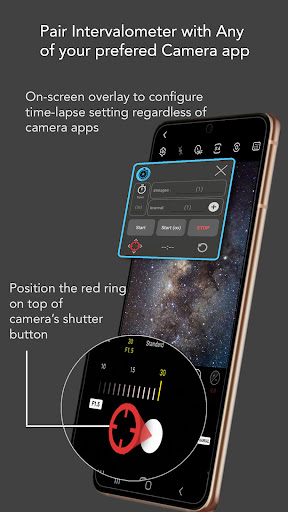
Intervalometer works with any camera modes in any camera apps including light-painting mode, HDR, night mode, manual mode, telephoto or ultra-wide angle mode to capture a series of time-lapse image frames.
This app works like an actual intervalometer for smartphones, it automates camera shutter triggering using AccessibilityService API and it works on any camera app for Android 7 and above.
It can also be used with dedicated camera's remote apps from Canon, Sony, Nikon and etc to trigger the shutter button in the camera's remote app, this acts as an actual intervalometer for dedicated cameras too.
With intervalometer and its flexibility to control time-lapse configurations, the following types of time-lapse are possible.
1. Low light time-lapse
2. Long exposure time-lapse
3. HDR time-lapse
4. Milky Way time-lapse / Star Trails time-lapse
5. Holy Grail of time-lapse (Day to night time-lapse)
6. Ultra wide angle time-lapse
7. Light painting time-lapse
Other than time-lapse, it can also be used to capture frames for image stacking in post-process (on other apps) to achieve higher quality images and etc.
1. Image stacking
2. Star trails
3. Lightning stacking
Features
- Full control on time-lapse configuration (delay timer, interval time, number of shots)
- Infinite mode
- Bulb mode
- Works with Any camera app (shutter button position can be reconfigured)
Note: For Huawei and Xiaomi devices, please try to restart your device if it doesn't work or touch input can't be triggered.
Disclaimer: Intervalometer only automates photo taking process, it is neither a camera app nor image processing app.
What's New
In-app purchases
$0.99 - $2.49 per item
Version Information
- Version
- 2.9.12
- Downloads
- 10K+
- Updated on
- Jul 14, 2025
- Released
- Nov 14, 2017
- Requires
- Android 8.0
Statistics
Google Play Rating History
Rating Distribution
Downloads Over Time
Intervalometer for TimeLapse has been downloaded times. Over the past 30 days, it averaged downloads per day.
Shaded area shows 30-day prediction based on historical trends
Historical data collection started recently. More data points will be available over time.
Intervalometer for TimeLapse - Google Play Rankings
Top Rankings
| Rank | Country | Category | List | Change |
|---|---|---|---|---|
| — |
Ranking History in
No ranking data available yet. Rankings are updated daily.
#18 in Top Paid Photography in United States

#20 in Top Paid Photography in United Kingdom

#25 in Top Paid Photography in Germany

#31 in Top Paid Photography in Vietnam

Intervalometer for TimeLapse users say on Google Play
 Ryan M
It needs allow on top permission enabled when you use it. Move the trigger over your shutter button. Set the intervalometer to 2 seconds above your shutter speed. A 8 sec photo needs a 10sec interval speed on the app for photo to store. Galaxy s20+ The app clicks the shutter button, thats all, it won't magically adjust your photo settings. It works well for timelapes with a tripod.
 Momo
Momo
App WORKS. $2.39 gets 1 second interval time lapse only. Need to purchase additional feature in order to change time intervals. Take photos, not video which is good. But unfortunately I am looking for an app to take one picture per day for a few years. I think max interval can only be set in seconds up to 4 digits.
 Rajesh Kaushik
Terrible app,i regret buying. The timer tab doesn't work, even if i make it zero it still counts from 3 or 5 sec.
 Reg Williams
I tried the app with just 2 images set. That was fine. I then increased the images to 10. Only 5 were taken. Wherever the number was set the images fell short. I then paid £1.69 for extended features. This did not make any difference to the images problem. I have sent an email to the author about the problem a few days ago. No response.
 Maluchi Enyi
I use this app to make time-lapses for the purpose of documenting my creative process. Many times, when this app is supposed to be capturing photos in my phone's camera app, I'll return to my phone after hours of painting to see the camera app no longer active. When this happens, the menu section of Intervalometer will be open. This is highly problematic because there is no indication when and if the app will crash back to the main screen. In the end I often lose hours of work.
ApkTrusted Ratings & Reviews
More from MobilePhoton
See more apps



Similar Apps

eZy Watermark Photos Pro
Paid

PicMaster - AI Photo Editor
Paid

Video Recorder
Paid

PhotoPills
Paid

Timestamp Camera Pro
Paid

3D Photo: Imager
Paid
Sun Seeker: Sunlight Tracker
Paid

mcpro24fps manual video camera
Paid
POV – Disposable Camera Events
Free

Via Capitale Camera
Free

Framelapse 2 Time Lapse Camera
Free

PhotoSpot: For Travel Planning
Free
InFrame - Photo Editor & Frame
Free

Sunrise and Sunset Times
Free

Arenti
Free

Printicular: Print Photos
Free
Scan this QR code to download

Forwarding you to the page at Google Play market in seconds...
Open Google Play market now