Auto Cut Paste: BG Eraser v3.7
photoshop mobile apps














About this app
Developer Description
1-Tap AI Remove. Save as PNG, JPG or Add Backgrounds & Stickers.
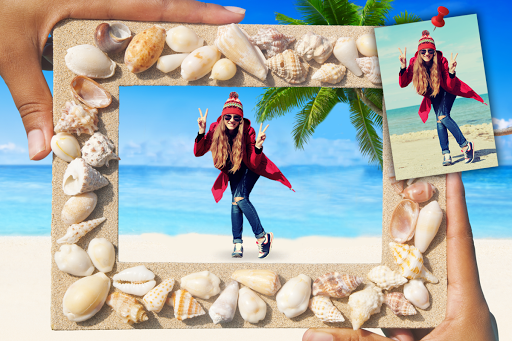
Auto Photo Cut Paste—the top-rated, AI Photo Editor designed for creators! If you need a powerful, smart photo editor that works instantly, look no further. Our app utilizes advanced AI detection and computer vision technology to give you flawless photo cut paste results in seconds. You can instantly remove background from any picture and create stunning professional pictures without hassle.
Join millions of users who rely on our AI cut paste tool for quick, professional results. Whether you're making content for social media, or need a photo collage maker, this app is your one-stop solution!
🪄 AI Magic: 1-Tap Background Removal & Smart Selection
Our core feature is the AI Magic Editor. It’s the ultimate auto background eraser designed for speed and precision.
Instant Background Remover: Our AI background remover accurately detects the main subject (people, pets, products) and instantly performs 1-Tap Background Removal.
Smart Object Select: The smart photo cut tool is powered by color detection AI, ensuring clean edges and seamless selection of even complex subjects like hair and fur.
Photo Layer Editor: Use our advanced features to create multi-layered compositions, acting as a powerful photo layer editor right on your phone.
Precision Control: While it’s primarily an Auto Cutter, you maintain full control with manual brush and restore tools for final touch-ups.
🎨 Creative Studio: Compose, Merge, and Share
Auto Photo Cut Paste is more than just a background remover. We give you tools to finish your creation and make it stand out.
Photo Layer Editor & Merger: Easily superimpose photo app elements by layering multiple cutouts. It functions as a powerful picture merger for complex visual effects.
Photo Collage Maker: Use your precise cutouts to design beautiful, customized photo collages. Easily blend elements to create compelling scenes.
Face Swap Magic: Enjoy the fun! Effortlessly cut faces from one picture and paste them onto another for hilarious, shareable content.
Profile Picture Maker: Create clean, eye-catching profile pictures and status photo editor images with perfect backgrounds.
🛒 High-Value Outcomes: From PNG to E-commerce
Our focus is on delivering high-intent outcomes for users:
Transparent PNG Creator: Get high-quality transparent background maker PNG files instantly for use in graphic design.
E-commerce Ready: Achieve clean white backgrounds for product photos instantly, helping you meet the strict requirements of platforms like Amazon and Etsy.
ID Photo Ready: Quickly change and adjust the background for passport photo background needs.
Sticker Creator & Meme Maker: Use your cutouts to quickly design custom WhatsApp Sticker packs or viral memes.
⭐ Why Our AI Editor Ranks Best
We combine the power of AI with an intuitive interface. Our commitment to the Auto Photo Cut Paste promise means you save time and achieve professional quality results, validated by our high community ratings. Stop using complicated, expensive software—your next great photo edit is just one tap away.
Download Auto Photo Cut Paste today to unlock the full power of the AI Editor and Background Eraser!
What's New
In-app purchases
$2.99 - $19.99 per item
Version Information
- Version
- 3.7
- Downloads
- 10M+
- Updated on
- Sep 15, 2025
- Released
- Nov 17, 2016
- Requires
- Android 7.0
Statistics
Google Play Rating History
Rating Distribution
Downloads Over Time
Auto Cut Paste: BG Eraser has been downloaded times. Over the past 30 days, it averaged downloads per day.
Shaded area shows 30-day prediction based on historical trends
Historical data collection started recently. More data points will be available over time.
Auto Cut Paste: BG Eraser users say on Google Play
 Brandon Lipsky
Honestly, I think this is a very good app that's well worth the price for pro. I use it mostly for the lasso feature when cropping, and its auto-erase tool is VERY well designed to support that, especially with the inclusion of a threshold slider that lets you alter how much or how little the auto-erase affects the image, which I think is just a really good quality of life feature. Makes me wonder why I haven't seen a threshold slider in a photo editor until now considering how useful it's been.
 Jer Dazzo
I have been using this app for years now and I highly recommend it for anyone looking to create stickers and icons directly on your phone. The workflow is very intuitive, easy, & quick. My one wish would be that I could do a one-time purchase to remove ads, because I just loathe having any ongoing subscription services for apps. I understand why they exist, but for what this app provides, I just think the subscription cost is too high. Free version is great, though, & the ads are worth it.
 Waklan Zero Coke
The ✅ button not functioning cannot edit at all. what should I do
ApkTrusted Ratings & Reviews
More from photoshop mobile apps
See more apps
Invitation Card Maker: Ecards
Free

Audio Extractor: Video to MP3
Free

Video Invitation Maker PartyZa
Free
Dynamo - Animated Video Waterm
Free
Story Maker for Status
Free

Video Merge: Joiner & Combiner
Free

Lens Flare
Free

Mirror Photo
Free

PostLab: Designer Collages, Po
Free

Video Speed Changer: SlowMo
Free

Baby Pics: Baby Collage
Free

Video Splitter - Status Maker
Free

Superimpose Pictures
Free

DSLR Blur Effects: Photo Focus
Free

TinyFlick - Video Compressor
Free

Art4Cause
Free
Similar Apps

Apowersoft Background Eraser
Free

Fotogenic : Face & Body Editor
Free

Background remover - remove.bg
Free

AI Photo Eraser - Inpaint Lab
Free

Background Eraser - BG Remover
Free

PixaGen: Ai image generator
Paid

PicMonkey Photo Editor
Free

Banano Pro İmage Generator
Paid
PicCollage: Photo Video Editor
Free

Promeo - Story & Reels Maker
Free

Cut Cut: Photo Editor & CutOut
Free

PICNIC - photo filter for sky
Free

PicMa: AI Video&Photo Enhancer
Free

PicWish: AI Photo Editor
Free

Magic Polish Lab: Photo Editor
Paid

Printicular: Print Photos
Free
Scan this QR code to download

Forwarding you to the page at Google Play market in seconds...
Open Google Play market now