ScreenCast Receiver vVARY
NeoYantra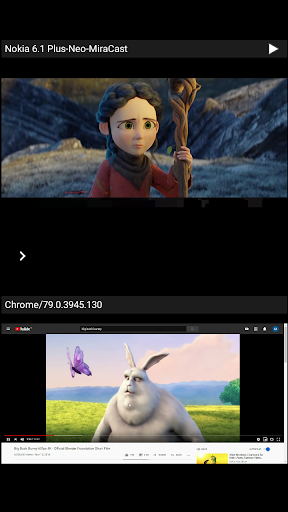


About this app
Developer Description
ScreenCast is Receiver for mirroring Android, Windows and Apple devices
This app is highly useful for sharing the screen/audio content of sender devices with family, friends, colleagues, customers or business partners.
Instructions for using ScreenCast App:
--------------------------------------------------------------
1. Launch ScreenCast App on the Android Device. The App will start advertising Android Device as a Receiver. Default name of the Receiver is Android Device’s name suffixed with 'Neo-Cast'.
2. On the sender Device, enable casting and select the Receiver's name from the list. Enabling the casting will vary from one device to other. Please check the sender device's user manual for instructions to enable mirroring using Google cast. The sender and receiver devices should be in the same network.
3. On the App, the list of sender devices connected to the App are shown in semi transparent control-screen which slides out on touching ">". For unhindered mirroring, slide control -screen to left by swiping it to left or by touching outside the control-screen.
4. One can disconnect sender device and mute/unmute the mirroring by touching mirroring window in the App for about two seconds, or by going to control screen and perform disconnect and mute/unmute.
Disclaimer:
Apple, Microsoft, Windows, MAC, Chrome, Chromebook, Android, Android TV, iPhone, iPad, Mac are trademarks/tradenames of their respective owners.
Version Information
- Version
- -
- Downloads
- 1K+
- Updated on
- -
- Released
- Feb 26, 2020
- Requires
- Android Varies with device
Statistics
Google Play Rating History
Rating Distribution
Downloads Over Time
ScreenCast Receiver has been downloaded times. Over the past 30 days, it averaged downloads per day.
Shaded area shows 30-day prediction based on historical trends
Historical data collection started recently. More data points will be available over time.
ScreenCast Receiver users say on Google Play
 A Google user
A cool app which has all the casting technologies in one, like we can just toggle what we want and the quality of rendering in each is awsome loved it.
 Gordon Tang
Doesn't work. One of my device can see the cast receiver, but cannot connect, my other simply can't see it
ApkTrusted Ratings & Reviews
More from NeoYantra
See more apps


Similar Apps

Video Recorder
Paid

OrderBoard Display
Paid

Castro Premium - system info
Paid

All Languages Translator App
Paid

Travel Packing Checklist
Paid

Screen Recorder: Audio & Video
Paid
Homey — A better smart home
Free

HQ Video Player & Casting
Paid
Nest
Free

Yatse: Kodi remote and cast
Free

Lorex Classic
Free

TP-Link VIGI
Free

HeadTrack
Paid
Microsoft Intune
Free

Loom – Screen and Cam Recorder
Free

Home Assistant
Free
Scan this QR code to download

Forwarding you to the page at Google Play market in seconds...
Open Google Play market now