
AirMirror: AirPlay Receiver v2.4
NeoYantra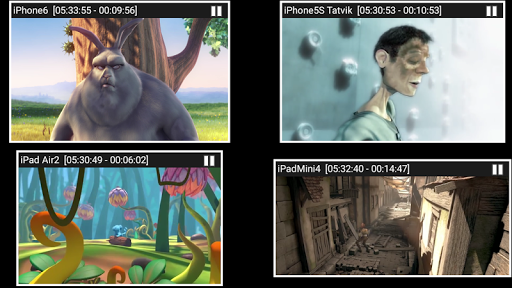






About this app
Developer Description
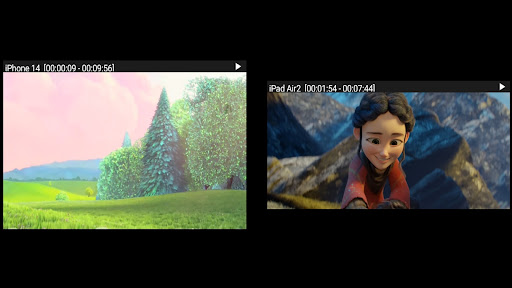
AirMirror is Receiver for Screen Mirroring and Casting from Apple Devices.
Features:
-------------
o Mirroring of Screen of Apple Devices (iOS version 9 to 15).
o Mirror/cast from up to 4 Apple devices simultaneously.
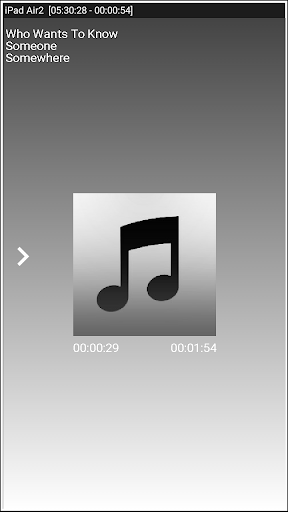
o Playback of Apple device’s media content.
o Slideshow of photos, images and videos of Apple device.
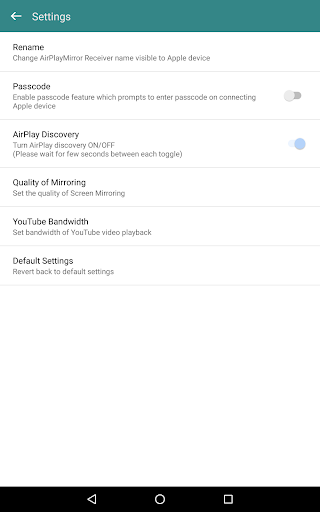
o Restrict unauthorized user from sharing his Apple device using passcode feature.
o Playback of YouTube free content from Apple device to AirMirror receiver.
o Resize and move the mirroring/casting window in the App view.
o Share game screen while playing game on Apple device.
o Share game screen while playing game on Apple device.
o Bluetooth Low Energy based advertising to mirror devices across different subnets.
Instructions of using AirMirror App:
1. Launch AirMirror App on Android Device. The App will start advertising Android Device as a Receiver to screen mirror an Apple Device. The default name of the Receiver is Android Device’s name.
2. On Apple Device, enable Screen Mirroring and select AirMirror Receiver's name from the list. Enable Mirroring using the slider. The Apple device should be in the same network as the Android Device.
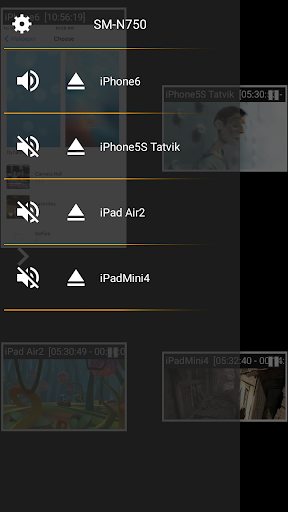
3. On AirMirror App, the list of Apple devices connected to the App are shown in semi transparent control-screen which slides out on touching ">". For unhindered mirroring, slide control -screen to left by swiping it to left or by touching outside the control-screen.
4. One can disconnect Apple device and mute/unmute the mirroring/casting by touching mirroring window in the App for about two seconds, or by going to control screen and perform disconnect and mute/unmute.
5. Touching Settings icon on the control-screen, the user can navigate to Settings, where user can rename AirMirror Receiver's name, enable/disable password for authentication, toggle AirMirror Receiver discovery to on/off, change quality of mirroring, set YouTube bandwidth, or reset to default settings.
Known Limitation:
1. The app does not work with DRM protected content like Netflix, paid iTunes videos, paid Google Movies etc.
2. App has limited capability for Live TV from only some Apps or websites.
You may reach us at sales@neoyantra.com.
Disclaimer: Apple, iPhone, iPad, MacBook, iMac, Airplay, iTunes, YouTube, NetFlix, Google, Android etc. are trademarks/tradenames of their respective owners. We do not have any association with Apple or Google or any other entity.
What's New
Version Information
- Version
- 2.4
- Downloads
- 10K+
- Updated on
- Jul 5, 2024
- Released
- Feb 14, 2017
- Requires
- Android 11
Statistics
Google Play Rating History
Rating Distribution
Downloads Over Time
AirMirror: AirPlay Receiver has been downloaded times. Over the past 30 days, it averaged downloads per day.
Shaded area shows 30-day prediction based on historical trends
Historical data collection started recently. More data points will be available over time.
AirMirror: AirPlay Receiver - Google Play Rankings
Top Rankings
| Rank | Country | Category | List | Change |
|---|---|---|---|---|
| — |
Ranking History in
No ranking data available yet. Rankings are updated daily.
#24 in Top Paid Video Players in United States
#3 in Top Paid Video Players in Spain

#9 in Top Paid Video Players in Japan
 Video Downloader Pro
AirMirror: AirPlay Receiver
Video Downloader Pro
AirMirror: AirPlay Receiver
#18 in Top Paid Video Players in United Kingdom
 AirReceiver AirPlay Cast DLNA
 BitTorrent Pro - Torrent App
AirMirror: AirPlay Receiver users say on Google Play
 A Google user
For over a month, I’ve been researching the gazillion different ways to mirror (not just cast to certain apps) my iOS devices (iPad and iPhone) to my android TV. Sony 900F series with a Sonos sound bar connected (TV and iOS devices on same network - TV is connected via Ethernet cable, mobile iOS devices by WiFi) This app did exactly what I wanted (what we ALL want) without any trouble whatsoever. It’s now an icon next to the Netflix, Prime, Plex, etc apps. Click it. It loads in <15 seconds. Go to the screen mirroring setting on my iOS device. The TV is listed. Click it. Mirroring with perfect screen and sound (lag is almost unnoticeable). Before you buy this, just D/L the demo version (separate app) to confirm it works and then drop the $5 on this (full) version. It’s exactly what I was looking for. Thanks to the development team!
A Google user
Fantastic app!! I was looking for half an eternity to find an Airplay solution like this one that would allow me to scale and move my mirrored screens. Well done! Only one thing I am reeeeeally longing for: Any plans for a feature that allows users to save their arrangements? It’s super time consuming to start from scratch every time the app starts or a device is connected.
 Susan Kavanagh
this app worked well until the new software update for apple. Now my apple devices wont connect to the Sony Bravia tv as before. considering I paid for the app I would expect it to last longer than a few months.
 Silvano CF
Works if you stream films from apple tv app on ipad but can't play anything from amazon prime,very disapointed
 K. C.
K. C.
This app drops connection all the time. I can never get through a video without restarting. It seems as if the paid version cuts off at a certain time just like the demo. I really want a refund.
ApkTrusted Ratings & Reviews
More from NeoYantra
See more apps


Similar Apps

OrderBoard Display
Paid

Kisi
Free

HeadTrack
Paid

Lorex Classic
Free

INTEGRA CONTROL
Free

Travel Packing Checklist
Free

Loom – Screen and Cam Recorder
Free

Brightline
Free

AirDroid: File & Remote Access
Free
Stream Vision 2
Free

Castro Premium - system info
Paid

Plume Home
Free

Pinwheel Caregiver
Free

RealVNC Viewer: Remote Desktop
Free

Vittae
Free
Scan this QR code to download

Forwarding you to the page at Google Play market in seconds...
Open Google Play market now