
Panasonic LUMIX Sync v2.0.16
Panasonic Holdings Corporation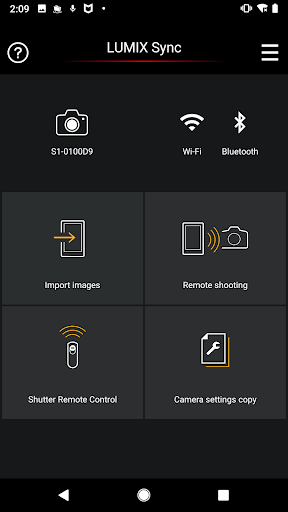
About this app
Developer Description
The app lets you control Panasonic Wi-Fi cameras via smartphone.(DC-S1/S1R/S1H)
S series: DC-S1 / S1R / S1H / S5 / BS1H / S5M2 / S5M2X / S9
G series: DC-G100 / G110 / GH5M2 / BGH1 / GH6 / G9M2 / G100D / GH7 / G97
* Remote recording and image transfer functions can be used with DC-GH5 / GH5S / G9.
For using all functions, use Panasonic Image App.
* For models other than the above, use Panasonic Image App.
--
The Panasonic LUMIX Sync application software allows you to operate a Panasonic digital camera supporting Wi-Fi with your smartphone. With it, you can copy images into your smartphone, take pictures from your smartphone by remote control, and do more.
The following major functions are available with this application.
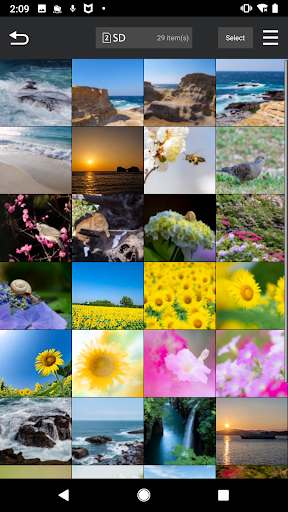
・LUMIX Sync allows you to copy pictures and videos from the digital camera to your smartphone.
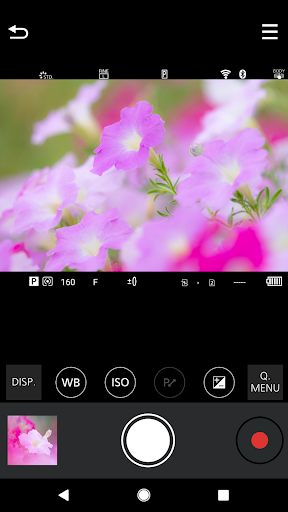
・LUMIX Sync allows you to take pictures by remote control, checking the digital camera live view on your smartphone.
・LUMIX Sync allows you to easily register a camera (camera pairing) through guidance.
・LUMIX Sync allows you to easily make a Wi-Fi connection through Bluetooth.
・The photographic location (location information) is automatically recorded to pictures, which is handy for sorting pictures later on.
・LUMIX Sync, which supports 802.11ac Wi-Fi, allows you to copy images at a higher speed through a Wi-Fi router. (*1)
・LUMIX Sync includes """"User Guide"""", which allows you to know more about how to use it.
*1: The Wi-Fi router and smartphone must support 802.11ac.
[Compatible Operating Systems]
Android 10 - 16
[Notes]
・Be aware that when using the location information recording function, continued use of the GPS function can lead to a dramatic decrease in battery capacity.
・For information on using this app or compatible models, visit the following support page.
https://panasonic.jp/support/global/cs/soft/lumix_sync/en/index.html
・Please understand that we will not be able to contact you directly even if you use the “Email Developer” link.
What's New
Now compatible with DC-S5M2 (Firmware Version 3.4).
Now compatible with DC-S5M2X (Firmware Version 2.4).
Now compatible with DC-S9 (Firmware Version 1.6).
Now compatible with DC-GH7 (Firmware Version 1.5).
Now compatible with DC-G9M2 (Firmware Version 2.5).
Version Information
- Version
- 2.0.16
- Downloads
- 500K+
- Updated on
- Sep 23, 2025
- Released
- Mar 10, 2019
- Requires
- Android 10
Statistics
Google Play Rating History
Rating Distribution
Downloads Over Time
Panasonic LUMIX Sync has been downloaded times. Over the past 30 days, it averaged downloads per day.
Shaded area shows 30-day prediction based on historical trends
Historical data collection started recently. More data points will be available over time.
Panasonic LUMIX Sync users say on Google Play
 Nicholas Adair
very useful even tho its an older app still works great
 Mohammed Islam (Mo)
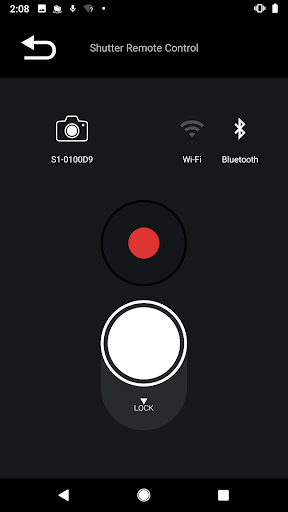
Everything but!! So far this is the best app to remote control my camera, I can use the live view and do almost everything from my phone. Also has Bluetooth remote shutter... But, the remote shutter and the app is very sensitive, if you switch to another app good luck reconnecting back to the app, when I was taking 3 mins exposure it was practically impossible. Also doesn't have timer for the remote shutter, would be simple programming, I have to use a 3rd party tool for that.
 Phil Smith
clunky
 Connor McCann
Just Ok. Works occasionally
 Paul Garvey
Works great once it's connected. But getting it to connect is sooooo painful, unpredictable and unintuitive. Plus it only transfers stills. It takes far more time trying to get this to sync between phone and camera than simply pulling the card from the camera and dumping to my laptop.
ApkTrusted Ratings & Reviews
More from Panasonic Holdings Corporation
See more apps








Similar Apps














Scan this QR code to download

Forwarding you to the page at Google Play market in seconds...
Open Google Play market now